Convert Video
to Text

Transcribe your videos in Premiere Pro, supporting 100+ languages.
No more inaccurate transcripts for interviews, podcasts, lectures, livestreams.

Save time with
accurate video transcripts

Compared to OpenAI Whisper

Cutback provides one of the highest speech-to-text transcription accuracy products, supporting captions and subtitles for short-forms to VOD platforms.

Cutback provides one of the highest speech-to-text transcription accuracy products, supporting captions and subtitles for short-forms to VOD platforms.

premiere pro plugins, best free premiere pro plugins reddit 2024, adobe premiere pro plugins, best premiere pro plugins, plugins for premiere pro, better cut plugin premiere pro, how to add plugins to premiere pro, how to install premiere pro plugins, cutback pricing, premiere text to speech, premiere pro text to speech, premiere pro speech to text, adobe premiere transcription plugin, premiere pro auto cut silence, premiere pro multicam, good video editors like capcut, premiere pro subtitles plugin, adobe premiere pro auto captions, ai auto cut premiere pro, ai video editing

Benchmark results of
various Youtube videos

Benchmark results of
various Youtube videos

Compared to Adobe Premiere Pro's native transcription

0:00/1:34

Premiere Pro

Cutback

premiere pro subtitles plugin, adobe speech to text for premiere pro 2025, transcription extension, transcribe audio adobe, adobe speech to text installer, extension for adobe premiere pro, premiere text to speech, premiere pro text to speech, premiere pro speech to text, auto transcribe audio, auto transcript premiere pro, adobe premiere transcription plugin, change transcript language in premiere pro, text-based editing premiere pro

What You Can Do With Your Transcript in Premiere Pro

The transcript powers every downstream step of the edit. Use it to cut footage by editing text, generate captions in any format, export for paper cut workflows, or create YouTube chapter markers and summaries, all without leaving Premiere Pro.

The transcript is
just the beginning
of efficient video editing

Edit video with text

Search to locate parts to keep, edit like a doc right in Adobe Premiere Pro. Includes speaker info, multi-cam, silence lengths and more.

Search to locate parts to keep, edit like a doc right in Adobe Premiere Pro. Includes speaker info, multi-cam, silence lengths and more.

Powerful caption tools

Powerful caption tools

Use the transcript to create captions in any format you need right in Cutback. Hide filler words, hide profanity, word-per-line and more.

Use the transcript to create captions in any format you need right in Cutback. Hide filler words, hide profanity, word-per-line and more.

Export in any format

Export in any format

From transcript for paper-cuts, to caption SRT files, even YouTube summaries, get the content in any format required for the job.

Beyond Single-Camera Transcription

Premiere Assistant's transcription includes speaker labels for multicam sequences and silence markers visible inline, so the transcript reflects the full structure of your footage, not just the words.

How to convert
video to text

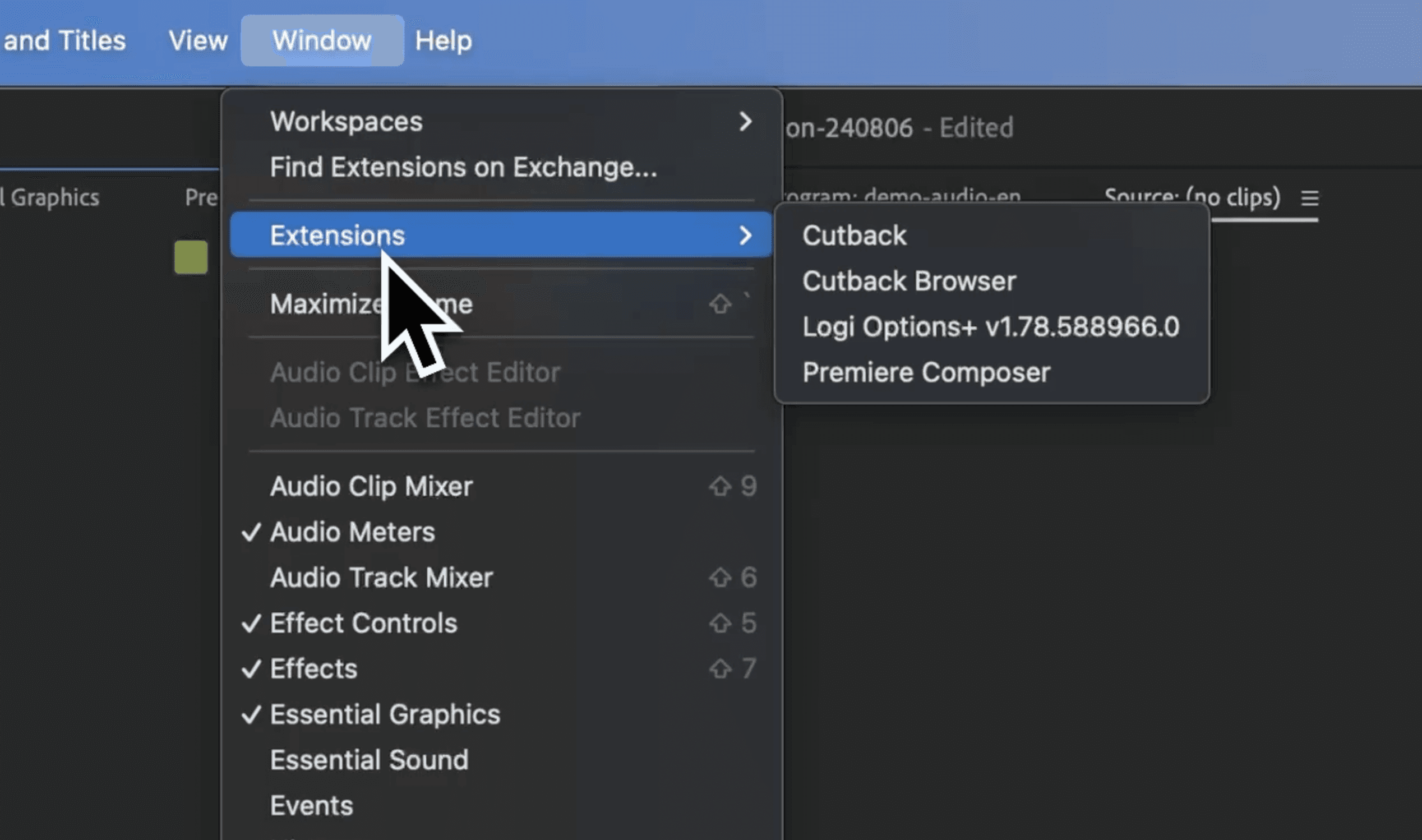
  1. Install Cutback plugin

Install Cutback extension for Premiere Pro. Transcribe right where you edit videos.
premiere pro subtitles plugin, adobe speech to text for premiere pro 2025, transcription extension, transcribe audio adobe, adobe speech to text installer, extension for adobe premiere pro, premiere text to speech, premiere pro text to speech, premiere pro speech to text, auto transcribe audio, auto transcript premiere pro, adobe premiere transcription plugin, change transcript language in premiere pro, text-based editing premiere pro
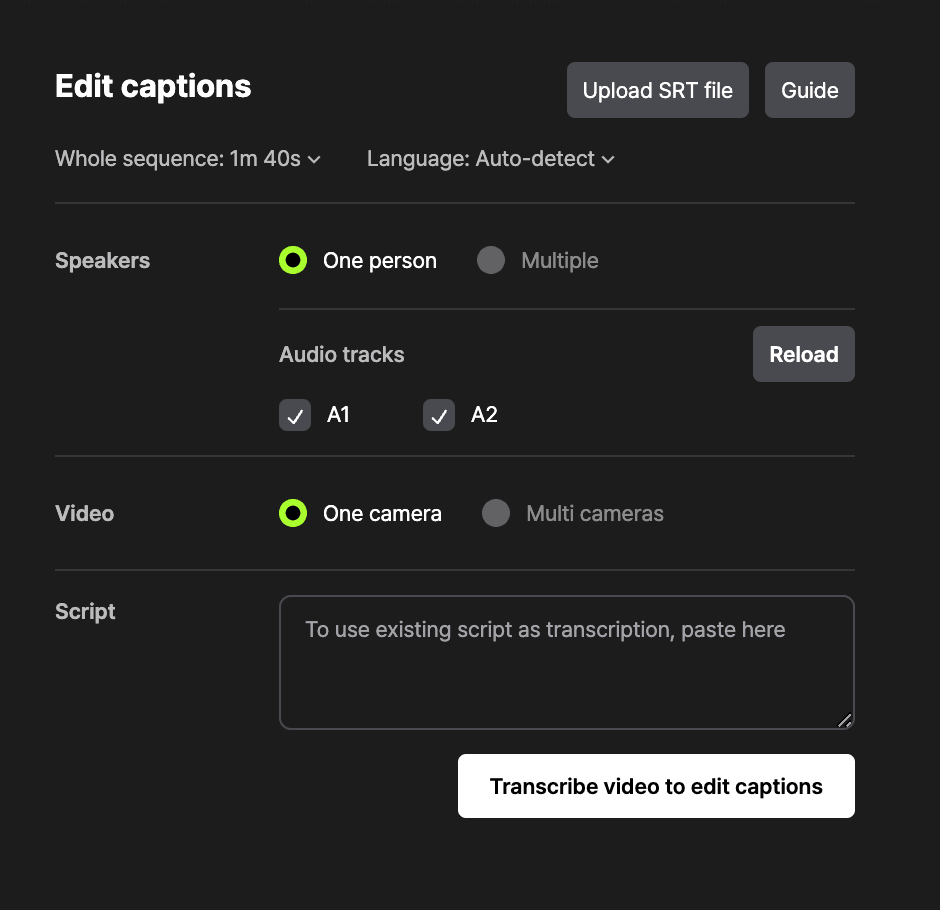
  1. Select options

Provide information about video for higher accuracy, or just try it with a click.
premiere pro subtitles plugin, adobe speech to text for premiere pro 2025, transcription extension, transcribe audio adobe, adobe speech to text installer, extension for adobe premiere pro, premiere text to speech, premiere pro text to speech, premiere pro speech to text, auto transcribe audio, auto transcript premiere pro, adobe premiere transcription plugin, change transcript language in premiere pro, text-based editing premiere pro
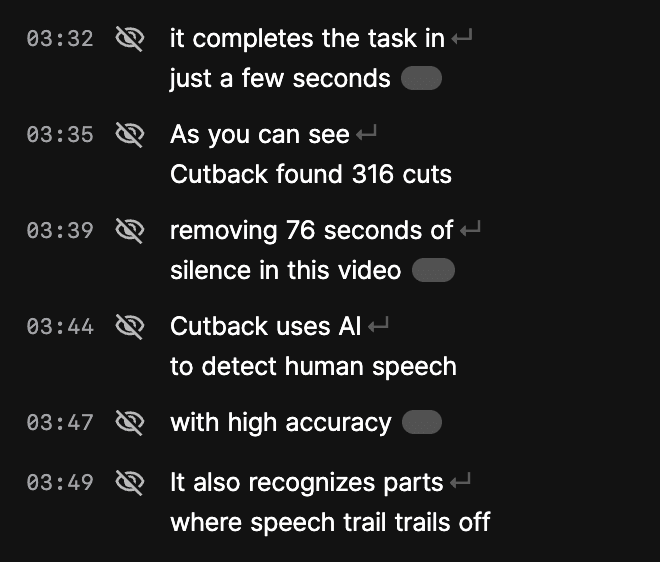
  1. Add to sequence

Use the transcription to edit video, and add captions in video.
premiere pro subtitles plugin, adobe speech to text for premiere pro 2025, transcription extension, transcribe audio adobe, adobe speech to text installer, extension for adobe premiere pro, premiere text to speech, premiere pro text to speech, premiere pro speech to text, auto transcribe audio, auto transcript premiere pro, adobe premiere transcription plugin, change transcript language in premiere pro, text-based editing premiere pro

FAQ

Can I transcribe video to text directly inside Premiere Pro without exporting?

What languages are supported?

Why is Premiere Assistant's transcription so accurate?

How accurate is Premiere Assistant's video-to-text transcription compared to Whisper?

Can I edit video by editing the transcript text in Premiere Pro?

Does video-to-text transcription work for multicam sequences in Premiere Pro?

Is there a limit on video length?
Why video editors
recommend Premiere Assistant

  • The updates are so frequent that it's like a completely different plug-in every time I open it. I've tried manyplug-ins, but this one costs less and performs much better.

    Park

    Video Editor

  • I used it extensively during the beta testing period, and the price is much more affordable than I expected, so I subscribed annually without hesitation.

    Troublemaker Neo

    Informational video editor

  • I primarily edit lectures and interview videos, and my workload has decreased by 90%. There's almost no need to edit subtitles, and I edit the video with captions too. I want to keep this to myself.

    Kim, Producer

    Lecture video editor

  • The photo and video search in Cutback's image browser is incredibly convenient. I always wished for a service like this, and it's the best! This is truly a plugin worth every dollar.

    editlife

  • It's incomparable to other video caption recognition programs. There are hardly any spelling errors, and the time sync is truly amazing.

    Oh

    Interview video editor

  • Cutback does all the tasks I really don't want to do and takes away my stress. The money was absolutely worth it.

    kora*****

    Producer with 7yrs exp

  • I use many AI programs, but none have been more helpful than ChatGPT except for Cutback.

    some****

    YouTuber

  • The response to feature requests and bug reports is incredibly fast, and the update speed is phenomenal. I'm really looking forward to what's coming next!

    Ha

  • This is insane... I tried working without Cutback, and the difference is so noticeable

    edi***

    Editor with 5yrs exp

  • Honestly, even if it were $70, it would still be worth it. I’m now making three videos in the time to make one.

    Kim

    Producer with 4yrs exp

Why video editors
recommend Premiere Assistant

  • The updates are so frequent that it's like a completely different plug-in every time I open it. I've tried manyplug-ins, but this one costs less and performs much better.

    Park

    Video Editor

  • I used it extensively during the beta testing period, and the price is much more affordable than I expected, so I subscribed annually without hesitation.

    Troublemaker Neo

    Informational video editor

  • I primarily edit lectures and interview videos, and my workload has decreased by 90%. There's almost no need to edit subtitles, and I edit the video with captions too. I want to keep this to myself.

    Kim, Producer

    Lecture video editor

  • The photo and video search in Cutback's image browser is incredibly convenient. I always wished for a service like this, and it's the best! This is truly a plugin worth every dollar.

    editlife

  • It's incomparable to other video caption recognition programs. There are hardly any spelling errors, and the time sync is truly amazing.

    Oh

    Interview video editor

  • Cutback does all the tasks I really don't want to do and takes away my stress. The money was absolutely worth it.

    kora*****

    Producer with 7yrs exp

  • I use many AI programs, but none have been more helpful than ChatGPT except for Cutback.

    some****

    YouTuber

  • The response to feature requests and bug reports is incredibly fast, and the update speed is phenomenal. I'm really looking forward to what's coming next!

    Ha

  • This is insane... I tried working without Cutback, and the difference is so noticeable

    edi***

    Editor with 5yrs exp

  • Honestly, even if it were $70, it would still be worth it. I’m now making three videos in the time to make one.

    Kim

    Producer with 4yrs exp

Premiere Pro Logo

Boost
productivity with
Premiere Assistant

Install Premiere Assistant extension to boost your
productivity and creativity right in Adobe Premiere.

Premiere Pro Logo

Boost
productivity with
Premiere Assistant

Install Premiere Assistant extension to boost your
productivity and creativity right in Adobe Premiere.