Jump Cut, J-Cut, and L-Cut Explained for Editors
A jump cut, a J-cut, and an L-cut solve different editing problems. Here's what each one actually does, when to use it, and how to build one.

TLDR: A jump cut skips time within one shot, a J-cut leads with the next scene's audio, and an L-cut lets the previous audio linger; three different tools for three different editing goals.
These three terms get confused constantly, partly because they sound similar and partly because two of them (J-cut and L-cut) are genuinely opposite versions of the same technique while the third (jump cut) is something else entirely. This post breaks down what each one actually is, how they're built, and when a good editor reaches for which one.
What Is a Jump Cut?
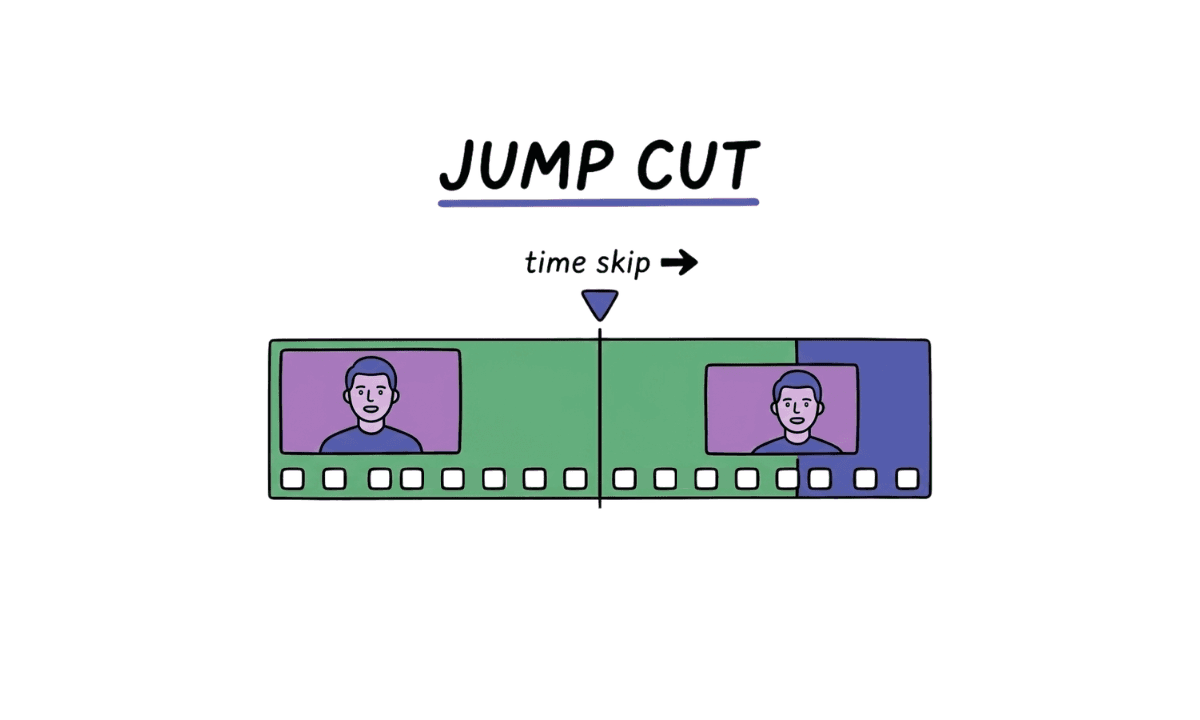
A jump cut is an edit that cuts between two shots of the same subject in the same scene, with the camera angle staying roughly the same, so the subject appears to skip forward in time. Where most editing techniques are built to hide the cut, a jump cut makes the edit obviously visible on purpose.
What is an example of a jump cut? The clearest version: a talking-head shot where a sentence gets trimmed mid-take, and instead of smoothing the gap with a cutaway, the editor just cuts straight across it. The subject's position shifts slightly, the background doesn't move, and the viewer clearly feels the missing time. Jean-Luc Godard's Breathless (1960) is the reference point most editors learn this from Godard needed to shorten the film and ended up removing chunks of footage mid-scene rather than reshooting, and the resulting jarring cuts became one of the most influential stylistic choices in film history almost by accident.
Are a J-cut and jump cut the same thing? No, and this is the single most common mix-up in this whole cluster of terms. A jump cut is a purely visual technique: same subject, same scene, a visible skip in time. A J-cut is about audio and video transitioning at different moments between two different shots. They don't overlap in what they do or when you'd reach for one.
What Is a J-Cut?
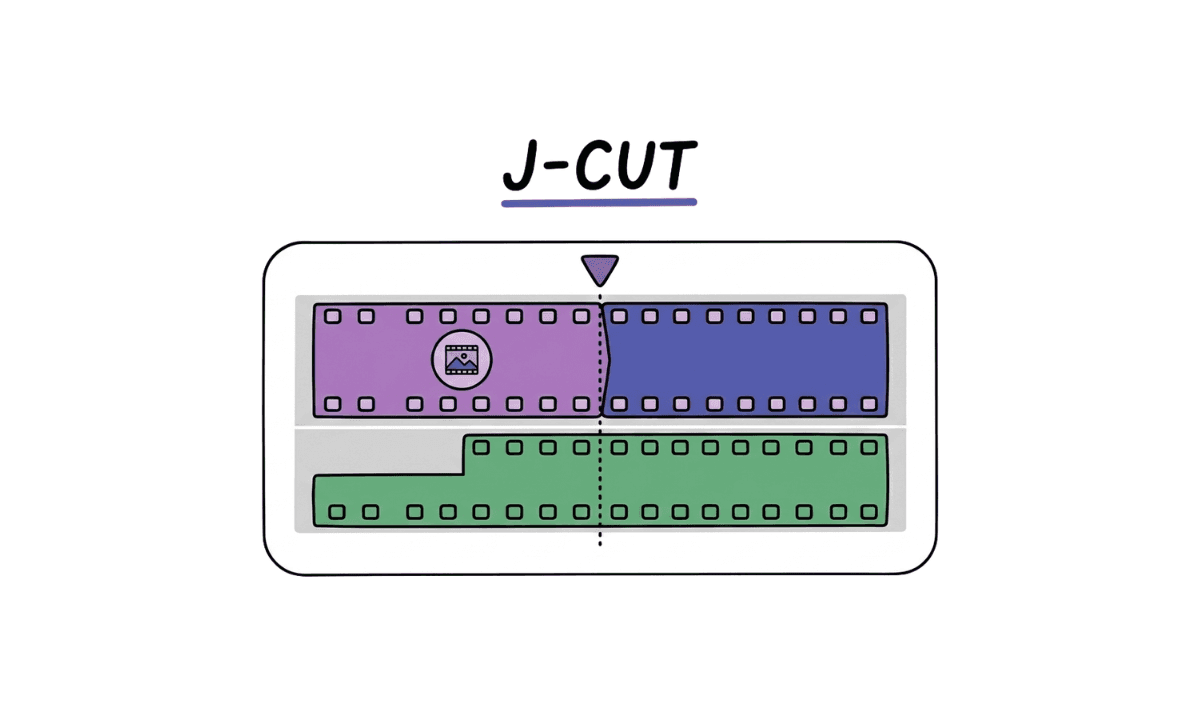
A J-cut is an edit where the audio from the next shot starts playing before the video cuts to it. The viewer hears what's coming before they see it. On a timeline, with video on top and audio underneath, the incoming clip's audio track extends left, underneath the tail end of the outgoing clip's video, forming a shape that looks like the letter J. That's genuinely where the name comes from; it's not a metaphor.
J-cuts are useful for leading into a new scene or location: hearing a new voice or a new ambient sound a beat before the picture changes primes the viewer for what's coming, rather than surprising them with a hard visual jump.
What Is an L-Cut?
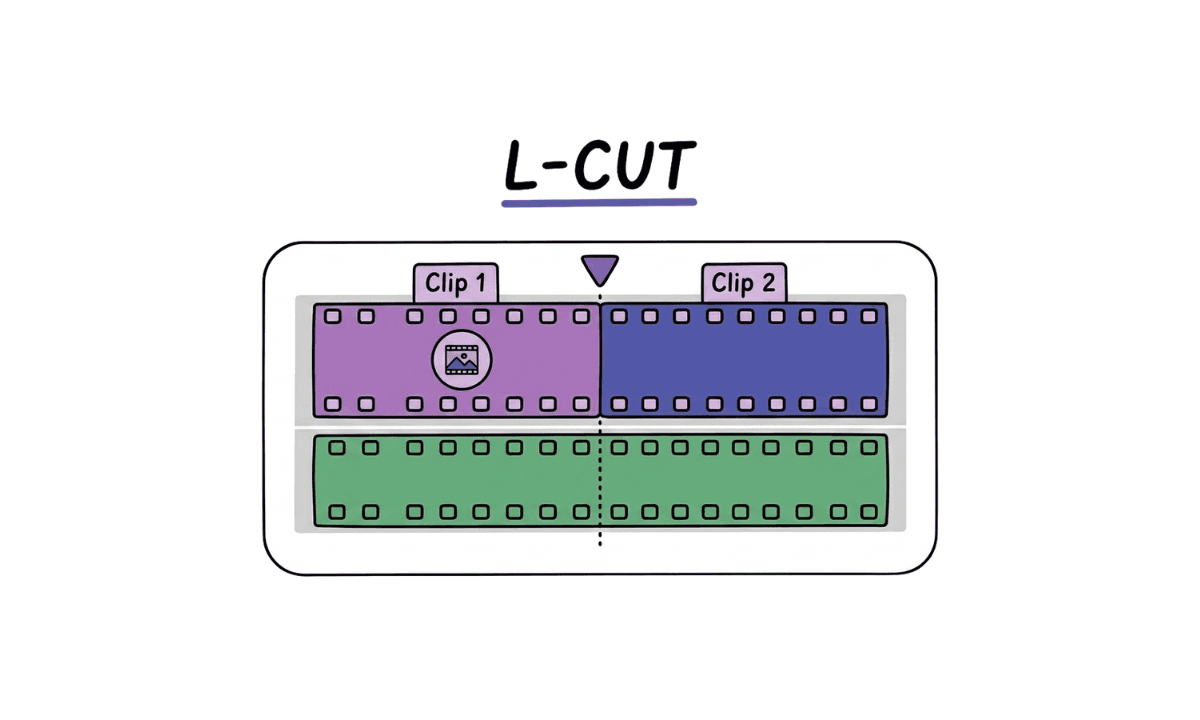
An L-cut is the reverse. The audio from the outgoing shot continues playing after the video has already cut to the next shot. The viewer keeps hearing the previous moment while looking at something new. On the timeline, the outgoing clip's audio track extends right, underneath the start of the new clip's video, forming an L shape.
Why is it called an L-cut? Same logic as the J-cut; it's named directly after the shape the audio and video clips make on the editing timeline once they're offset from each other. No deeper meaning beyond that.
L-cuts are the standard tool for reaction shots and dialogue scenes: someone's voice keeps talking while the frame cuts to the other person's face, letting the viewer see how the line lands instead of just hearing it.
J-Cut vs L-Cut: When to Use Which
Audio behavior | Best for | |
|---|---|---|
J-cut | Next clip's audio starts before its video | Setting up a new scene, building anticipation |
L-cut | Previous clip's audio continues after its video ends | Reaction shots, dialogue flow, staying grounded in a moment |
Professional editors often call both of these split edits, since the underlying mechanic, offsetting audio and video instead of cutting them together, is the same technique pointed in two different directions. Most conversational or interview-style edits use both throughout a single sequence: L-cuts to hold on a reaction, J-cuts to pull the viewer into whatever's said next.
What Is a Supercut?
A supercut is a compilation edit that strings together many short clips, usually built around a single repeated word, phrase, action, or visual motif, pulled from a larger body of footage. It's less a transition technique like the ones above and more a whole-video format: think "every time a character says a specific line" compiled across an entire season. Supercuts lean on rapid, often uniform cuts rather than J-cuts, L-cuts, or match cuts; the goal is volume and repetition, not narrative flow between two specific shots.
Match Cut vs Jump Cut
These two get confused because they're both named "cut" and both involve a kind of visual jump, but they're built to do opposite jobs. A match cut connects two different shots, often from entirely different scenes, by matching a visual, audio, or thematic element between them (a shape, a movement, a sound) to create a smooth, often metaphorically meaningful transition. The bone-thrown-into-the-air-becomes-a-spacecraft cut in 2001: A Space Odyssey is the textbook example.
A jump cut does the opposite job: it's the same subject in the same scene, and it's meant to feel abrupt rather than smooth. Where a match cut hides the seam between two shots, a jump cut makes the seam the point.
Other Common Types of Cuts in Film
Jump cuts, J-cuts, L-cuts, and match cuts are the ones editors mix up most, but they sit inside a broader toolkit: the hard cut (a standard, transition-free cut between two shots, the default), cross-cutting (alternating between two separate lines of action happening at the same time), and cutaways (briefly cutting to a related but separate shot, often to cover an edit or add context). Most edited sequences combine several of these rather than relying on just one.
How to Build a J-Cut or L-Cut
There's no single downloadable "J-cut L-cut template" that works across every project; the shape depends entirely on your specific footage, but the underlying steps are the same in every major NLE:
Place both clips on the timeline in sequence, video and audio linked as usual.
Unlink the audio and video (in Premiere Pro, toggle off Linked Selection, or hold Alt/Option while dragging).
For a J-cut, drag the second clip's audio left, underneath the first clip's video, so it starts before the visual cut.
For an L-cut, drag the first clip's audio right, underneath the second clip's video, so it continues after the visual cut.
Preview the transition and adjust the offset until the dialogue or sound lands naturally against the picture; there's no fixed number of frames that works everywhere, it's a pacing judgment call.
How AI Speeds Up Split-Edit and Jump-Cut Workflows
Building J-cuts and L-cuts by hand across a long interview or podcast is repetitive: the technique itself is simple, but doing it correctly dozens of times across an hour of footage adds up. Selects doesn't build split edits for you automatically; that's still a creative decision, but it removes the manual prep that usually precedes it: transcribing dialogue, detecting speakers, and identifying dead air or filler words, so an editor can see exactly where a reaction shot or a lead-in would land well before dragging a single audio clip.
The same applies to jump cuts in talking-head content. Selects' silence and filler-word removal effectively creates a version of the jump cut automatically, stitching together the clean parts of a take across the gaps, which is exactly the manual, repetitive work a jump-cut-heavy edit used to require by hand.
Frequently Asked Questions (FAQs)
Q: What is a jump cut?
A: A jump cut is an edit between two shots of the same subject in the same scene, with the camera angle staying roughly the same, so the subject appears to skip forward in time. Unlike most editing techniques, which are built to hide the cut, a jump cut makes the edit intentionally visible.
Q: What are jump cuts used for?
A: Jump cuts compress time within a single continuous shot, useful for trimming a long take (like a talking-head video) without cutting away to other footage. They're also used stylistically to create urgency or disorientation, a technique popularized by Jean-Luc Godard's Breathless.
Q: Are a J-cut and jump cut the same?
A: No. A jump cut is a visual technique involving the same subject and scene with a visible time skip. A J-cut is an audio-video offset between two different shots, where the next shot's audio starts before its video appears. They solve different editing problems and aren't interchangeable.
Q: What is an L-cut?
A: An L-cut is an edit where the audio from the outgoing shot continues playing after the video has already cut to the next shot, so the viewer keeps hearing the previous moment while looking at something new. It's commonly used for reaction shots and dialogue scenes.
Q: Why is it called an L-cut?
A: The name comes directly from the shape the clips form on an editing timeline. When the outgoing clip's audio is extended to continue underneath the start of the next clip's video, the offset creates a shape resembling the letter L.
Q: When should you use a J-cut vs an L-cut?
A: Use a J-cut to lead into a new scene, letting the next location's sound or voice prime the viewer before the picture changes. Use an L-cut to stay grounded in a moment, letting a line of dialogue or sound continue while the picture cuts to a reaction or new visual. Most dialogue-heavy edits use both throughout the same sequence.
Q: What is the difference between a match cut and a jump cut?
A: A match cut connects two different shots, often from different scenes entirely, by matching a visual, audio, or thematic element between them to create a smooth, often meaningful transition. A jump cut does the opposite: it's the same subject in the same scene, and it's meant to feel abrupt rather than seamless.
Q: What is a supercut?
A: A supercut is a compilation edit built from many short clips, usually organized around a single repeated word, phrase, or action pulled from a larger body of footage. It's a compilation format rather than a transition technique like a J-cut or match cut.

Kay Sesoko
Marketer
Share post