A-Roll, B-Roll, and C-Roll Explained for Editors
A-roll drives the story, B-roll supports it, and C-roll adds texture. Here's how each works, plus how Selects automates B-roll placement in your rough cut.
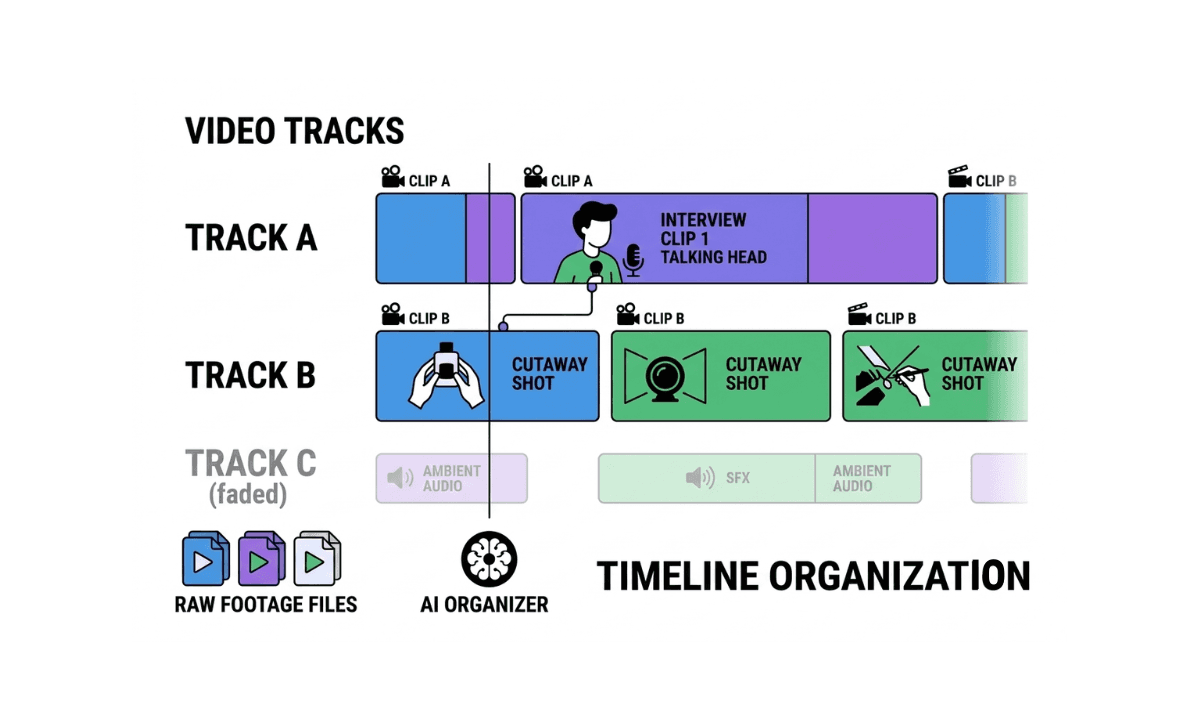
TLDR: A-roll is your main footage, and B-roll is what covers it, and Selects can place B-roll automatically during your rough cut.
Every editor learns A-roll and B-roll in their first week and spends years figuring out what actually separates a good cut from a flat one. The terms sound simple until you're staring at a timeline trying to decide what counts as which, or trying to explain the difference to a client who keeps calling all of it "extra footage." This post breaks down what each term actually means, where C-roll fits in, and why the distinction matters more on a 30-second TikTok than it ever did in a 1980s news edit suite.
If you want to learn more about editing terminology, check out our full glossary of video editing terms.
What Is A-Roll?

A-roll is your primary footage: the interview, the talking head, the main dialogue, the shot that carries the story on its own. If you played only the A-roll from start to finish with nothing cut away to, the video would still make sense. It's the footage doing the actual talking, whether that's a subject answering questions, a narrator delivering a script, or two people having a conversation the whole video is built around.
In a documentary, A-roll is the interview subject explaining what happened. In a YouTube video, it's the creator talking to camera. In a corporate video, it's the CEO or the customer testimonial. A-roll is the spine. Everything else in the edit exists to support it.
What Is B-Roll?

B-roll is the supplemental footage cut in around your A-roll: cutaways, establishing shots, close-ups, footage of someone doing the thing they're describing instead of just talking about it. B-roll doesn't carry the story on its own, but it's what makes the story watchable.
Why is it called B-roll? The name comes from the physical film editing era, when editors worked with two actual rolls of film. The A-roll held the main footage. A second, separate roll (the B-roll) held supplemental shots that got spliced in alongside it. On 16mm film specifically, splices between shots showed up as visible flaws on screen, so editors used the B-roll footage to cover those splice points rather than cutting straight from one A-roll shot to the next. By the 1980s, the term carried over into videotape editing, where tape decks were literally labeled A and B, and it stuck even after physical rolls and tapes disappeared entirely.
Today, "roll" doesn't mean anything physical. It's just the name that survived. B-roll now covers a wide range of shots: an interviewee's hands while they talk, a product being used, a location exterior, archival footage, even stock clips pulled from a library. What all of it has in common is that it plays under the A-roll's audio rather than carrying its own dialogue.
What Is C-Roll?
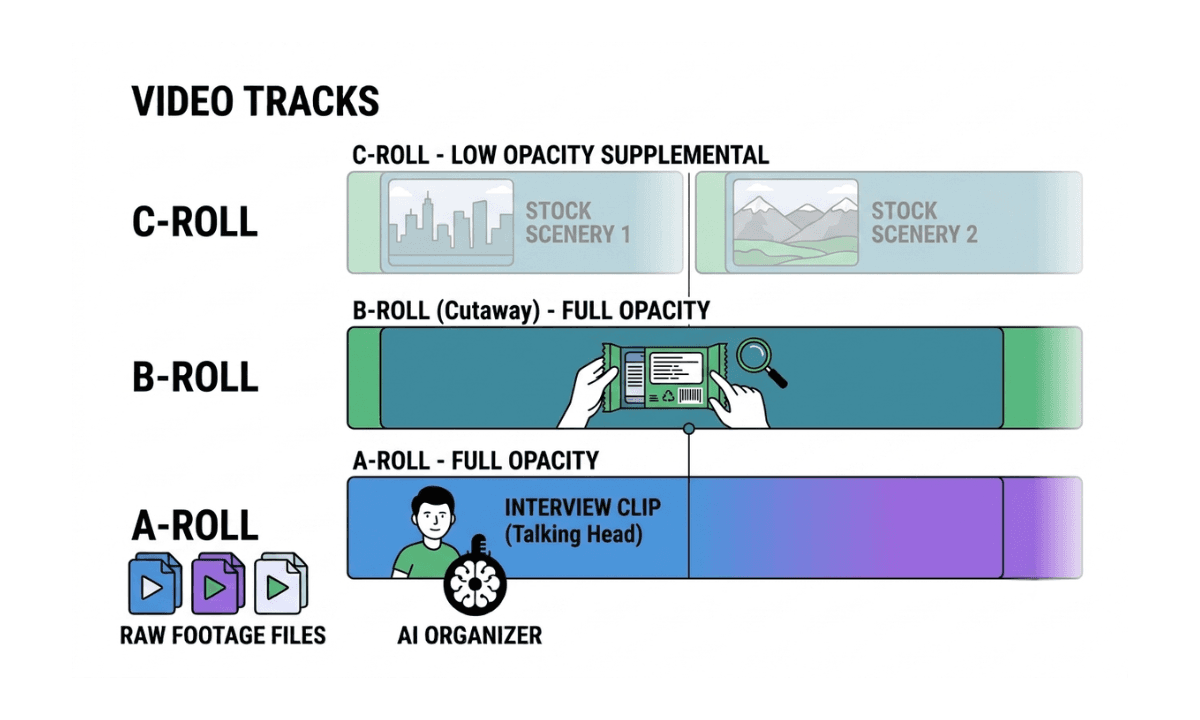
C-roll doesn't have the same settled definition as A-roll and B-roll. Most editors use it to describe a third layer of footage: supplementary material that's more generic or lower priority than B-roll, often stock footage, ambient background shots, or clips captured without a specific plan in mind. Where B-roll is usually shot with intention (you know you'll need a cutaway of hands typing before you go set up the shot), C-roll is often whatever gets picked up along the way that ends up being useful in the edit.
Because there's no universal standard for what counts as C-roll, don't expect every editor or every studio to define it the same way. Some treat it as a synonym for B-roll of a lower priority tier. Others use it specifically for stock or archival material that supplements shot-for-purpose B-roll. If you're working with a team, it's worth confirming what your specific studio or client means by C-roll before you organize footage around it, since the term is genuinely inconsistent across the industry in a way A-roll and B-roll aren't.
A-Roll vs B-Roll vs C-Roll: The Core Differences
Role | Carries story alone? | Typical source | |
|---|---|---|---|
A-roll | Main footage, the spine of the edit | Yes | Interview, dialogue, narration |
B-roll | Supports and illustrates the A-roll | No | Purpose-shot cutaways, second unit footage |
C-roll | Generic or lower-priority supplemental layer | No | Stock footage, ambient shots, unplanned footage |
The practical difference that matters most in an edit isn't the label, it's the function. A-roll answers "what is being said." B-roll answers "what does that look like." C-roll, when a project uses the term at all, fills gaps neither of the other two covers.
A-Roll and B-Roll Examples
An easy way to see the distinction: imagine an interview where a chef is talking about a dish she just plated. The chef speaking to camera, answering questions about the recipe, is A-roll. The shot of her hands searing the pan, the close-up of the plate being finished, the wide shot of the kitchen in motion while her voice continues over the top that's B-roll.
In a product review video, A-roll is the reviewer talking through their opinion. B-roll is the product itself being used, unboxed, or shown from angles the reviewer describes but isn't currently on camera for.
In a news package, A-roll is the reporter's stand-up or the interview clip. B-roll is the footage of the event itself: the crowd, the location, the action the story is actually about.
Why B-Roll Matters, Even When Nobody Notices It
Good B-roll is invisible in the way good editing usually is. Nobody watches a well-cut interview and thinks "great B-roll placement." They just don't get bored, don't notice the jump cut where three minutes of rambling got trimmed out, and stay with the video longer because there's always something to look at.
B-roll does three jobs at once. It covers edits, since cutting straight between two A-roll clips creates a visible jump unless something else is shown in between. It adds context, giving the viewer something concrete to look at instead of a static talking head for the full runtime. And it controls pacing, since an editor can speed up or slow down the felt rhythm of a scene by choosing how much B-roll sits between lines of A-roll.
Strip the B-roll out of most professionally edited long-form content and what's left is a flat, static interview that feels unfinished regardless of how good the A-roll performance was.
A-Roll vs B-Roll on TikTok and Short-Form Video
The terms didn't stay in traditional film and news production. Short-form platforms adopted the same structure, just faster and more compressed. A 30-second TikTok still has an A-roll (the creator talking to camera, or the main clip being reacted to) and B-roll (the cutaways, the reaction shots, the supporting footage layered in).
What's changed is density. A five-minute interview might have a B-roll cutaway every 20 to 40 seconds. A TikTok edit often cuts every one to three seconds, which means the ratio of B-roll to A-roll is much higher, and the footage often has to be sourced fast: stock clips, screen recordings, memes, or quick supplementary shots grabbed on a phone. This is also where C-roll gets used more loosely, as a catch-all for whatever extra layer gets stacked on top to keep a short video visually active for its entire runtime.
The underlying logic hasn't changed. A-roll still carries the point. B-roll still supports it. The platforms just compressed the timescale.
How to Plan A-Roll and B-Roll Before You Shoot
The editors who spend the least time hunting for B-roll in the edit are usually the ones who planned it before they ever hit record. Of course, they also utilize tools like Selects to find specific clips in their footage through video search, too.
Regardless, before a shoot, it's worth listing out what the A-roll will actually say, then working backward to identify the moments that need visual support: anything mentioned but not shown, anything abstract that benefits from a concrete visual, anything repetitive enough in the A-roll that a cutaway will help the pacing.
Shooting B-roll after the fact, once the A-roll is already cut, works but costs more time. You already know exactly what you need, but you're now coordinating a second shoot, second location, or second round of stock searching instead of capturing it in the same session.
How AI Is Changing B-Roll Placement
Sourcing and placing B-roll used to be entirely manual: scrub the A-roll cut for gaps, dig through a folder or a stock library for something that fits, drop it in, adjust timing, repeat for every gap in a long-form edit. On a 45-minute interview with 20 or more B-roll opportunities, that alone can add hours to a project that's otherwise finished.
Selects analyzes both A-roll and B-roll footage during its pre-editing pass and places B-roll automatically based on the relationship between what's being said and what the B-roll footage shows, as long as the B-roll is imported at project creation so it can be analyzed alongside the rest. The placement is a draft you review and adjust before handoff to Premiere Pro, Final Cut Pro, or DaVinci Resolve, not a black box you're stuck with. How Selects auto-places B-roll in long-form interviews proves the progression of agentic video editing.
Either way, the goal is the same one editors have always had with B-roll: cover the cut, add the context, keep the pacing tight, without losing an afternoon to the search.
Frequently Asked Questions (FAQs)
Q: What is the difference between an A-roll and a B-roll?
A: A-roll is the primary footage that carries the story on its own, typically an interview, dialogue, or narration. B-roll is supplemental footage cut in around the A-roll, such as cutaways, establishing shots, or footage showing what's being discussed. A-roll can stand alone; B-roll exists to support it.
Q: Why is it called B-roll?
A: The term comes from physical film editing, when editors worked with two separate rolls of film: the A-roll held the main footage, and the B-roll held supplemental shots spliced in alongside it. On 16mm film, B-roll was originally used to cover visible splice marks between shots. The term carried into videotape editing in the 1980s and stuck even after physical rolls disappeared.
Q: What is an example of a B-roll?
A: In an interview about cooking, B-roll would be shots of hands searing a pan or a finished dish, while the interview audio continues underneath. In a product review, B-roll is footage of the product being used or unboxed while the reviewer's voice plays over it. Any supporting shot that isn't the main talking subject counts as B-roll.
Q: What is A-roll, B-roll, and C-roll?
A: A-roll is the main footage that carries the story. B-roll is supplemental footage that supports and illustrates the A-roll. C-roll is a less standardized third tier, generally used for lower-priority or generic supplemental footage like stock clips or ambient shots. Unlike A-roll and B-roll, C-roll's definition varies between editors and studios.
Q: Can AI automatically add B-roll to a video?
A: Yes. Selects analyzes A-roll and B-roll footage during its pre-editing pass and places B-roll automatically based on the relationship between the A-roll audio and the B-roll content, as long as the B-roll is imported at project creation. Premiere Assistant handles B-roll differently, letting editors search and insert royalty-free B-roll from sources like Pexels and Pixabay directly inside Premiere Pro without leaving the timeline.
Q: What's the best way to organize A-roll and B-roll before editing?
A: Import both into your project at the same time rather than sourcing B-roll after the A-roll cut is finished. Planning B-roll needs before the shoot (what needs visual support, what's mentioned but not shown) saves significantly more time than hunting for coverage after the fact. Tools like Selects can then analyze both together and suggest placement automatically instead of an editor scrubbing for gaps manually.

Kay Sesoko
Marketer
Share post