Selects vs Opus Clip: Pre-Edit Pipeline vs Clip Distribution
Opus Clip clips finished videos. Selects automates the pre-edit. A practical comparison of where each AI video editing tool saves time, and where it doesn't.
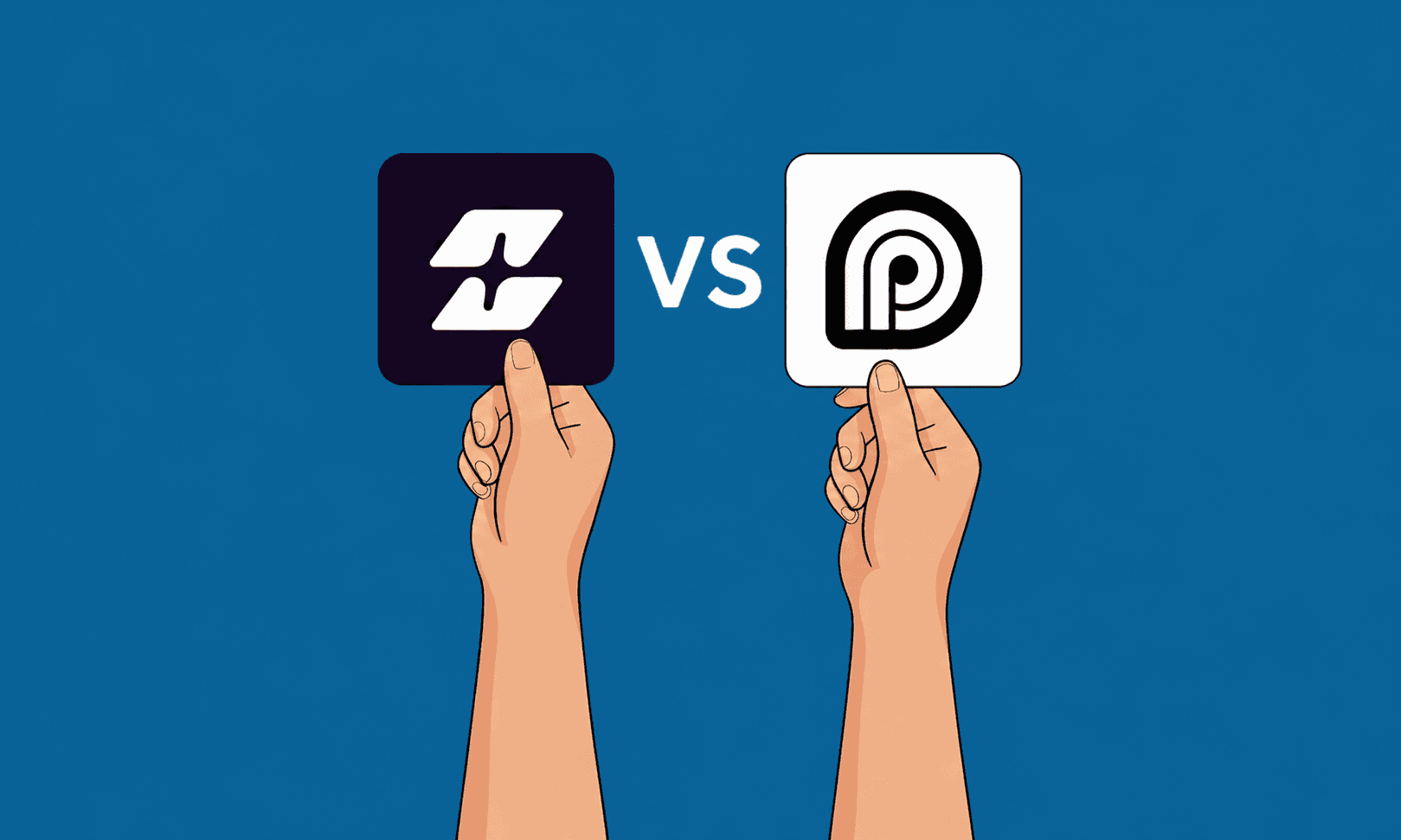
TLDR: Opus Clip is a browser-based tool that takes a finished long-form video and slices it into vertical clips for TikTok, Reels, and Shorts. Selects is a desktop app that takes raw multicam straight off the cards and turns it into an organized project for Premiere Pro, Final Cut Pro, or DaVinci Resolve. They sit at opposite ends of the same pipeline. Choose Opus Clip when you have a finished cut and need clips. Choose Selects when you have a card full of footage and need a cut.
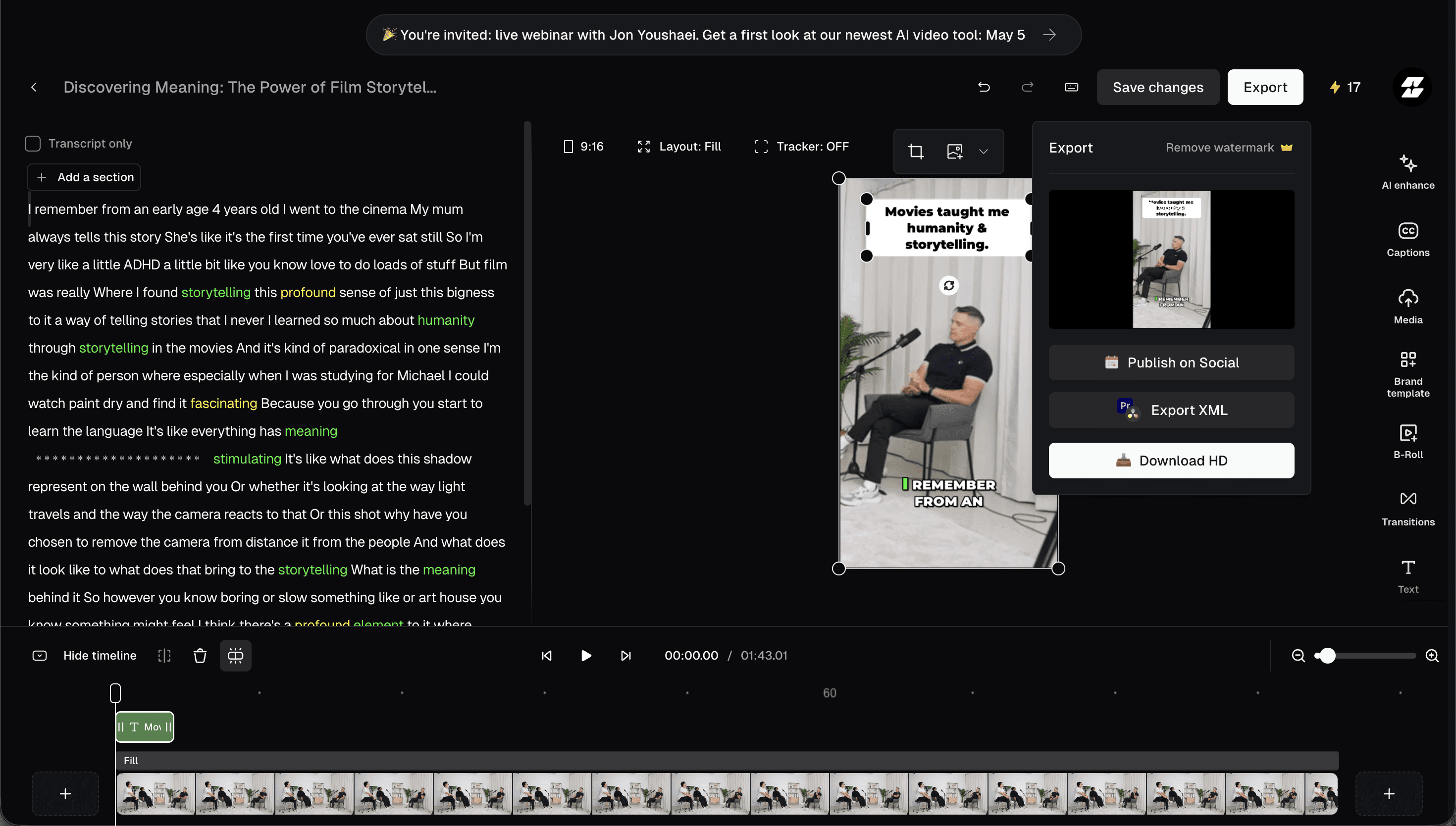
Opus Clip is one of the loudest names in AI video right now, and the numbers back it up: 16 million users, a feature set built around the social-distribution problem, and a free tier that gets creators through the door before a credit card ever comes out. ClipAnything reads a long video, picks the moments that play, scores them for virality, animates the captions, and queues the output up for TikTok, Reels, and Shorts. As consumer creator tools go, it's about as polished as the category gets.
The wrinkle is that all of that runs on top of a finished video. Before any clipping happens, somebody has already done the part where the day disappears: synced four cameras, scrubbed through dead air, picked the takes, organized the bins, and roughed out the structure of the cut. Opus Clip doesn't touch that part. It can't. It's a tool for the other end of the workflow.
Selects, built by Cutback, lives at that other end. It's the desktop app where raw multicam becomes an organized rough cut, and it sits one stage upstream from anything Opus Clip does. Same pipeline, opposite direction. This breakdown is for the editors and producers trying to figure out which one belongs in their stack, and where each one actually pays for itself.
Selects vs Opus Clip at a glance
Selects | Opus Clip |
|---|---|
Standalone desktop app that handles the entire pre-edit on raw multicam — sync, transcribe, organize, assemble. Exports native Premiere, Final Cut, and DaVinci Resolve projects. $16/mo with a 7-day free trial. | Browser-based clipping tool that takes a single finished video and produces vertical short clips with captions, virality scores, AI dubbing, and auto-publishing to TikTok, Reels, and Shorts. Free tier (watermarked); paid plans start at $15/mo. |
Why Opus Clip earned 16 million users
Opus Clip didn't get this big by accident. If you have a 90-minute podcast or a long-form YouTube upload and you need 30 vertical clips ready to post by Friday, it'll get you there. ClipAnything reads the audio, the captions, and the on-screen content together, and the moments it surfaces are usable a high percentage of the time. The virality score is a calibration tool, not a magic wand, but as a "should I post this one" sanity check it works.
Two features tend to surprise first-time users. Twenty-plus-language AI dubbing produces lip-synced voiceover tracks without re-recording, which is a real lever for creators chasing international audiences. The social scheduler closes the loop after that: clips don't just get generated, they get queued and posted on whatever cadence you set. For solo creators whose ceiling is reach, that combination is hard to beat.
So if your bottleneck is "I make finished video and I need to do more with it," Opus Clip is the right tool. The catch is that for most studios, freelancers, and production teams, that's not where the bottleneck actually is.
What has to happen before Opus Clip can run
Opus Clip needs an input. That input is a finished video. Producing the finished video is a separate, longer job. Somebody has to ingest the footage. Somebody has to sync four cameras, or six, or ten. Somebody has to log it, transcribe it, organize the media into bins so the cut is even findable a week from now. Somebody has to scrub through the dead time, pick between takes, build the narrative, and assemble a rough cut.
The 90-minute math For a 90-minute podcast episode with three cameras, AutoPod saves you 20–30 minutes on the camera cuts. The remaining four to six hours of pre-edit work, the sync, the logging, and the rough assembly are still on you. This is the gap Selects was built to fill. |
Pre-edit, in other words, is the part of the workflow most clipping tools quietly assume someone else is handling. For solo creators with one camera and a clean recording, that assumption is fine. For anyone running a real multicam shoot, it's where the schedule lives or dies.
Why the pre-edit is where days disappear
A clipping tool saves minutes once the cut exists. The pre-edit is where the hours actually went, and where they go on every project. Multi-track sync alone can eat half a day on a four-person podcast if you're doing it the old PluralEyes-then-cleanup way. Transcription, logging, and bin organization eat another chunk. Take selection and rough-cut assembly eat the rest. By the time the lead editor opens the project, an assistant editor has already burned a full day on prep that doesn't show up anywhere in the finished video.
Selects compresses that day into a single end-to-end run.
Selects: one pass from cards to cut
Selects is the desktop app where the pre-edit happens, all in one place, before your NLE. Drop the cards on it. The work begins immediately on your local machine.
The sync engine handles up to 10 audio and video tracks using MFCC spectral analysis, which means no Syncalia round-trip and no PluralEyes pass. AI speaker detection runs at 97 to 98 percent accuracy on every track simultaneously, so the system actually knows who is talking when. The full session gets transcribed at the word level, making the conversation searchable from the timeline. Silences and filler words come out across all tracks at once, with a 0.25-second threshold that keeps the cuts from getting choppy. Footage gets sliced into topic chapters and color-coded bins automatically.
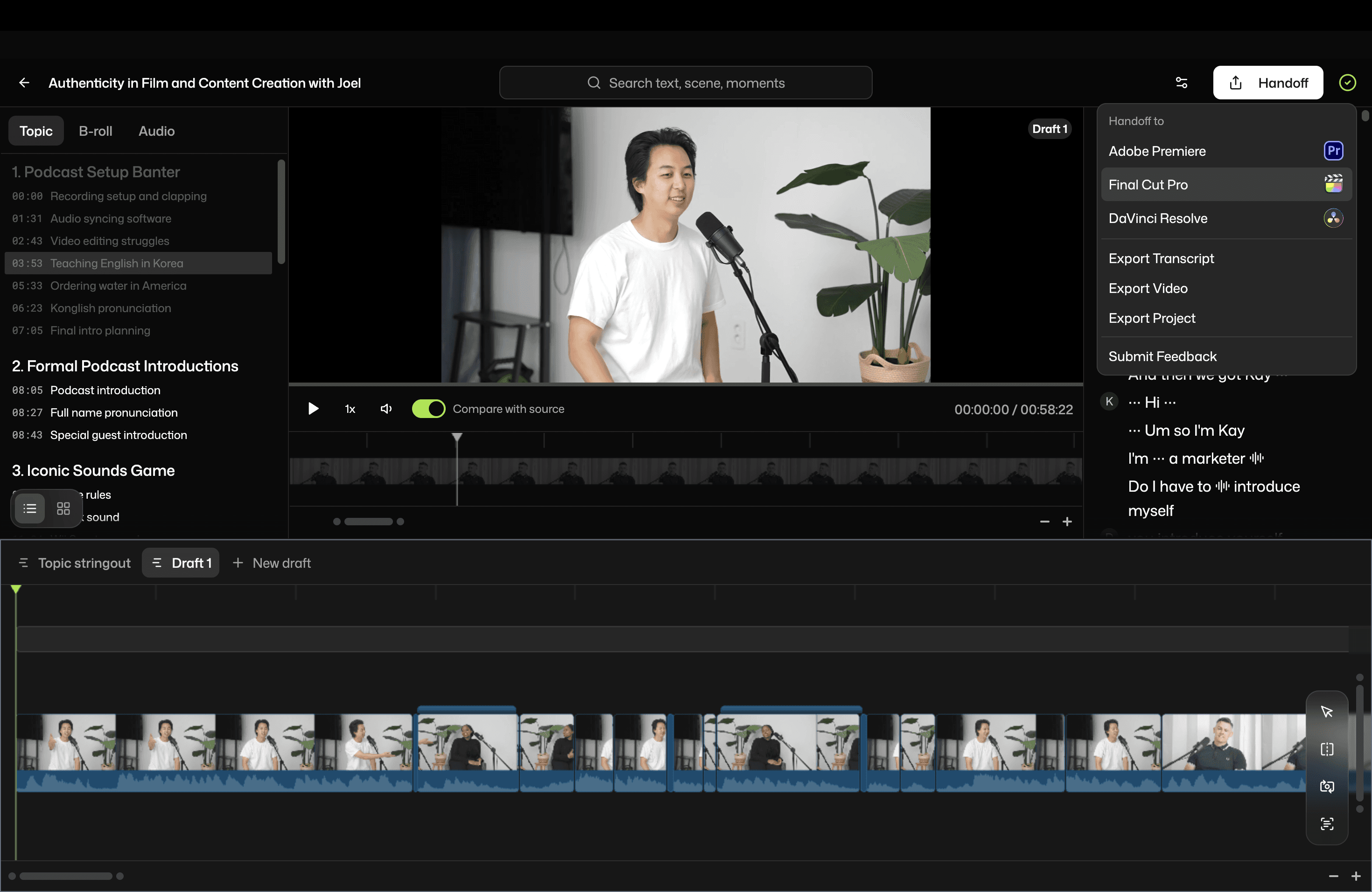
Then comes the part that puts daylight between Selects and the rest of the category: a prompt-driven rough cut. You describe the edit you're after, and Selects assembles a draft from the actual conversation, with multi-take selection, director-signal detection ("okay, take that again"), and pacing that adapts to the material. Open the project in Premiere, Final Cut, or DaVinci Resolve, and you're not building from zero. You're holding a draft that's already roughly two-thirds of the way to picture-lock.
01: Stage. Opus Clip lives on the post-edit side of the pipeline (vertical clipping for distribution). Selects lives on the pre-edit side (sync through rough cut), as a single end-to-end pass before your NLE.
02: Ingest. Opus Clip wants a finished long-form video, uploaded. Selects wants whatever the cards look like: ProRes, BRAW, R3D, MXF, all native, no transcoding, no upload.
03: Deliverable. Opus Clip outputs vertical clips, captioned, ready to schedule. Selects outputs an organized .prproj, FCPXML, or Resolve timeline with bins, markers, and a draft sequence ready to refine.
For a different angle on this comparison, the Selects vs AutoPod breakdown covers the Premiere-side automation question with a focus on multicam and jump cuts.
Side-by-side feature metrics
Feature | Selects | Opus Clip |
|---|---|---|
Multi-cam switching | ✓ Up to 10 tracks, AI speaker detection | ✗ |
Speaker Detection | ✓ 97~98% diarization on all tracks | ⚠ Single-speaker focus |
Silence/filler-word removal | ✓ Automatic across all tracks | ⚠ Per-clip, post-cut |
Transcription | ✓ Full session, searchable | ⚠ Caption-grade only |
AI dubbing | ✗ | ✓ 20+ languages |
Virality scoring | ✗ | ✓ |
Pro codec playback (ProRes / BRAW / R3D / MXF) | ✓ Native, frame-accurate, local | Cloud transcode required |
Rough-cut assembly | ✓ Prompt-driven narrative draft | ⚠ ClipAnything (clip section only) |
Social/vertical resizing | ⚠ Via NLE export | ✓ Native, scheduled to TikTok/Reels/Shorts |
NLE support | ✓ Premiere Pro, Final Cut Pro, DaVinci Resolve | ✗ XML on Pro tier and above |
Works offline from NLE? | ✓ Standalone app | ✗ XML on Pro tier and above |
Local processing | Yes, footage never leaves the machine | ✗ Cloud upload required |
Team collaboration/SSO | ✓ Team + Enterprise plans | ⚠ Limited |
SOC 2 | ✓ Enterprise | ⚠ Limited |
Starting price | $16/month (Starter) | ⚠ Free with watermarks; $15/mo paid |
Six practical differences that decide the choice
The starting input. Opus Clip wants a single finished cut. Selects wants whatever's on the cards. If your project hasn't been edited yet, Opus Clip has nothing to work with.
Multicam handling. Opus Clip doesn't sync multicam. Selects syncs up to 10 tracks with MFCC spectral analysis and 97 to 98 percent speaker detection. On a four-person roundtable, that's the difference between half a day in your NLE and an organized project waiting for you.
Codec workflow. Opus Clip is a browser tool, so anything you give it gets uploaded and transcoded. Cinema codecs (ProRes, BRAW, R3D, MXF) take real time to push through that pipe. Selects plays them locally, frame-accurate, with no upload step. For documentary, news, or any project shot on cinema cameras, that's a workflow-changing detail.
Privacy and offline work. Opus Clip requires a cloud upload, which is a non-starter for clients with NDAs, embargoed news, or legal sensitivity. Selects keeps the footage on your machine and works without internet. On a remote shoot, that matters more than the marketing pages let on.
The handoff. Opus Clip outputs a stack of clips ready for the social feed, with XML available on Pro plans for NLE refinement. Selects outputs a structured project file: native .prproj for Premiere with nested sequences and B-roll bins, clean FCPXML for Final Cut, and a real Resolve timeline for DaVinci. Different stages, different savings.
Where the savings show up. Opus Clip saves minutes per clip, multiplied by however many clips you publish. Selects saves hours per project on the part of the workflow that consumes the day. The two add up if you use both, but they're not interchangeable.
Pricing, and what it's actually buying
Opus Clip's entry tier is hard to argue with: free with watermarks, $15/month for Starter once you want them gone, with Pro plans unlocking XML export, AI dubbing, and higher clip volume. Selects starts at $16/month with a 7-day free trial. The numbers look close at the floor. They're paying for completely different things.
Opus Clip's per-month fee is buying clip output, measured in clips per month. Selects' per-month fee is buying time saved on the pre-edit, measured in hours per project. On a four-camera podcast that used to take a full day of prep, Selects pays for itself well inside the first project. The Creator and Pro tiers add multicam capacity (20 hours and 80 hours respectively) and shared workflows. Enterprise adds SSO, SOC 2 Type II, and dedicated support for studios with compliance or volume requirements.
Plan | Price | Best for | Included |
|---|---|---|---|
Selects - Starter | $16/mo | Solo editors | Basic pre-edit automation |
Selects - Creator | $40/mo | Creators and freelancers | Multi-cam sync, 20hrs capacity |
Selects - Pro | $160/mo | Small post teams | 10-track multi-cam, 80 hrs, collaboration |
Selects - Team | $160/seat/mo | Post-production teams | Centralized admin, shared projects |
Selects - Enterprise | Custom | Studios and broadcasters | SSO, SOC 2, dedicated support |
Opus Clip - Free | $0 | Trying it out | Watermarked clips, limited volume |
Opus Clip - Starter | $15/mo | Solo creators | Higher volume, no watermarks |
Opus Clip - Pro | $29/mo | Heavy creators | XML export, dubbing, more credits |
Pick Selects if
You're starting with raw multicam, not a finished cut
You want sync, transcript, organization, and a rough cut handed to your NLE
You edit in Premiere Pro, Final Cut Pro, or DaVinci Resolve
You shoot on cinema cameras and need ProRes, BRAW, R3D, or MXF native
The schedule slips on the prep work, not the polish
Pick Opus Clip if
You already have a finished long-form video and need vertical clips quickly
Auto-publishing to TikTok, Reels, and Shorts is part of your workflow
A virality score is useful as a sanity check before posting
AI dubbing into 20-plus languages is part of your distribution plan
Your output is polished video, not a raw multicam project
For agencies and studios sizing up the full cost of pre-edit prep, our breakdown of how top video studios use AI covers ROI across different team sizes.
Frequently Asked Questions (FAQs)
What's the cleanest one-line difference between Selects and Opus Clip?
Selects produces the finished video. Opus Clip distributes it. They live at opposite ends of the same workflow, so the question isn't really "which one wins" but "which end of your pipeline is leaking the most time." The pre-edit (sync, transcript, organization, rough cut) is Selects. The post-cut (vertical clips, captions, virality scoring, social scheduling) is Opus Clip.
Can Opus Clip work with raw footage from the cards?
No. Opus Clip is built around a single finished video as its input. There's no multicam sync, no native pro-codec playback, and no real NLE timeline. If your starting point is unedited multicam, you need a pre-edit tool. That's where Selects sits.
Does Selects produce vertical short clips?
Selects exports vertical clips through the Premiere Pro plug-in workflow, which is fine for occasional use. For high-volume short-form repurposing with auto-posting and virality scoring, Opus Clip is the more focused tool. Studios that publish heavily to social often run both tools in series: Selects to assemble the long-form cut, Opus Clip to repurpose it for social.
For a four-camera podcast, which tool saves more time?
Selects, by a meaningful margin. The reason is structural. A four-camera podcast hits the multicam sync problem before any clipping is possible. Opus Clip can't help until that multicam is already a finished video. Selects compresses the sync, transcript, organization, and rough-cut assembly into a single end-to-end pass. After that, Opus Clip is useful downstream for the social cut-up. They're additive, not interchangeable.
Can Selects auto-publish clips to TikTok, Reels, or YouTube Shorts?
No. Distribution is the part of the workflow Selects deliberately leaves to dedicated tools like Opus Clip, Vizard, or Submagic. Selects exports the timeline; the publishing layer sits downstream.
How does the pricing actually compare on a real project?
Opus Clip is $0 to $15 a month for the entry tier, scaling up as clip volume grows. Selects is $16 a month at the entry tier and scales by multicam capacity (20 hours, 80 hours, and so on) and team workflows. The two prices look identical at the floor, but they're paying for different bottlenecks. On a four-camera podcast where prep eats four to six hours, Selects pays for itself inside the first project. On a creator workflow producing 50 clips a month from finished video, Opus Clip pays for itself inside the first week.
Will Opus Clip clips play nicely with Premiere Pro, Final Cut Pro, or DaVinci Resolve?
XML export is available on Opus Clip's Pro tier and above, which gives you a sequence of clips that an NLE can open. It's not a structured project, though. Selects exports native .prproj files with nested sequences and B-roll bins, clean FCPXML for Final Cut, and a real DaVinci Resolve timeline, on every paid plan. The handoff difference is the real story.
Should I use both?
Yes, if your workflow runs end-to-end. The clean stack is: Selects to take raw multicam to a finished long-form cut, Premiere or Final Cut or Resolve to refine, Opus Clip to repurpose the finished video into vertical shorts for social. They're stages, not competitors.
Is the footage uploaded anywhere?
With Selects, no. Everything is processed locally on your machine, which matters for privacy, NDAs, embargoed material, and remote shoots without reliable internet. Opus Clip is a browser tool by design, so the footage does upload to its cloud for processing.
See also: our roundup of AI tools for podcast editors covers Descript, AutoPod, Riverside, and a few others worth knowing about.
Ready to Cut Your Editing Prep in Half?Drop in your raw footage and let Selects handle the sync, the organization, the transcription, and the rough cut. You open your NLE to refine, not to build. |

Cutback Team
Share post