Selects vs AutoPod : Which AI Video Editing Tool Is Right for You?
AutoPod handles camera cuts in Premiere; Selects automates the full pre-edit across any NLE. An honest comparison of features and pricing.
TLDR: AutoPod is a Premiere Pro plugin that automates camera switching and jump cuts; Selects is a standalone app that automates the entire pre-edit pipeline across Premiere Pro, Final Cut Pro, and DaVinci Resolve. Pick AutoPod if you only need camera cuts in Premiere. Pick Selects if you want hours (not minutes) back per episode.
If you edit podcasts, interviews, or any multi-camera video content, you've probably heard of AutoPod. It's one of the most popular automation tools for podcast editors working inside Adobe Premiere Pro, and for good reason. AutoPod does a handful of things well: it switches cameras based on who is talking, removes silences with jump cuts, and resizes clips for social media. For a solo editor cutting a weekly podcast in Premiere, it's a solid, affordable tool at $29 per month.
But AutoPod isn't the only option anymore. Selects, built by Cutback, takes a fundamentally different approach to the same problem. Where AutoPod automates a few specific tasks inside your NLE, Selects handles the entire pre-edit pipeline, from raw footage to rough cut, before you ever open Premiere Pro, Final Cut Pro, or DaVinci Resolve.
This guide is an honest comparison: what each tool does, who it's built for, and which makes more sense depending on how you actually work.
Selects vs Autopod
Which AI video editing tool is right for you: a focused Premiere plugin, or a full pre-edit pipeline that runs before your NLE?
SELECTS | AUTOPOD |
|---|---|
Standalone desktop app. Automates the entire pre-edit pipeline, including sync, transcribe, organize, and assemble a rough cut, and exports to Premiere. Final Cut and DaVinci Resolve. | Premiere Pro plugin. Automates multi-cam camera switching, jump cuts, and social resize inside you NLE after you've already done the prep work. $29/mo - 30-day free trial |
What AutoPod Does Well
AutoPod earned its reputation by solving a real pain point for podcast editors. If you have a two- or three-camera podcast setup and you're tired of manually switching between angles every time someone talks, AutoPod handles that automatically. Its multi-camera editor analyzes audio cues to detect which speaker is active and cuts to the appropriate camera, supporting up to 10 cameras in a single session.
It also includes a Jump Cut Editor that removes silences from single-camera footage, which is useful for talking-head YouTube videos and solo podcast recordings. And its Social Clip Creator resizes sequences into vertical formats for short-form distribution.
These are useful features, and AutoPod executes them cleanly inside Premiere Pro. The problem isn't what AutoPod does; it's everything it doesn't do.
Where AutoPod Stops and Manual Work Begins
Camera switching is one step in a much longer editing pipeline. Before you ever get to that step, someone has to sync all the footage. Someone has to organize the media into bins. Someone has to scrub through hours of raw tape to find the moments that matter. Someone has to build the narrative structure of the edit, deciding what stays, what goes, and in what order.
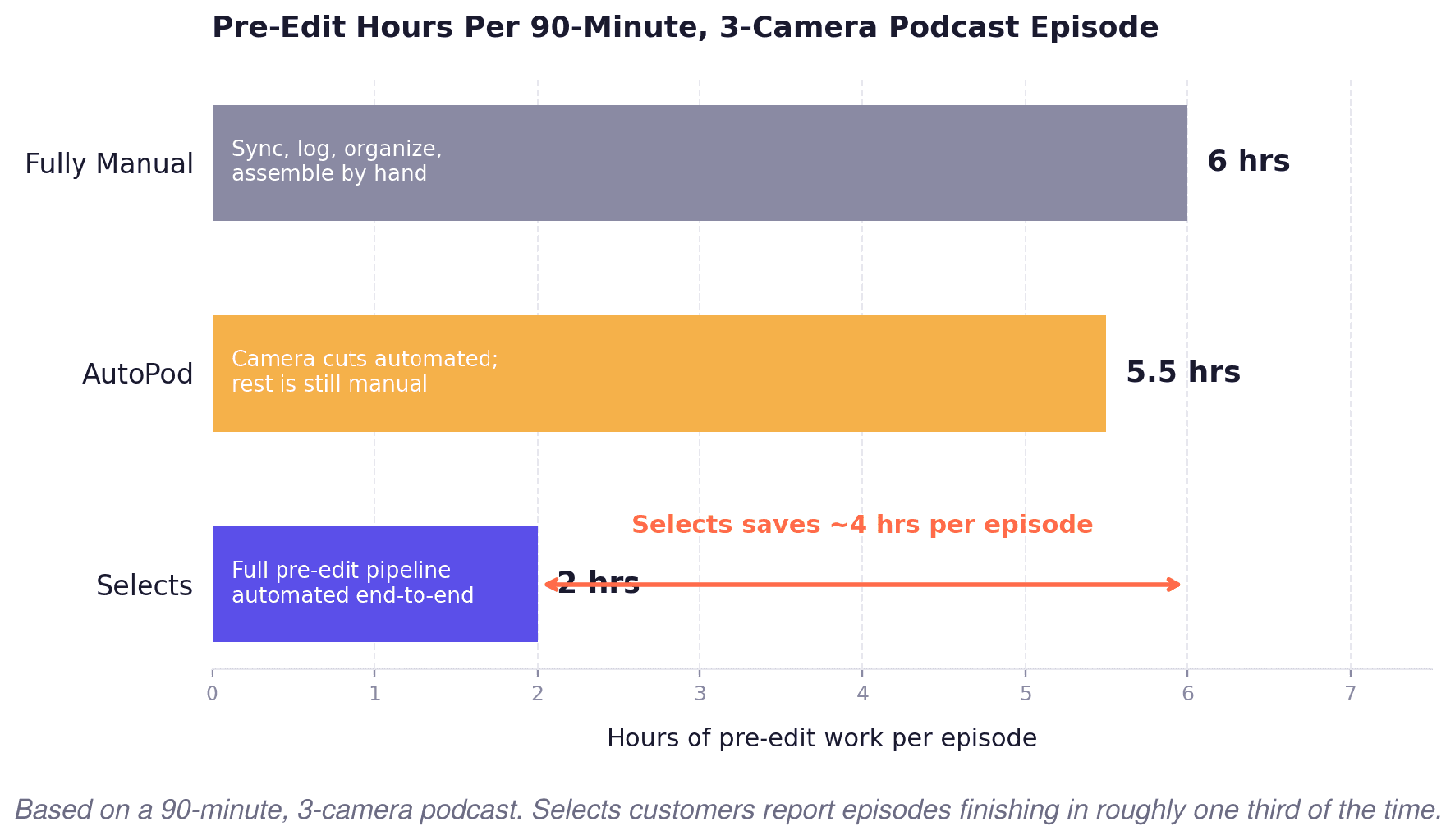
The 90-minute math For a 90-minute podcast episode with three cameras, AutoPod saves you 20–30 minutes on the camera cuts. The remaining four to six hours of pre-edit work, the sync, the logging, and the rough assembly are still on you. This is the gap Selects was built to fill. |
This is the stage most guides skip. Here's what the pre-edit pipeline actually involves and why it consumes more time than the edit itself.
For creators whose bottleneck is the social distribution side rather than the pre-edit, how Selects compares to Opus Clip covers that end of the pipeline separately.
Where the Hours Actually Go
AutoPod shaves minutes off a task that was never the bottleneck. Selects replaces the entire pre-edit workflow that an assistant editor used to spend a full day on before the lead editor could touch the timeline.
How Selects Works: The Full Pre-Edit Pipeline
Selects isn't a plugin. It's a standalone desktop app where the entire pre-edit happens before you open your NLE. The workflow is simple: you drop in your raw multi-camera footage, and the AI handles everything from there.
It starts by syncing audio and video across up to 10 tracks, not just aligning waveforms, but using AI-driven speaker detection to identify who's talking and when. It transcribes the full session with high accuracy, making the entire conversation searchable. It removes silences and filler words automatically. It organizes clips by topic and scene into color-coded bins. And then it does something AutoPod can't do at all; it assembles a prompt-driven rough cut based on the actual content of the conversation.
When you open Premiere Pro, Final Cut Pro, or DaVinci Resolve, you're not starting from scratch. You're opening an organized project with structured timelines, markers, topic tags, and a narrative draft that's roughly 70% of the way to a finished edit. Your job shifts from building the edit to refining it.
01 SCOPE | 02 NLE COMPATIBILITY | 03 TEAM INFRASTRUCTURE |
|---|---|---|
AutoPod automated three tasks inside Premiere. Selects automates the entire pre-editing workflow, including ingest, sync, transcribe, organize, and assemble, as one end-to-end process. | AutoPod is Premiere-only. Selects exports organized projects to Premiere, Final Cut, and DaVinci Resolve with native formatting, structured bins, markers, and transcripts. | AutoPod is built for individual editors. Selects include collaboration (Pro), er-seat pricing (Team), and SSO + SOC 2 compliance (Enterprise), the security studios actually need. |
For a deeper look at how Selects compares to Descript specifically, the Selects vs Descript comparison covers transcription, captions, and NLE handoff in detail.
Feature-by-Feature Comparison
Here's how the two tools stack up across the features that matter most to video editors.
Feature | Selects | AutoPod |
|---|---|---|
Multi-cam switching | ✓ Up to 10 tracks, AI speaker detection | ✓ Up to 10 cameras, audio-based |
Silence/filler-word removal | ✓ Automatic across all tracks | ✓ Jump Cut Editor (single-cam) |
Transcription | ✓ Full session, searchable | ✗ |
Clip organization | ✓ Color-coded by topic and scene | ✗ |
Rough-cut assembly | ✓ Prompt-driven narrative draft | ✗ |
Social/vertical resizing | ⚠ Via NLE export | ✓ Social Clip Creator |
NLE support | Premiere Pro, Final Cut Pro, DaVinci Resolve | Premiere Pro only |
Works offline from NLE? | ✓ Standalone app | ✗ Runs inside Premiere |
Team collaboration/SSO | ✓ Team + Enterprise plans | ✗ |
SOC 2 | ✓ Enterprise | ✗ |
Starting price | $16/month (Starter) | $29/month |
Where The Real Differences Are
Multi-cam switching. Both handle 10 tracks. AutoPod switches on audio level; Selects identifies who is talking, not just when sound is happening. On a four-person roundtable that matters, AutoPod will cut to whoever's mic is loudest; Selects cuts to whoever's actually speaking.
Silence removal. AutoPod's Jump Cut Editor runs on a single camera at a time. Selects runs it across every track in one pass, so your multi-cam stays in sync after the cuts.
Transcription and organization. AutoPod doesn't do either. If you want a searchable transcript or topic-tagged bins, you're running a second tool (Descript, Otter, Premiere's own transcribe) before or after AutoPod. Selects bundles both into the pre-edit.
Rough-cut assembly. This is the real gap. AutoPod gives you better raw footage; Selects gives you a timeline that's 70% of the way done. Different outputs, different time savings.
NLE support. AutoPod lives inside Premiere Pro. If your project uses Final Cut or Resolve, or your team switches NLEs between projects, AutoPod isn't an option. Selects exports natively to all three.
Pricing shape. AutoPod is one flat plan. Selects tiers by capacity and features, so a solo creator pays less than AutoPod, and a studio with multiple editors pays more.
What Each Dollar Buys
AutoPod keeps it simple: one plan at $29/month (or $20/month billed yearly). Every feature, multi-cam, jump cuts, and social resizing, is in the box.
Plan | Price | Best for | Included |
|---|---|---|---|
Selects - Starter | $16/mo | Solo editors | Basic pre-edit automation |
Selects - Creator | $40/mo | Creators & freelancers | Multi-cam sync, 20hrs capacity |
Selects - Pro | $160/mo | Small post teams | 10-track multi-cam, 80 hrs, collaboration |
Selects - Team | $160/seat/mo | Post-production teams | Centralized admin, shared projects |
Selects - Enterprise | Custom | Studios & broadcasters | SSO, SOC 2, dedicated support |
AutoPod | $29/mo | Solo Premiere editors | Camera switching, jump cuts, social resize |
Choose Selects if:
You want the full pre-edit pipeline automated
You edit in Final Cut Pro or DaVinci Resolve (or switch NLEs between projects)
You work on documentaries, YouTube long-form, events, or multi-person podcasts
You're on a team that needs collaboration, SSO, or SOC 2
You want to eliminate hours (not minutes) per episode
Choose AutoPod if:
You edit podcasts or interviews primarily in Premiere Pro
Your main pain is camera switching and silence removal
You already have a transcription/organization workflow you like
You're a solo editor, and one flat $29/month is easier to budget
For agencies and studios evaluating the full cost of pre-editing prep, this breakdown of how top video studios use AI covers the ROI across different team sizes.
Frequently Asked Questions (FAQs)
Q: What is the main difference between Selects and AutoPod?
A: Selects is a standalone application that handles the full footage-to-rough-cut pipeline, ingesting, syncing, organizing, transcribing, and assembling a narrative draft across Premiere Pro, Final Cut Pro, and DaVinci Resolve. AutoPod is a Premiere Pro plugin that automates multi-camera switching and jump cuts for podcasts. AutoPod automates tasks within your NLE; Selects automates the entire pre-edit workflow before you open your NLE.
Q: Does AutoPod work with Final Cut Pro or DaVinci Resolve?
A: No. AutoPod is an Adobe Premiere Pro plugin exclusively. If you edit in Final Cut or DaVinci, or move between NLEs depending on the project, Selects is the cross-NLE alternative that supports all three platforms with native exports.
Q: Can Selects handle multi-cam sync like AutoPod?
A: Yes. Selects supports up to 10-track multi-cam sync on its Pro plan, with AI-driven speaker detection and automatic camera switching. AutoPod supports up to 10 cameras inside Premiere with audio-based switching. Both tools handle multi-cam; Selects adds speaker identification, contextual switching, and cross-NLE export on top of sync.
Q: Which tool is better for podcast editing?
A: Depends on what you mean. If you mean automated camera switching and jump cuts inside Premiere, AutoPod is a solid, focused tool at $29/month. If you mean the entire pre-edit workflow, syncing, transcribing, organizing by topic, removing filler words, and building a rough cut that's ready for creative refinement, Selects handles all of that in a single step across any NLE.
See also: the full comparison of the best AI podcast editors, including Descript, Riverside, and more.
Q: Is Selects more expensive than AutoPod?
A: AutoPod is $29/month. Selects start lower at $16/month (Starter) and scale up to $200/month (Pro) depending on features and capacity. If you only need camera switching in Premiere, AutoPod is affordable and effective. If you need the full pre-edit pipeline, Selects at $40/month (Creator) or $160/month (Pro) eliminates hours of manual work per episode and typically pays for itself within the first project.
Q: Can I try Selects or AutoPod for free?
A: Selects offers a 7-day free trial with full access to features. AutoPod offers a 30-day free trial on monthly billing, plus one free month per year on annual plans.
Q: What types of video content does Selects handle that AutoPod cannot?
A: Selects handles documentaries, YouTube long-form, educational content, event coverage, livestream edits, and any multi-camera production, in addition to podcasts. AutoPod is designed specifically for podcast and interview formats with its camera-switching and jump-cut features.
Q: Do I need to leave my NLE to use Selects?
A: Yes. Selects is a standalone desktop app where pre-edit work happens before you open your NLE. Once your footage is synced, organized, transcribed, and assembled into a rough cut, Selects exports everything: bins, timelines with markers, topic tags, and transcript, directly into Premiere, Final Cut, or DaVinci Resolve.
Q: Does Selects work for solo editors or only for teams?
A: Both. The Starter plan at $16/month is designed for solo editors. Creator and Pro add multi-cam, larger capacity, and collaboration. Team and Enterprise serve post-production teams with multiple seats, centralized admin, SSO, and SOC 2. AutoPod is designed primarily for individual editors with no team features.
Ready to Cut Your Editing Prep in Half?Drop in your raw footage and let Selects handle the sync, the organization, the transcription, and the rough cut. You open your NLE to refine, not to build. |

Cutback Team
Share post