Selects vs Descript Reviews: Which Is Better for Long-Form Video Editing?
Selects vs Descript, an honest comparison for long-form video editors. See which AI tool wins for multicam, NLE handoff, silence removal, and podcast workflows.
TLDR: Descript is the better tool for solo creators doing script-heavy, single-camera edits. Selects is the better tool for anyone working with multi-camera long-form footage at volume, it handles the pre-editing stage that Descript doesn't touch.
Last updated: April 2026. Pricing and feature data verified from official Descript and Selects pricing pages.
If you're comparing Selects and Descript, you've already done most of the research. You know AI video tools exist, you've probably tried at least one, and now you're deciding which one actually fits your workflow. The honest answer is that these two tools don't fully compete; they solve different problems at different stages of production. Understanding that distinction is the fastest path to the right decision.
For the full landscape of AI podcast editing tools, see the complete comparison of the best AI podcast editors.
Quick Verdict
Selects | Descript | |
|---|---|---|
Overall rating | ⭐⭐⭐⭐⭐ | ⭐⭐⭐⭐ |
Best for | Multi-camera long-form, agencies, studios | Solo creators, audio-first podcasts |
Workflow layer | Pre-editing (before NLE) | Editing (browser-based) |
NLE handoff | ✅ Premiere, Final Cut, DaVinci | ❌ No direct NLE export (project formatting) |
Multicam support | ✅ Up to 10 tracks (Pro) | ⚠️ Basic |
Silence removal | ✅ Across all tracks, pre-edit | ✅ Single-track, in-editor |
Filler word removal | ✅ Included | ✅ Uses AI credits |
Starting price | $16/month (yearly) | $16/month (yearly) |
Free option | 7-day free trial | Free tier (60 min/month) |
Credit/usage limits | No credit system | AI credits + media minutes |
What Are You Actually Comparing?
Most tool comparisons treat Selects and Descript as direct competitors. They're not, at least not entirely.
Descript is a browser-based editing tool. You upload footage, it transcribes everything, and you edit the video by editing the text. Delete a sentence from the transcript, and that footage disappears from the timeline. It's a fundamentally different editing paradigm, built for creators who find traditional timeline navigation frustrating.
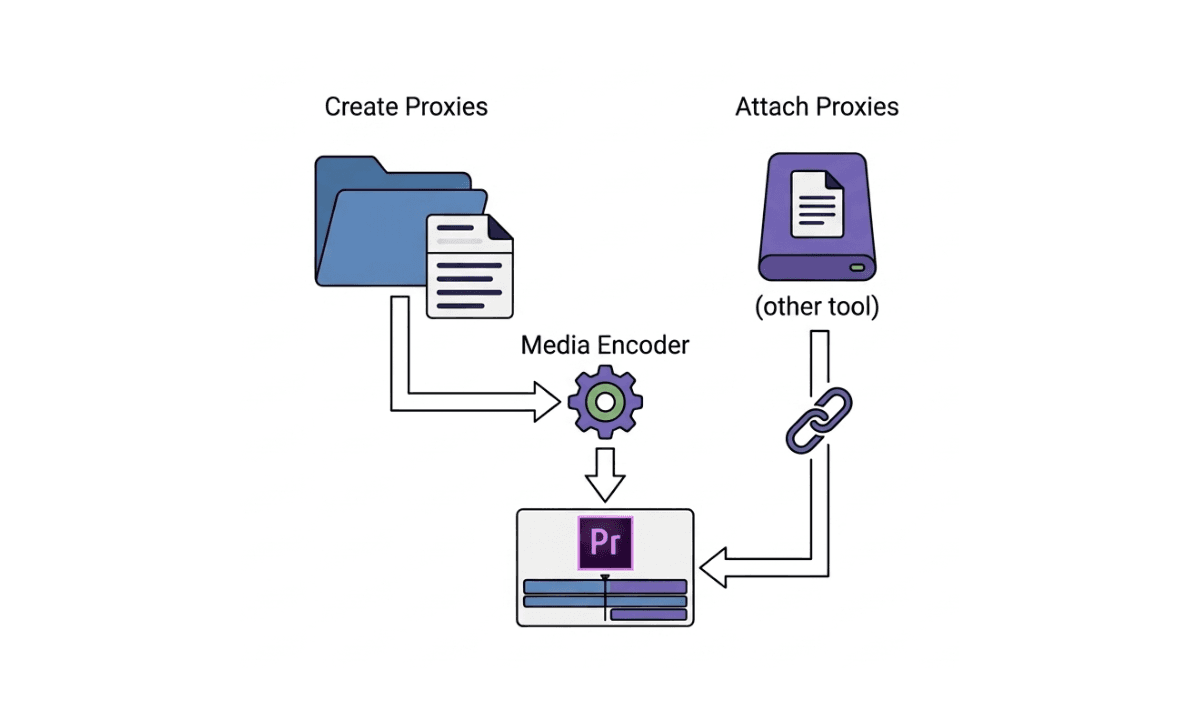
Selects is a pre-editing tool. It handles everything that happens before you open your NLE, syncing multi-camera footage, transcribing audio, detecting speakers, removing silences and filler words, organizing content into topic-based chapters, and building a structured rough cut. Then it exports that work directly to Premiere Pro, Final Cut Pro, or DaVinci Resolve. The editor picks up from a clean, organized starting point rather than raw files.
Descript is built for editing. Selects is built for pre-editing. For serious long-form producers, understanding what agentic pre-editing actually means is the difference between a tool that replaces part of your NLE workflow and one that removes the bottleneck that happens before it.
Feature-by-Feature Comparison
Transcription and Text-Based Editing
Selects | Descript | |
|---|---|---|
Transcription | ✅ Included, used for structure | ✅ Included, IS the edit |
Text-based editing | ⚠️ Transcript informs structure | ✅ Core editing mechanic |
Speaker detection | ✅ Automatic | ✅ Speaker Detective feature |
Multi-language | ✅ 29 languages | ✅ 25 languages |
Usage limits | Based on raw video hours | Media minutes consumed on upload |
Transcription for long-form multi-track: Selects ⭐⭐⭐⭐⭐ / Descript ⭐⭐⭐
Transcript-first single-camera editing: Selects ⭐⭐⭐⭐ / Descript ⭐⭐⭐⭐
This is where Descript has the clearest advantage for a specific type of editor.
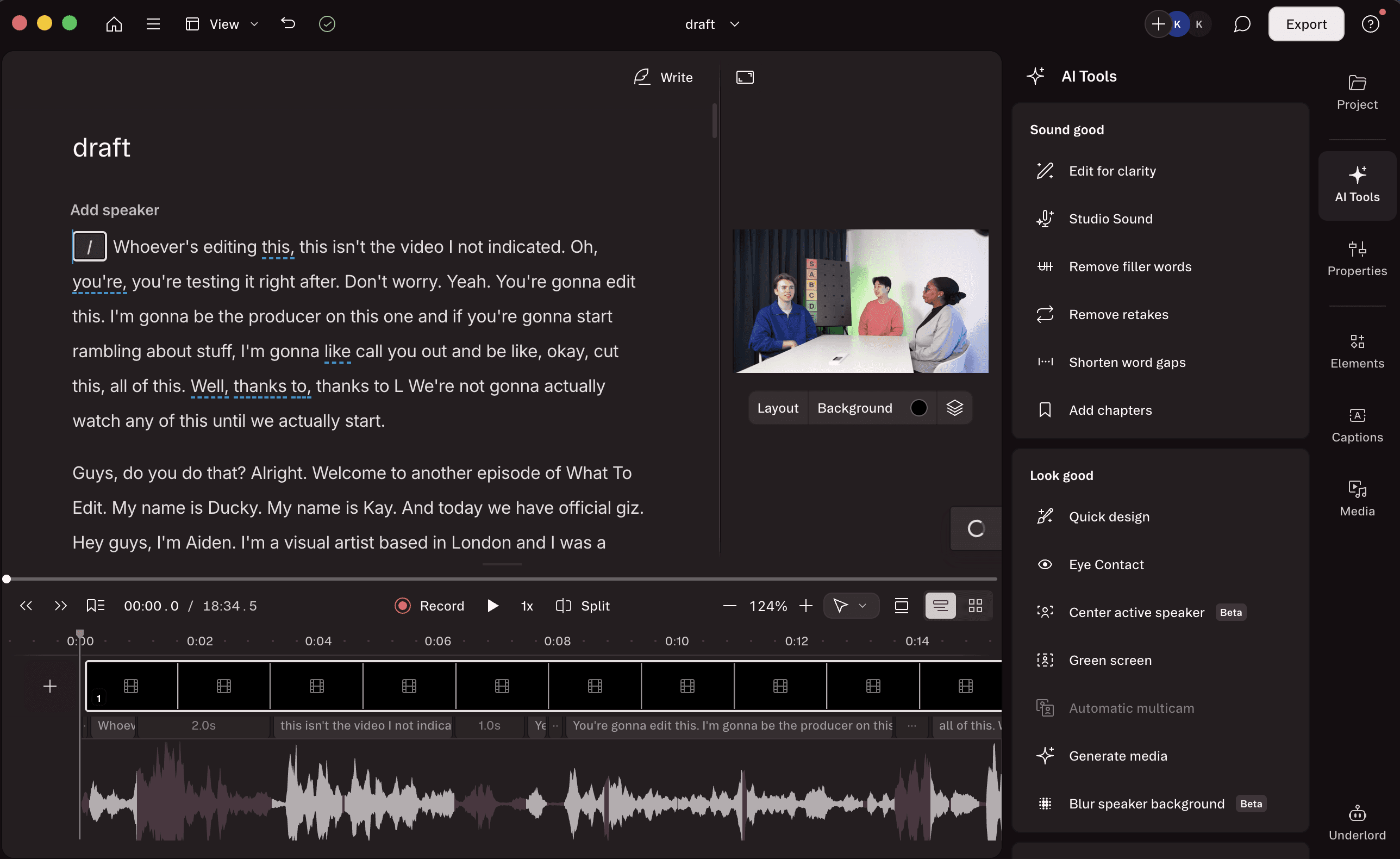
Descript's core mechanic, editing video by editing text, is genuinely elegant for script-heavy content. If you recorded a structured interview or a tightly scripted show, being able to delete a paragraph and have the corresponding footage disappear is fast and intuitive. Descript also uses credits, 'media minutes' for transcription/uploading, and AI credits for advanced AI tools, for transcription features on lower plans, which means heavy users may hit limits before the end of the month.
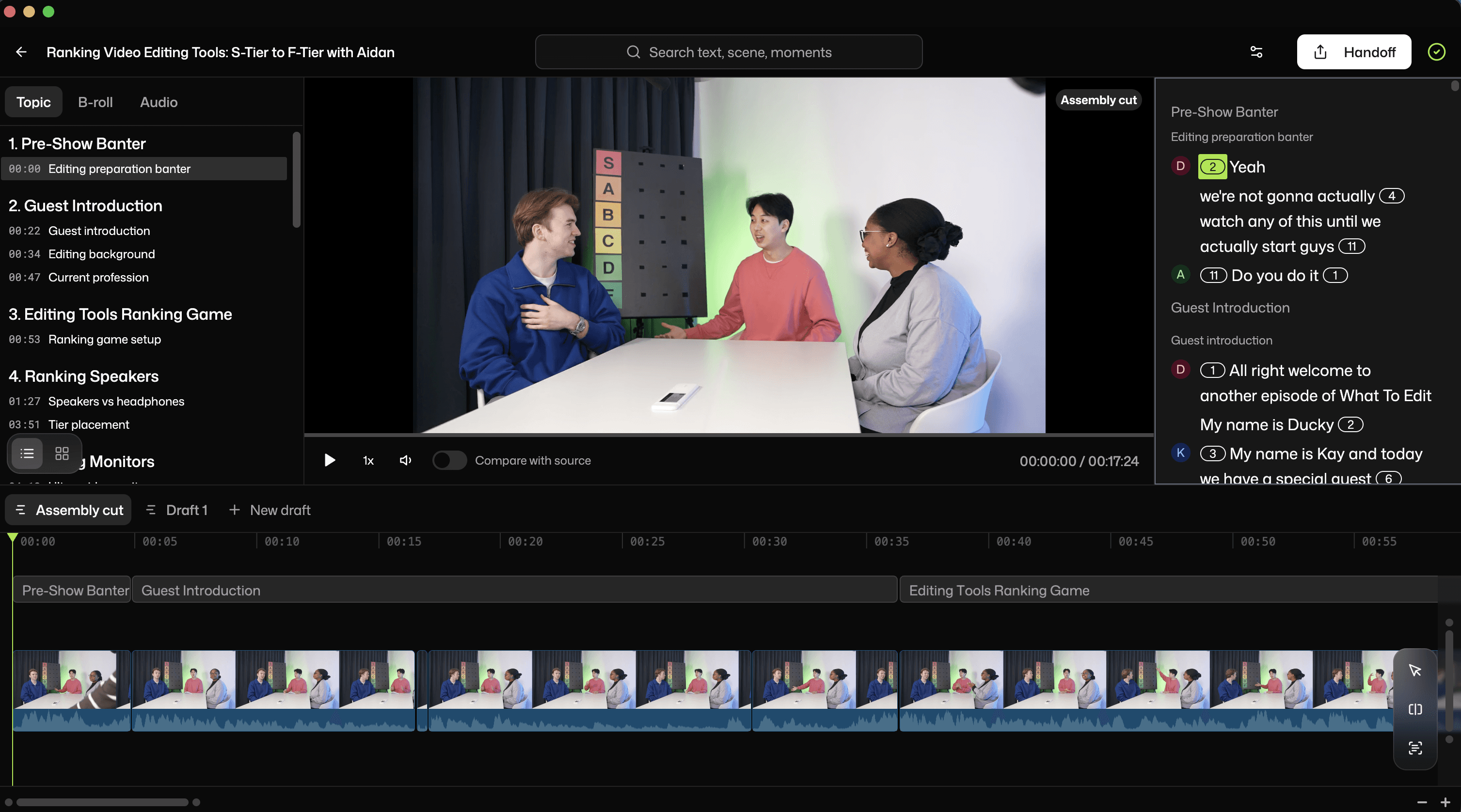
Selects uses transcription differently. The transcript isn't the editing interface; it's the analytical layer that powers everything else. Selects reads the transcript to identify speakers, detect topic shifts, find silences, flag filler words, and organize footage into chapters. This is in addition to detecting context in the footage and switching the camera based on pacing, speaker reactions, and other visual context. The editor never works directly in the transcript unless they want to. For editors handling two hours of raw multi-camera footage, this distinction matters; you need the AI to make sense of the material at scale, not just let you click through it line by line.
Silence Removal and Filler Word Cleanup
Selects | Descript | |
|---|---|---|
Silence removal | ✅ Pre-edit, across all tracks | ✅ In-editor, single-track |
Filler word removal | ✅ Included | ✅ Uses AI credits |
Retake removal | ✅ Included | ✅ Automatic retake detection |
Preview before applying | ✅ | ✅ |
Credit cost | None | ~10 AI credits per Studio Sound use |
Rating: Selects ⭐⭐⭐⭐⭐ / Descript ⭐⭐⭐⭐
Both tools remove silences and filler words. The difference is in where in the workflow it happens.
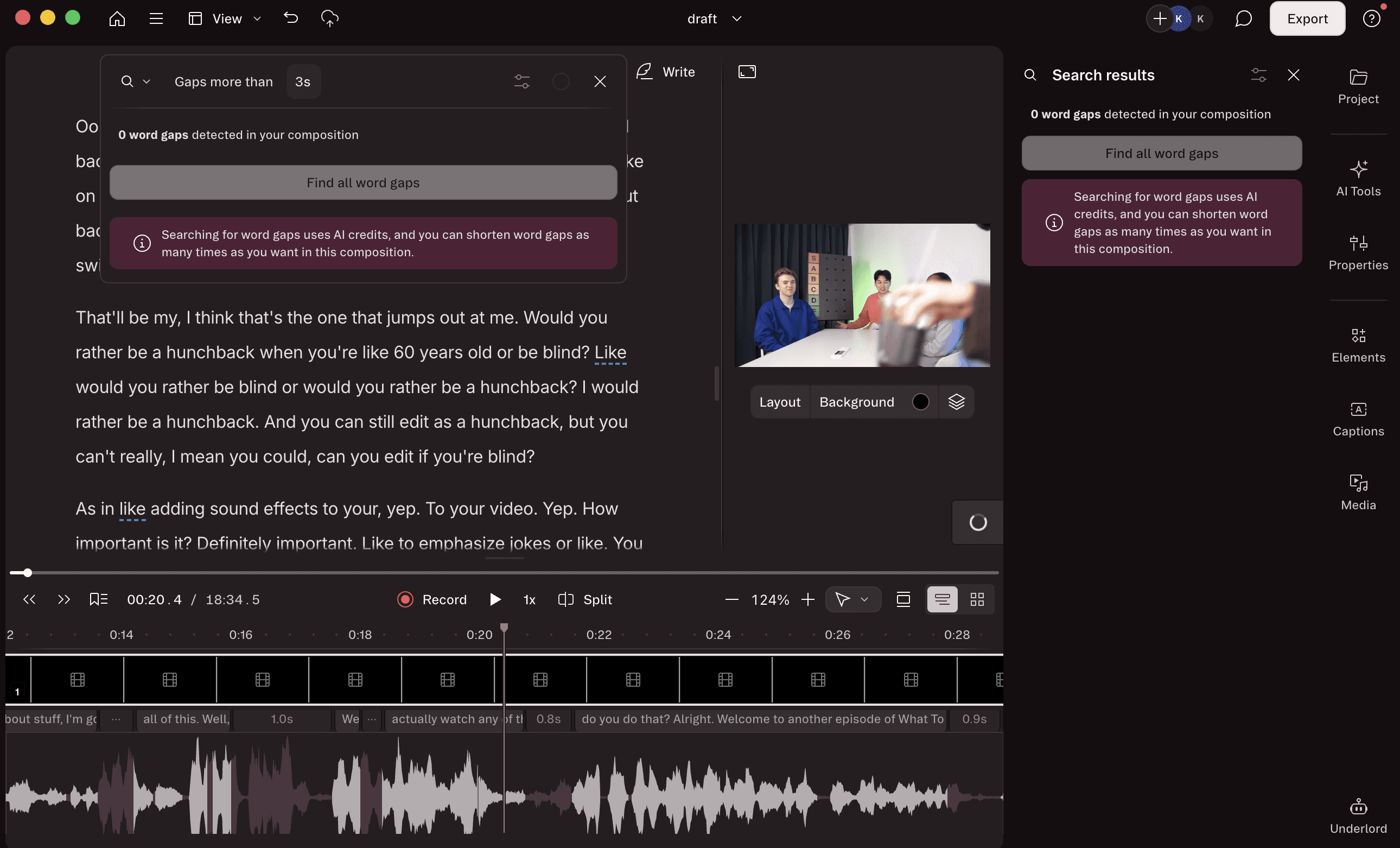
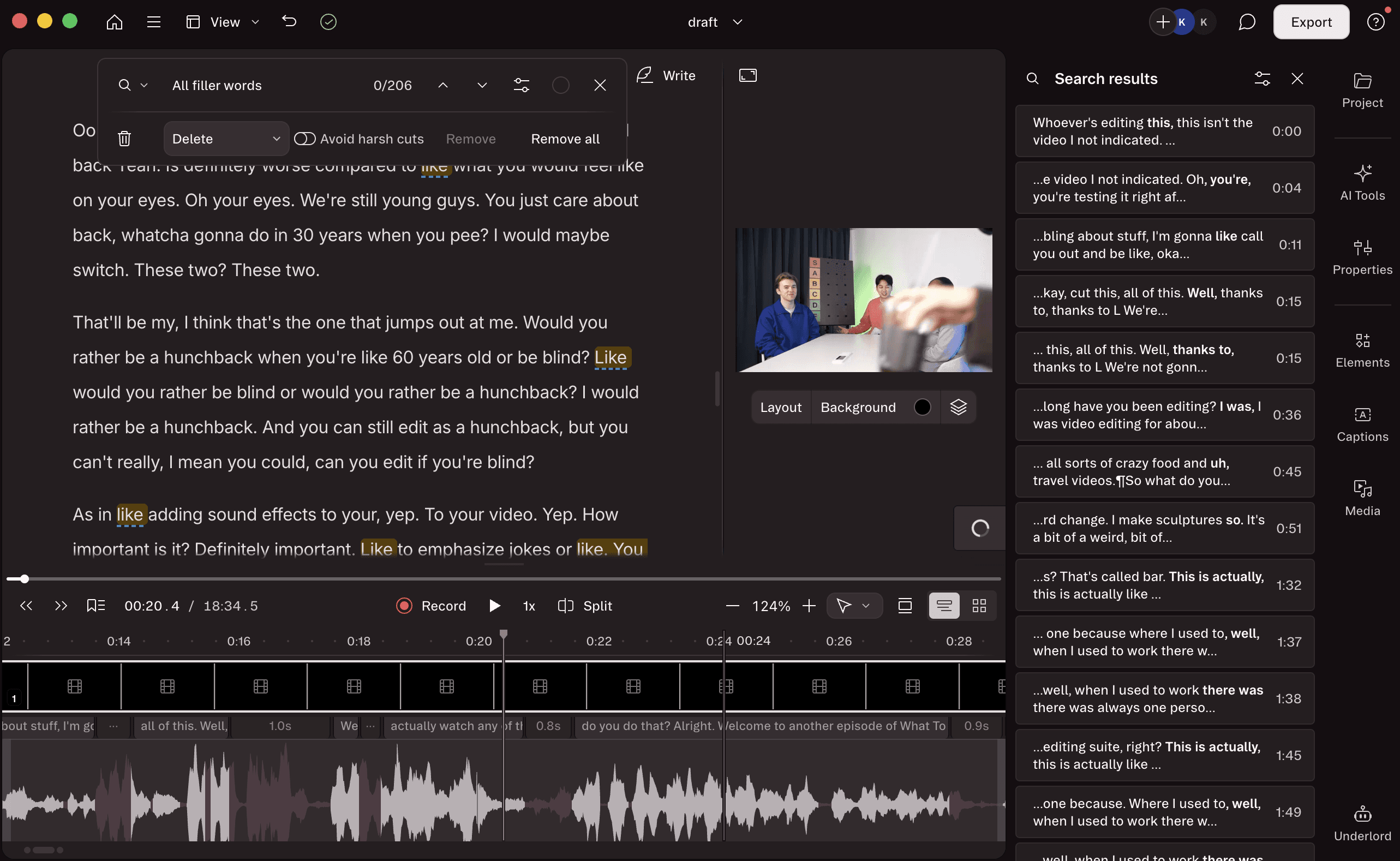
Descript detects filler words across the transcript and lets you remove them in bulk. It works well for single-track audio content and is one of Descript's most praised features. The process is clean and visible, with the transcript showing you exactly what's being cut before you commit. However, the process will cost you credits.
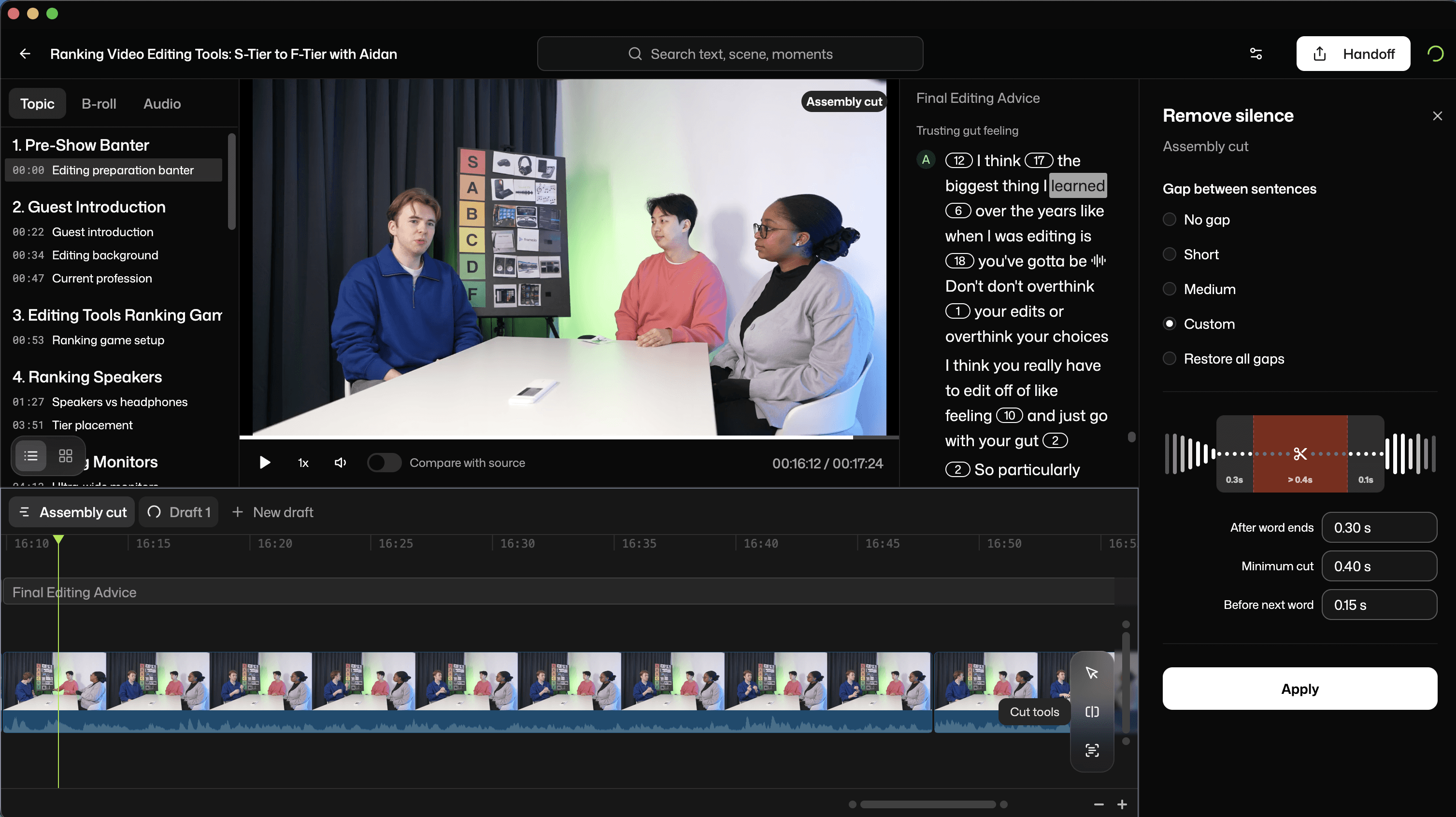
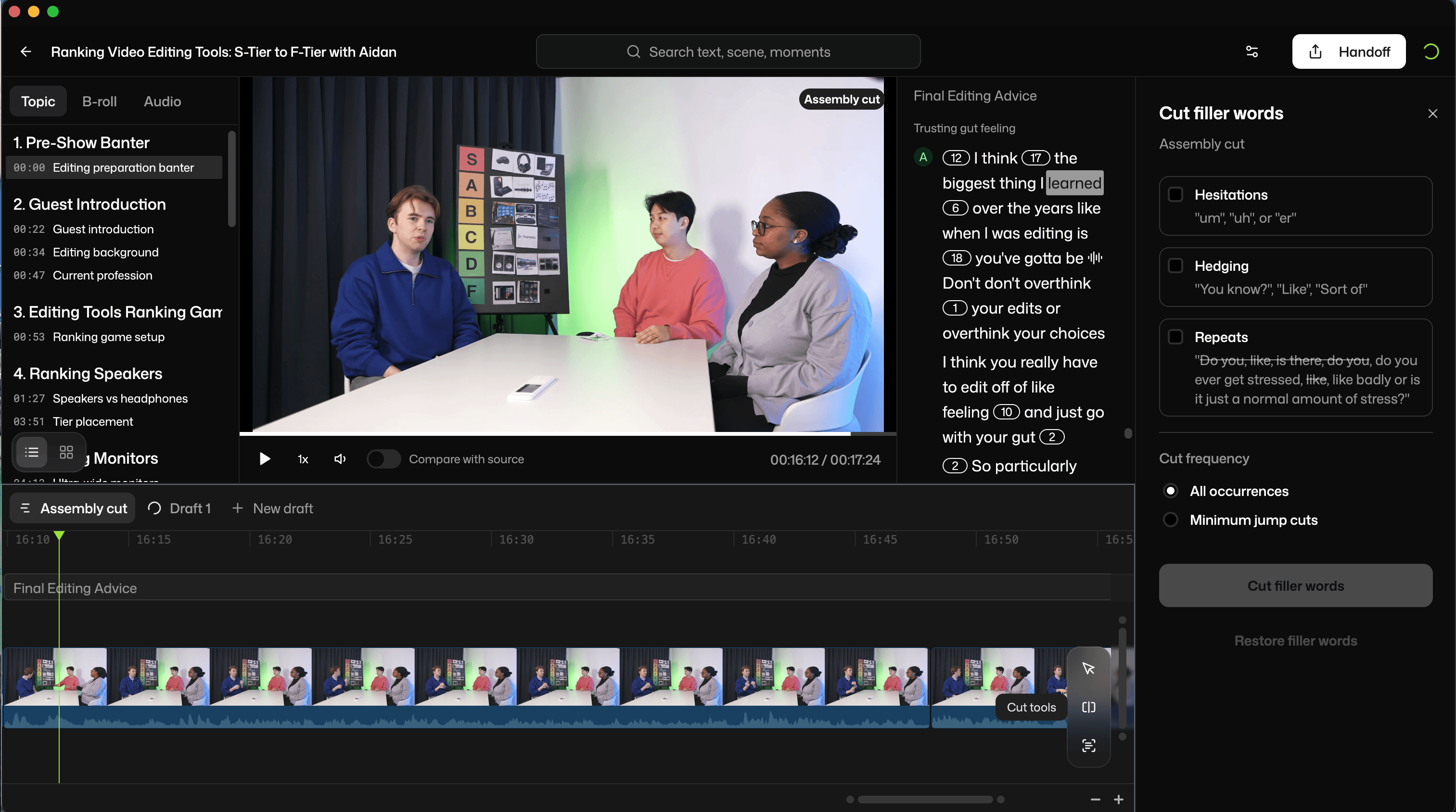
Selects handles silence removal and filler word cleanup at the pre-editing stage, before the editor opens their NLE. This means it's applied automatically across multicam footage audio as part of the rough cut assembly. This is visualized by seeing the reduction in the timeline and transcript directly.
Descript's AI credit system is worth understanding before committing. Hobbyist plan users get 400 credits/month, approximately 40 Studio Sound uses. Heavy users on lower tiers can exhaust credits within the first two weeks of the month. Whereas Selects doesn't have a specific usage limit on silence removal within the project in the Selects pricing plan.
Multicam Support and Camera Switching
This is the clearest gap between the two tools.
Selects | Descript | |
|---|---|---|
Multicam sync | ✅ Automatic | ⚠️ Manual setup required |
Camera tracks | Up to 3 (Creator), 10 (Pro) | ⚠️ Limited |
Speaker-based switching | ✅ Automatic | ⚠️ After manual setup |
External audio sync | ✅ Automatic | ⚠️ Part of manual setup |
4K support | ✅ Across plans | ✅ Creator and above |
Descript has added multicam features, but it is not designed for complex multi-camera production. Camera switching is available, but Descript's architecture, a browser-based transcript editor, is fundamentally built around single-track content. For 2–4 camera podcast or interview setups with external audio sources, Descript requires significant manual work to manage track alignment and camera switching. You need to assign speaker labels and make sure the audio for each participant is associated with their video track for camera switching, as well. Whereas camera switching is completely automated in Selects, with the ability to adjust the automation, according to taste, afterwards.
Selects is built specifically for multi-camera long-form content. It syncs cameras and external audio automatically, organizes footage across tracks, and switches angles based not only on speaker detection, but also on pacing, speaker reactions, and visual context. The result is a fully organized multicam timeline ready for the NLE, built from raw files without manual track alignment.
Auto Captions
Selects | Descript | |
|---|---|---|
Caption generation | ✅ Optional during NLE handoff | ✅ Native |
Animated captions | via Premiere Assistant / unavailable in DaVinci Resolve and Final Cut Pro | ✅ Native |
Caption styling | via Premiere Assistant / unavailable in DaVinci Resolve and Final Cut Pro | ✅ Native |
Export format | ✅ Optional during NLE handoff | ✅ Burned-in or separate files |
Rating: Selects ⭐⭐⭐ (via workflow) / Descript ⭐⭐⭐⭐⭐
Descript handles captions natively and does it well. You can generate captions, style them, add animated caption effects, and export them burned-in or as separate files, all within the Descript interface. For creators publishing directly from Descript without a finishing NLE, this is a complete solution.
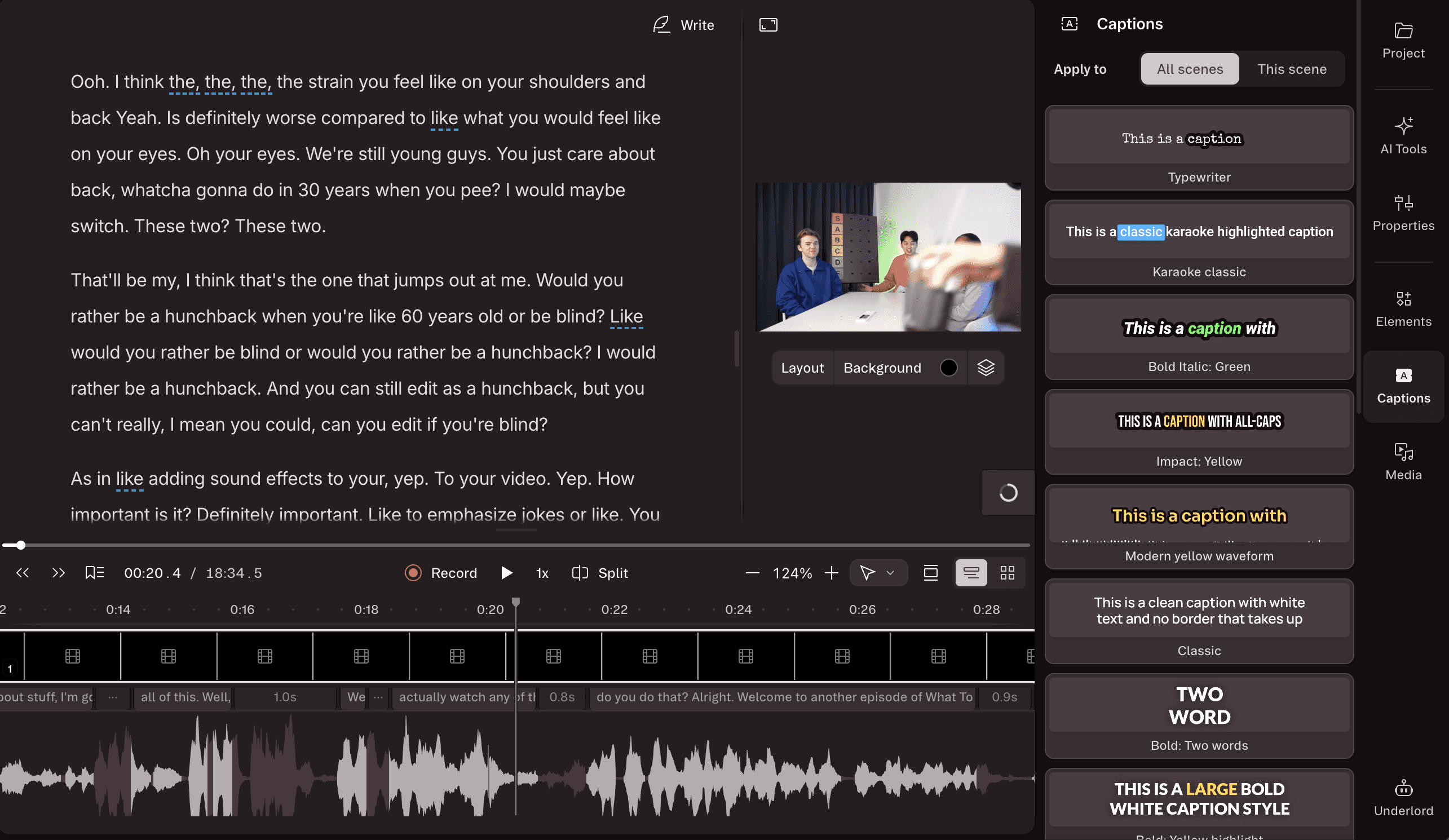
Selects focuses on the pre-editing layer. Caption generation and styling for the final deliverable happen downstream, either in the NLE directly or via Premiere Assistant, Cutback's AI plugin for Adobe Premiere Pro, which handles animated captions, caption styling, and export within Premiere. However, Selects does generate captions/subtitles, which are optional to export during the NLE handoff (think documentary or movie-style subtitles, which you can format in either Final Cut, Adobe Premiere, or DaVinci Resolve later).
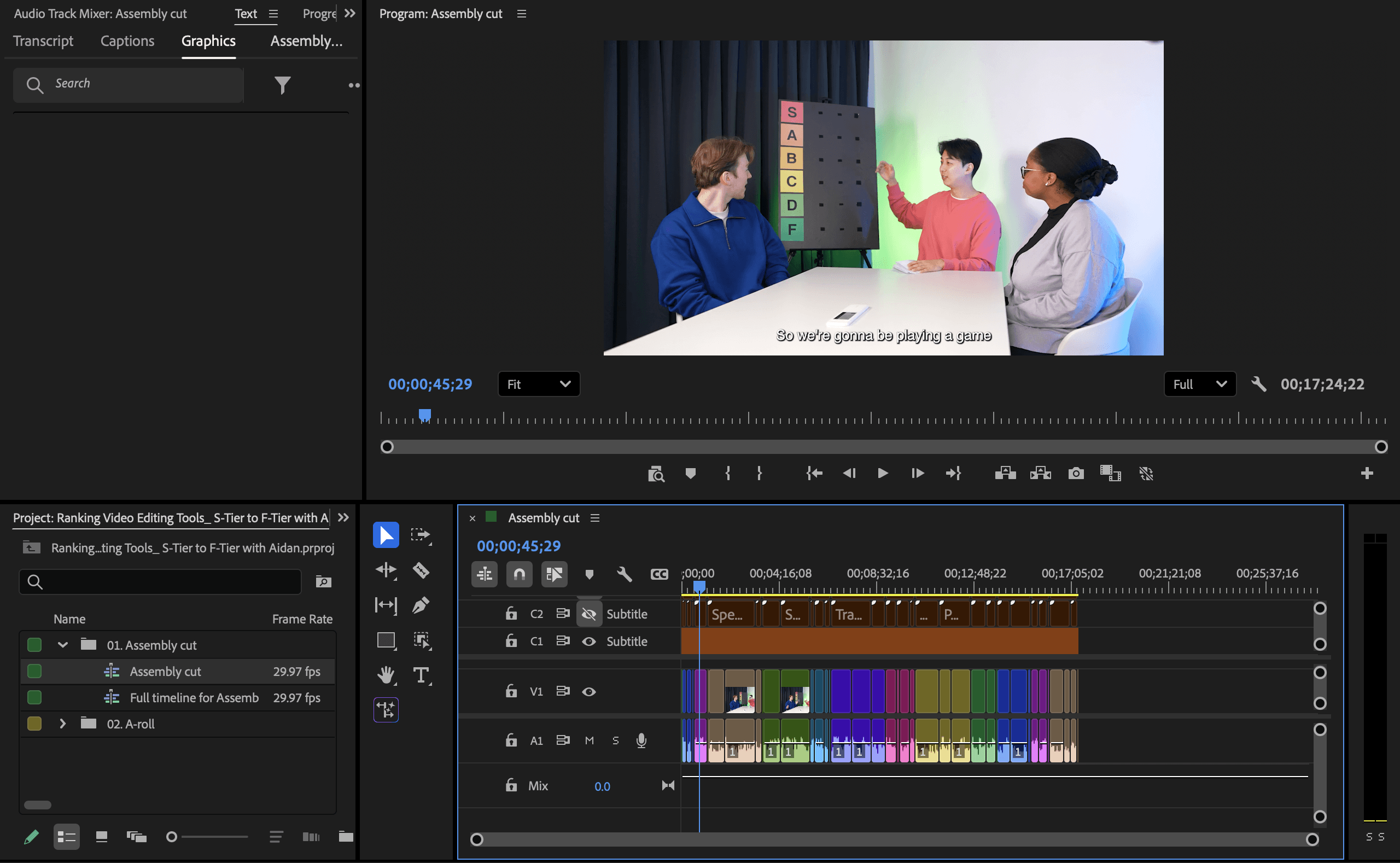
This isn't a weakness in Selects so much as a reflection of where it sits in the workflow. Pre-editing tools handle raw footage prep. Caption work happens at the finishing stage, which is downstream of what Selects is built to do. However, Selects bundled with Premiere Assistant creates the perfect start-to-finish workflow.
NLE Handoff and Export Flexibility
Selects | Descript | |
|---|---|---|
Premiere Pro export | ✅ Direct, native project file | ❌ |
Final Cut Pro export | ✅ Direct, native project file | ❌ |
DaVinci Resolve export | ✅ Direct, native project file | ❌ |
YouTube export | Via NLE | ✅ Direct |
Google Drive export | Via NLE | ✅ Direct |
Timeline labels/markers | ✅ Color-coded, with transcripts | N/A |
Rating: Selects ⭐⭐⭐⭐⭐ / Descript ⭐⭐ (for NLE users)
This is one of the starkest differences between the two tools and the most important one for professional editors.
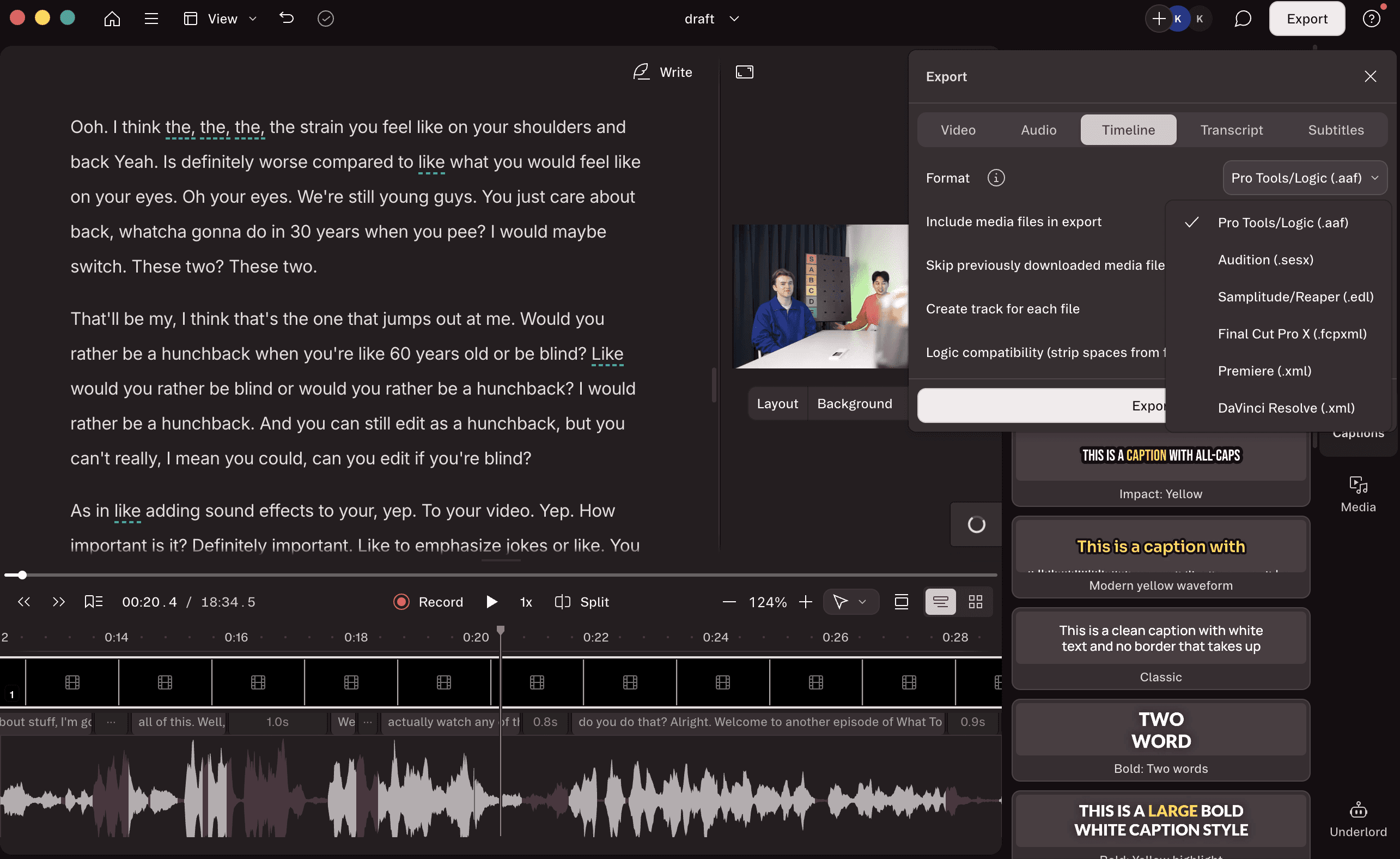
Descript exports to YouTube, Google Drive, and similar platforms. It does not export directly to Adobe Premiere Pro, Final Cut Pro, or DaVinci Resolve in the typical sense. It has a 'Timeline Export' feature that generates XML files to import into the NLE, which may need media relinking upon import or have issues like multi-cam unsync or effects being lost in the timeline.
For editors who finish in a professional NLE, which describes most YouTube studios, podcast agencies, and in-house production teams, Descript's output is a middle step. You export from Descript, then re-import into your NLE to finish the edit. That's an additional round trip that adds friction to an already complex workflow.
Timeline export is available on the Creator, Business, and Enterprise plans only.
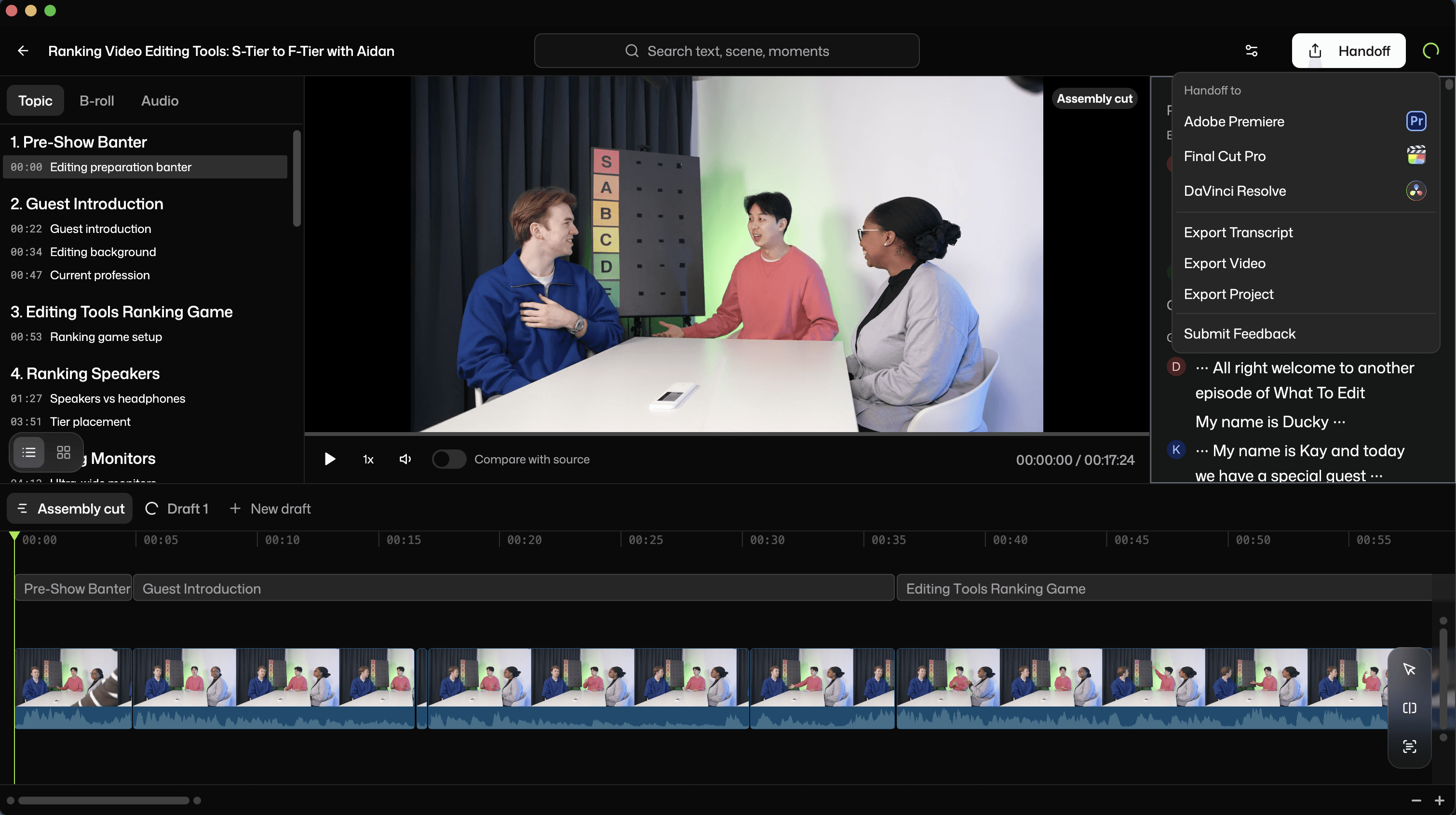
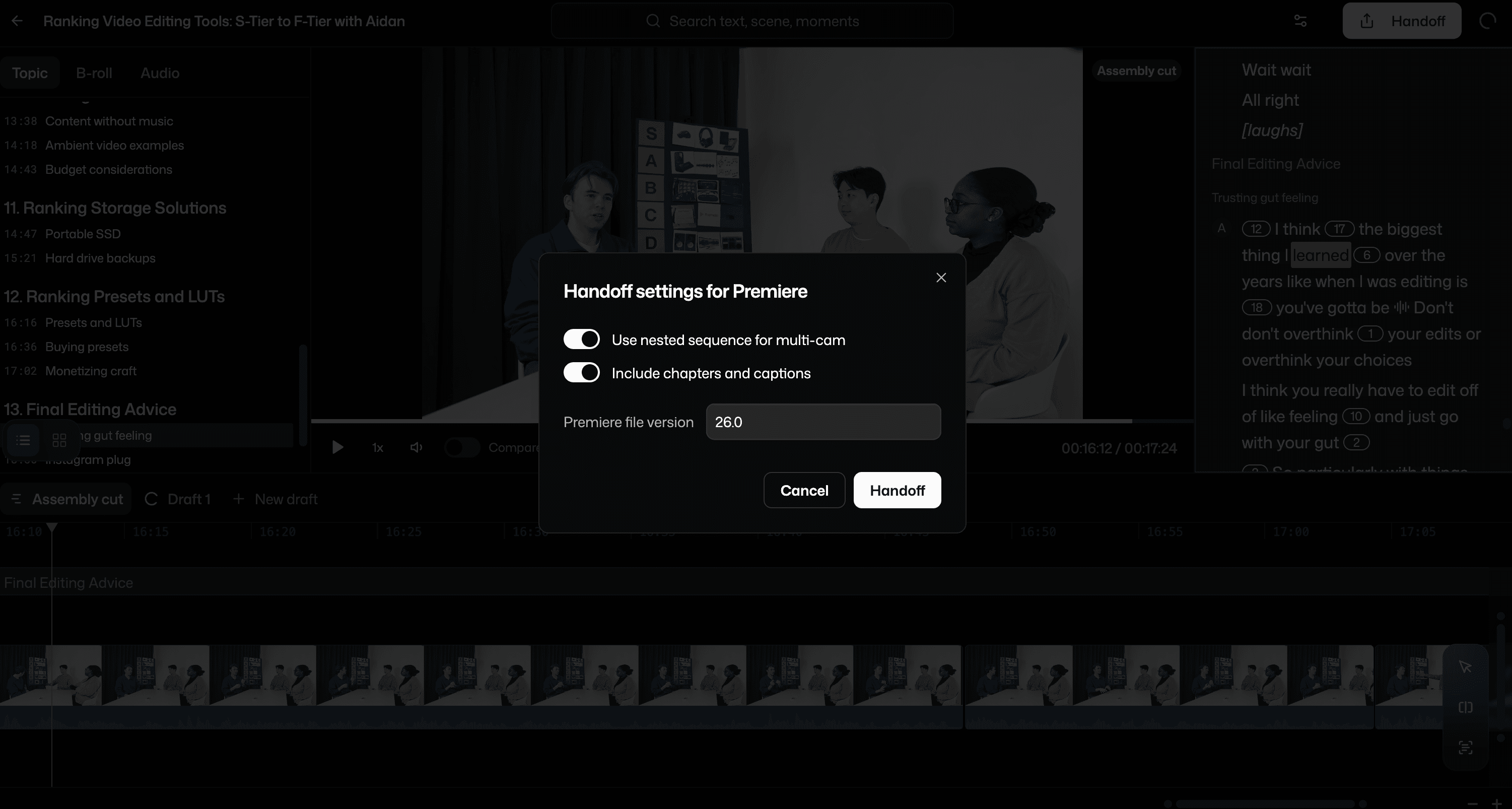
Selects exports directly to Premiere Pro, Final Cut Pro, and DaVinci Resolve as a structured, labeled, color-coded timeline (ready in a one-click project file suited to the NLE, e.g., Premiere's .prproj format. Nothing needs to be re-imported, re-synced, or relinked in the NLE again. Markers, chapter labels, speaker labels, and transcripts are all included. The editor opens their NLE, and the pre-edit work is already done with neatly organized project bins/folders, not in a format that needs to be re-ingested, but in a native project file ready for the creative edit.
NLE handoff is available for all Selects pricing plans.
Pricing
Selects | Descript | |
|---|---|---|
Free option | 7-day trial | Free tier (60 min media/month) |
Entry paid plan | $16/month (yearly) - Starter | $16/month (yearly) - Hobbyist |
Mid tier | $40/month (yearly) - Creator | $24/month (yearly) - Creator |
Pro tier | $160/month (yearly) - Pro | $40/month (yearly) - Business |
Team plan | $160/seat/month (yearly) - Team (5 seats min) | Custom |
Usage limits | Raw video hours per plan | Media minutes + AI credits |
Overage cost | Upgrade to the next tier | Top-up purchases (Creator+ only) |
Credit system | None | AI credits for AI features |
Selects offers a free 7-day trial and paid plans starting at $16/month billed yearly.
Selects plans in detail:
Plan | Price (yearly) | Raw video | Multicam tracks |
|---|---|---|---|
Starter | $16/month | 10 hours | Single cam only |
Creator | $40/month | 20 hours | 3 tracks |
Pro | $160/month | 80 hours | 10 tracks |
Team | $160/seat/month | Everything in Pro | 10 tracks + shared credits |
Descript offers a free tier and paid plans starting at $16/month billed yearly. The AI credit system on lower tiers means transcription-heavy features have monthly limits, heavy users may need to purchase additional credits before their billing cycle resets.
Descript plans in detail:
Plan | Price (yearly) | Media minutes | AI credits |
|---|---|---|---|
Free | $0 | 60 min/month | 100 (one-time) |
Hobbyist | $16/month | 10 hours/month | 400/month |
Creator | $24/month | 30 hours/month | 800/month |
Business | $40/month | 60 hours/month | 1,500/month |
At comparable price points, the decision comes down to which tool does more of the work you actually need done, not which one costs less.
Which Tool Is Right for Your Workflow?
Choose Descript if:
You're a solo creator doing single-camera, script-heavy content
You want a browser-based all-in-one tool without an NLE
You primarily produce audio-first podcasts
Your editing process is built around rewriting the transcript text
You publish directly to YouTube or social platforms without finishing in Premiere, Final Cut, or DaVinci
Choose Selects if:
You work with multi-camera footage regularly
You edit long-form interviews, podcasts, or YouTube shows
You finish your edit in Premiere Pro, Final Cut Pro, or DaVinci Resolve
You need to compress hours of pre-editing prep time across multiple projects per week
You're running a podcast agency or YouTube studio where editor capacity is the bottleneck
You're tired of relying on LLMs like Claude or ChatGPT for video editing
When you might use both
Some workflows use Descript for audio-only podcast content and Selects for video-heavy production. They're not strictly competing for the same job. If your content mix includes both audio-only and multi-camera video, they can sit at different points in different pipelines without conflict.
If you're also evaluating AutoPod, the Selects vs AutoPod comparison covers the multicam switching and pre-edit pipleline differences in detail.
If your bottleneck is social distribution rather than pre-edit prep, the Selects vs Opus Clip comparison covers where each tool sits in the full pipeline.
Final Verdict: Which AI Video Editing Tool is the Best?
Descript is a genuinely well-built tool for a specific type of creator. If you're a solo podcaster, a TikTok or YouTube commentary creator, or anyone who wants to edit by working with text rather than a timeline, Descript does that job well. Its filler word removal is strong, its transcript editing is fast, and for single-camera content, it removes a lot of the friction that traditional NLE editing creates.
Selects is built for a different problem at a different stage. For YouTube studios, podcast agencies, and in-house content teams managing regular multi-camera production, the bottleneck isn't in the NLE; it's in the hours of prep work that happen before the creative edit starts. Syncing cameras, pulling selects, building a rough structure from hours of raw footage, that's what Selects automates, and it's a stage Descript isn't designed to touch.
If your workflow ends at publishing from a browser, Descript is probably enough. If your workflow ends in a professional NLE and starts with hours of multi-camera footage, Selects is the tool that removes the bottleneck Descript leaves in place.

Kay Sesoko
Marketer
Share post