Can ChatGPT Edit Your Videos? We Tested the Whole Workflow So You Don't Have To (2026)
ChatGPT can plan your script, but can't touch your footage. We tested the full LLM video editing workflow so you don't have to. Here's what actually works.
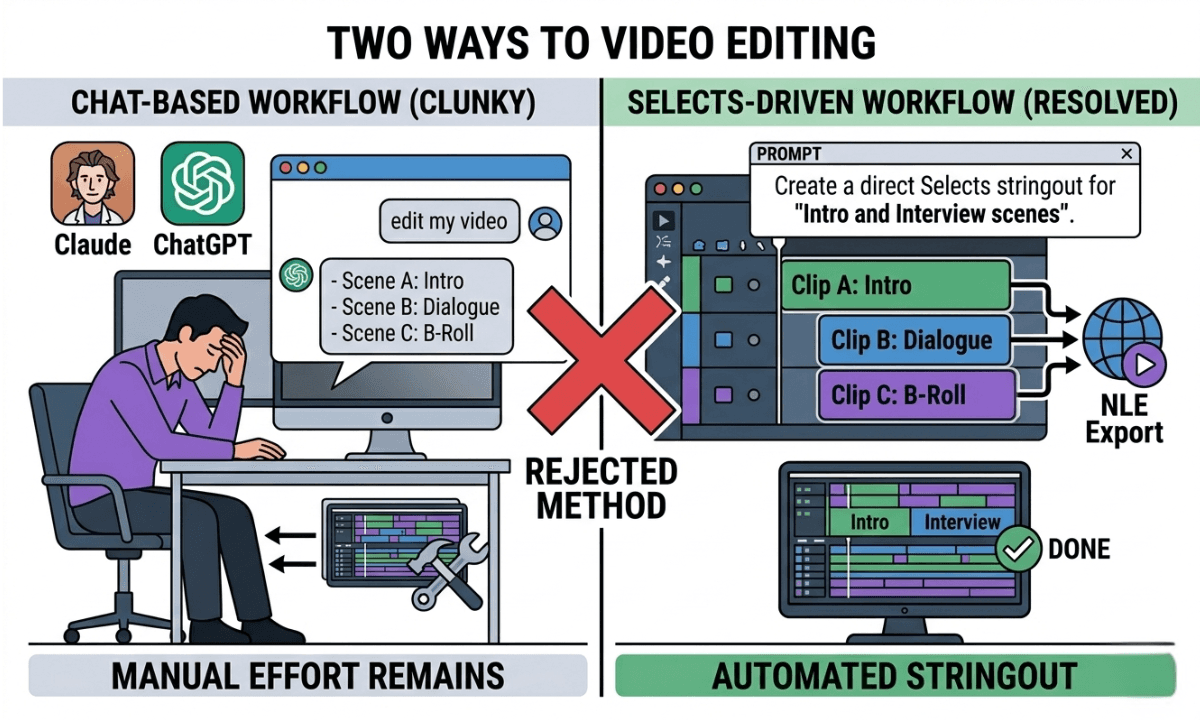
TLDR: LLMs like ChatGPT and Claude AI can plan your script, but can't touch your footage. Selects is the agentic AI that actually edits, built for editors who are done being the middleman in the age of AI video automation.
Every week, more editors and content teams try some version of the same experiment: open ChatGPT, paste in a transcript, ask it to edit the video. It sounds reasonable. It doesn't work. Not the way you need it to.
This post walks through the full workflow people actually attempt, from script planning to filming to trying to prompt an LLM into cutting footage, and shows exactly where each stage breaks down. Then it shows what the tool they were actually looking for looks like.
Can You Use an LLM to Edit Video? Why Everyone Is Trying to Use LLMs for Video Editing
It makes complete sense that editors are trying this.
ChatGPT can write. It can structure, it can summarize a transcript, and tell you which sections are weak. In fact, the ChatGPT transcript editing workflow can be quite useful. Claude can read a long document and identify the strongest moments. Gemini can help you plan a content calendar. These are genuinely useful capabilities, and it's logical to wonder whether they extend to video.
The promise is obvious: if an LLM can read a transcript and identify what to cut, why can't it just... cut it? If it can suggest a better structure for a script, why can't it apply that structure to the timeline?
The answer is that LLMs operate on text. They don't operate on footage. And that gap, between understanding what should happen and being able to make it happen inside a video file, is where every LLM video editing workflow eventually collapses. They can identify the points for text-based editing, but they can't execute it.
Understanding that gap is the difference between spending three hours fighting a chatbot and spending that time actually editing.
For context on how chat-based editing fits into the broader AI editing landscape, it's worth understanding what the term actually means, because it gets conflated with LLM editing constantly, and they're not the same thing.
Stage 1: Using an LLM to Plan Your Script (This Part Works)
It's natural to be curious about Manus AI's video editing capabilities or whether Gemini can edit videos. To be fair, the first stage of a video production workflow is where LLMs are genuinely useful.
Script drafting and refinement: ChatGPT and Claude are strong script collaborators. They can take a rough idea, turn it into a structured outline, suggest hooks, tighten arguments, and rewrite sections that aren't landing. This is legitimate value, and if you're not using an LLM at the scripting stage, you're leaving time on the table.
Research and structure: LLMs can help you research a topic quickly, identify the key points your audience cares about, and structure your talking points in a logical order before you ever press record.
Shot lists and run-of-show documents (paper cuts): With the right prompt, an LLM can turn a script into a basic shot list or production brief. Again, genuinely useful, especially for solo creators or small teams without a dedicated producer. This is how top video agencies use AI to stay ahead.
The problem isn't that LLMs are bad at pre-production. They're actually quite good at it. The problem is that the utility stops the moment you walk away from your keyboard and press record. Once footage exists, the LLM has no way to interact with it. These are the video editing limitations of LLMs like ChatGPT.
Stage 2: Filming Your Content (LLMs Can't Help Here)
This stage is self-explanatory but worth naming explicitly, because it's where the mental model breaks down for a lot of people.
An LLM cannot observe your shoot. It cannot flag when audio quality drops. It cannot tell you that your B-cam drifted out of focus during take three. It cannot sync your cameras or log your clips.
Some teams try to bridge this by keeping detailed shot logs manually and feeding them to the LLM afterward. That works to an extent, and you can give ChatGPT a text log of your takes and ask it which ones to use. But you've now added a manual logging step to your workflow specifically to accommodate a tool that still won't be able to touch the footage. This is why ChatGPT can't win vs dedicated video editing AI.
The workaround creates more work than it saves.
Stage 3: Trying to Get an LLM to Cut Your Footage (This Is Where It Fails)
This is the stage where most people hit the wall.
The typical workflow looks like this: record the video, export a transcript (from Premiere Assistant, Selects, or another third-party transcription tool), paste the transcript into ChatGPT or Claude, ask it to identify what to cut, get back a text outline of suggested edits, then go back to the NLE and manually find every suggested cut by time code.
At best, this is a marginally faster way to make editorial decisions, but ChatGPT can't process video files. That's the difference between an AI chatbot and an AI video editor. At worst, which is most of the time, it creates a frustrating loop where you're acting as the middleman between a chatbot and your timeline.
We ran this experiment on a 30-minute interview and measured every cut. The results are worse than you'd expect. 93% target miss, 11 of 11 cuts mid-sentence, hallucinated arithmetic.
Here's what LLMs fundamentally cannot do with video:
They cannot ingest video files. ChatGPT, Claude, Gemini, Perplexity, none of them can take a raw video file and process its content natively. No AI chatbot can automatically edit video files. They work with text inputs. Video is not text.
They cannot make time-coded edits. Even if an LLM tells you to "cut the section between 4:23 and 6:15," you still have to go find that section manually and make the cut yourself. The LLM is giving you a suggestion. It is not making an edit.
If you're searching for an AI video editor that works without copy-pasting a transcript, what you're describing is a footage-native agentic tool, not a chatbot.
They cannot sync multicam footage. If you shot with two cameras and external audio, an LLM has no mechanism for aligning those files. You're doing that manually regardless.
They cannot make autonomous decisions about your footage. An LLM responds to prompts. It doesn't analyze footage, understand context, and make editorial decisions on its own. That requires an entirely different architecture, one built specifically for video.
The same limitation applies to using Claude Code or Claude Cowork for video editing. These are powerful tools for file management and text-based automation, but they operate on the same fundamental constraint: they work with text and files they can read, not with the visual and audio content inside a video file.
This is where vibe editing as a concept is genuinely interesting. The idea of directing an AI with intent rather than precise instructions, but the execution requires a tool that actually has access to your footage.
💡 Skip this step with Selects: Selects ingests your raw footage directly. No transcript copy-pasting, no manual time codes, no switching between tools. → Start your agentic video editor free 7-day trial today!
What People Are Actually Looking For
The ChatGPT Video Editing Alternative You're Actually Looking For
When someone searches "can ChatGPT edit videos" or "how to edit videos using an LLM," they're not really asking about ChatGPT. They're asking whether AI can do what they're imagining: take raw footage and turn it into a structured, ready-to-edit starting point without requiring hours of manual prep.
That's a legitimate and solvable problem. It's just not solved by an LLM. You need an AI video editor that understands footage to replace manual video editing prep.
What they're describing, without knowing the term for it, is an agentic video editing tool. A system that can ingest footage, understand its contents, make autonomous decisions about structure and organization, and hand off a clean timeline to an NLE. This is the best alternative to using ChatGPT for video editing.
The distinction matters. An LLM is a language model that processes text. An agentic video editing tool is a system built specifically to work with footage, to perceive it, analyze it, and act on it without requiring a human to direct every step. All the better if it's an AI video editor with NLE handoff.
The complete guide to AI video editing in 2026 covers where these tools sit relative to each other in the broader landscape. The short version: LLMs and agentic video tools are not competitors. They operate at completely different layers of the production workflow.
The comparison people are actually searching for, Selects vs ChatGPT for video editing, isn't really a comparison between two tools. It's a comparison between a text interface and a footage-native AI.
How Selects Actually Solves This: The Best AI Video Editor for Talking Head Content
This is what the workflow people are searching for actually looks like in practice. Selects is a standalone AI pre-editing tool built specifically for long-form video, and unlike an LLM, it works directly with your footage.
How to Use the Selects AI Video Editor as an LLM Alternative
Here's how the workflow runs, based directly on what Selects does:
Step 1: Prompt a Draft
Upload your raw footage to Selects. Then click "Prompt a Draft" and describe exactly how you want your video edited, the tone, the structure, what to prioritize, and what to cut. If you're not sure how to phrase it, hit "Improve" and Selects will sharpen your instructions automatically. Your edit will be as strong as your prompt is good, using Selects 'Prompt a Draft' feature.
This is the moment that feels most like using ChatGPT, but with a critical difference. Selects already has your footage. It's not generating a text outline for you to implement manually. It's using your prompt to make actual decisions about actual clips through automated video editing without manual timecodes.
For talking head content specifically, this prompt-to-draft approach is the fastest way to go from raw footage to a structured edit without any manual prep.
Step 2: Topics and Subtopics
Because Selects has already read your files and labeled your footage, it separates your content into topics and subtopics. It understands what each segment is about, who's speaking, and where the usable material is. It pulls the exact clips and builds your timeline in seconds, not a suggested outline, a real timeline.
Step 3: Make Unlimited Drafts
Need a different version? Don't go back to ChatGPT and start over. Open a new draft inside Selects, tweak your prompt, or use the transcript panel on the right to highlight and delete exactly what you don't want. Every version is generated from the same footage, in the same tool, without switching context.
Step 4: Handoff to Your NLE
When your draft is ready, click Handoff and choose Premiere Pro, Final Cut Pro, or DaVinci Resolve. Your edit, labeled, structured, and organized, opens directly in your NLE, ready for the creative decisions only you can make.
Watch the full workflow in this Selects tutorial video below:
This is what Selects' approach to long-form editing automation is built around: removing the mechanical prep layer entirely, so editors can get straight to storytelling. No middleman. No copy-pasting between tools. No hunting for time codes.
Stop acting as the middleman between a chatbot and your timeline. That's exactly what an LLM workflow asks you to be. Selects removes that role entirely.
Start your free 7-day trial of Selects today!
Frequently Asked Questions (FAQ)
Q: Can ChatGPT edit videos? A: No, not directly. ChatGPT is a large language model that processes text. It cannot ingest video files, analyze footage, make time-coded cuts, or sync multicam recordings. It can help with scripting, transcript analysis, and suggesting edits in text form, but you still have to implement every suggestion manually in your NLE. If you're looking for AI that can actually work with footage, you need a purpose-built video tool rather than a general-purpose LLM.
Q: Which AI is best for editing videos? A: For the pre-editing stage, syncing footage, transcribing, and building a structured rough cut, tools built specifically for video, like Selects, are significantly more capable than general LLMs. ChatGPT, Claude, and Gemini are useful for scripting and planning, but they can't process video files natively. For editing inside an NLE, AI plugins like Premiere Assistant handle silence removal, captions, and filler word cleanup directly in Adobe Premiere Pro.
Q: Is Selects better than ChatGPT for video editing? A: They solve different problems, but for actual video editing, yes, Selects is purpose-built for it, and ChatGPT is not. ChatGPT is useful at the scripting stage. Selects takes over once footage exists: it ingests raw files, transcribes audio, organizes content by topic, builds a structured rough cut based on your prompt, and hands off directly to Premiere Pro, Final Cut Pro, or DaVinci Resolve. It does what people are hoping ChatGPT can do. It just actually works with footage.
Q: Can Selects replace the copy-paste transcript workflow I use with ChatGPT? A: Completely. The copy-paste transcript workflow, export transcript, paste into ChatGPT, get a text outline, manually find time codes, and implement cuts exists because ChatGPT can't access footage directly. Selects eliminates every step of that workaround. You upload footage, prompt your draft, and get a real timeline back. No middleman, no manual implementation.
Q: Can I use Claude, Claude Code, or Claude Cowork to edit videos? A: Claude, Claude Code, and Claude Cowork are powerful for text and file-based tasks, but they face the same fundamental limitation as ChatGPT when it comes to video: they cannot natively process video files or make time-coded edits inside a timeline. You can use Claude to analyze a transcript or plan an edit structure, but you'll still need to implement those decisions manually. For an agentic tool that actually works with footage end-to-end, Selects is the purpose-built alternative.
Q: Is Selects worth it for solo creators and small video teams? A: Yes. Selects is particularly high-value for small teams because the time savings per project represent a larger proportion of total capacity. Instead of spending hours on footage prep, sync, and rough cut assembly, a solo editor or two-person team gets a structured, labeled timeline ready to work from. The Selects free 7-day trial lets you run it on a real project before committing.
Kay Sesoko
Marketer
Share post