How Top Video Studios Use AI to Stay Ahead
The best video studios aren't just talented, they're systematized. Here's how top agencies use AI at every production stage, and how Selects fits in.
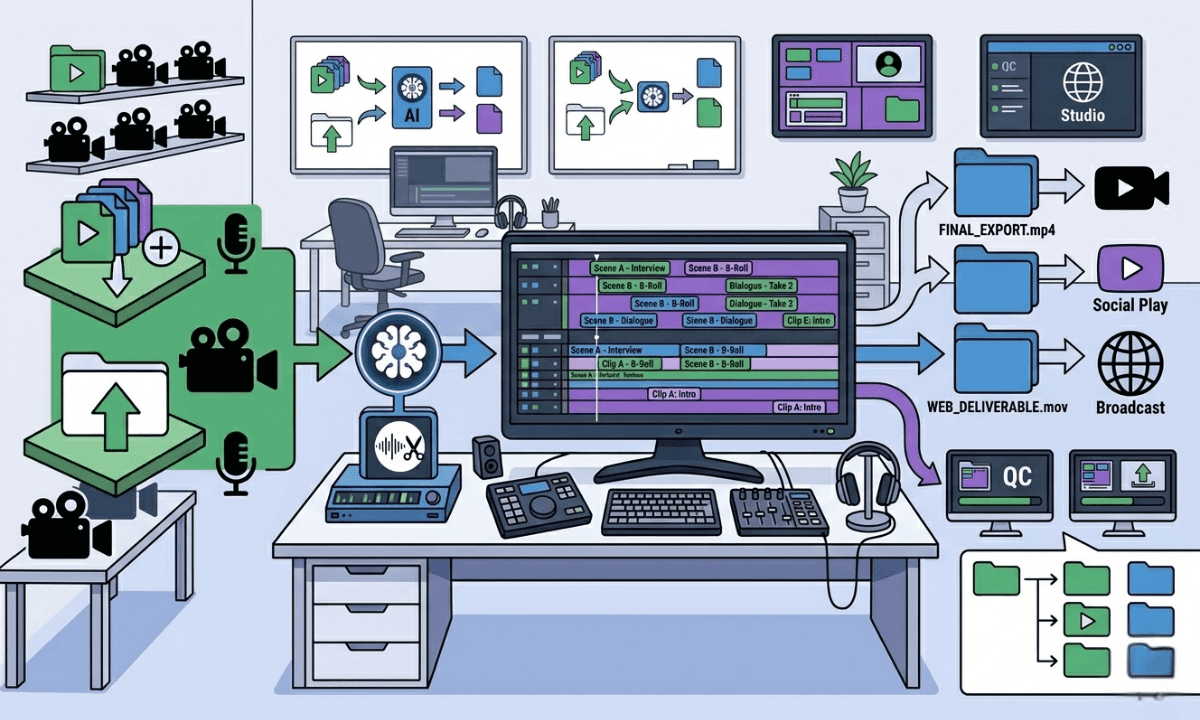
TLDR: Elite video studios aren't faster because of bigger budgets, they're faster because of better systems, and AI is now the backbone of those systems at every stage of production.
The gap between a studio that produces two videos a week and one that produces twenty isn't talent. It isn't headcount. It isn't even a budget, beyond a certain point.
How do video production agencies scale? It's all in their systems.
The highest-output video operations in the world, YouTube studios at the scale of MrBeast or Jubilee, podcast agencies managing dozens of clients, and in-house brand teams producing content across multiple platforms, share one characteristic that has nothing to do with creative talent. They've removed the mechanical work from their editors' plates.
They understand how to systemize video prodcution through AI. And the studios that haven't made that shift yet are already falling behind the ones that have.
Video Production Operations for Agencies: What Actually Separates Elite Video Studios From Everyone Else
Ask most people what separates a high-output studio from a struggling one, and they'll say budget, or talent, or team size. Those things matter, but they're not the differentiator.
The real differentiator is the ratio of creative time to mechanical time in an editor's day.
At a mid-tier studio, an editor might spend three to four hours on prep, syncing multi-camera footage, labeling speakers, pulling selects, building a rough stringout, before a single creative decision gets made. At an elite studio, that prep stage is compressed or eliminated entirely. The editor arrives at a structured, organized starting point and goes straight to storytelling.
That's not a talent gap. It's a systems gap. And increasingly, it's an AI gap. That's what separates professional video studios from amateur ones.
McKinsey's research on AI in film and TV production found that AI-enabled workflows could reduce post-production time significantly across content types, with the greatest gains coming not from creative AI but from automation of repetitive technical tasks (especially agentic AI), exactly the prep work that consumes the most editor time.
The studios pulling ahead aren't necessarily using more AI; they're using it earlier in the process, at the layer where the most time is currently lost.
The Pre-Editing Layer: Where Elite Studios Win Before the Edit Starts
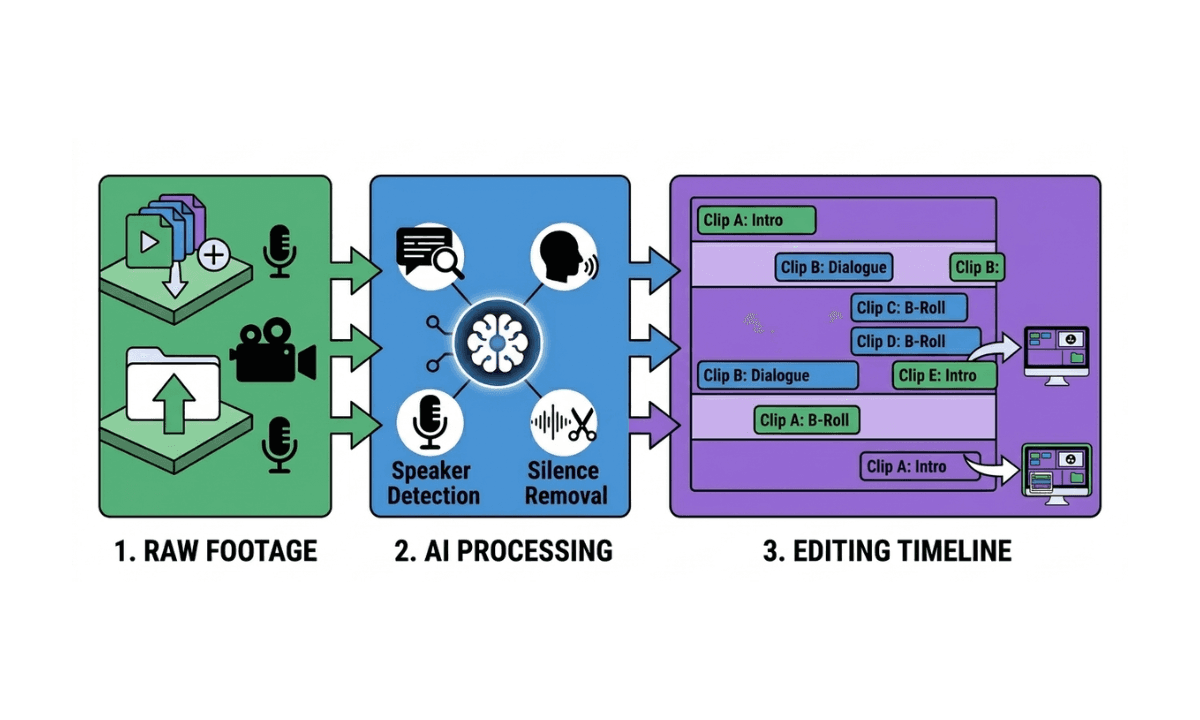
Most conversations about AI in video focus on editing tools, plugins, auto-captions, and smart reframing. That's the wrong layer to start with.
The highest-leverage AI in a professional video workflow sits upstream of the NLE. It's the work that happens between the shoot wrapping and the editor opening Premiere Pro, Final Cut, or DaVinci Resolve.
At scale, that work includes:
Syncing multi-camera footage with external audio sources
Detecting and labeling speakers across multiple tracks
Identifying and removing silences, filler words, and unusable takes
Organizing content into topic-based chapters or segments
Building a rough stringout that gives the editor a structured starting point
At a one-person studio, this takes hours per project. At an agency running five concurrent podcast clients, it's a full-time job, or it was, until AI pre-editing tools and automated video work software for agencies came into play.
The studios that have solved the pre-editing layer don't just save time. They change the economics of each project. When prep is automated, editor capacity scales with client volume instead of headcount. A team of three editors can take on the workload of a team of six, without the six salaries or team fatigue.
That pre-editing stage maps directly to what editors call the assembly cut, the most time-consuming stage of any long-form project, and the one most agencies haven't systemized yet.
This is the layer where the biggest operational gains are available right now, and it's the layer most studios haven't fully addressed yet.
AI at the Editing Layer: What's Actually Being Used at Scale
Once footage reaches the NLE, a different set of AI tools takes over. Here's what's actually in use at high-output studios, beyond the hype:
Transcript-based and chat-based editing: Tools that let editors interact with footage through text, cutting by deleting transcript lines, searching for specific moments using natural language, removing filler words, and retakes in bulk. This is now table stakes for any studio doing significant long-form volume. The speed improvement over traditional timeline scrubbing is substantial.
Automated silence and filler word removal: Not glamorous, but enormously time-saving at scale. Podcast agencies in particular have adopted AI silence removal as a baseline; it's the kind of task that used to eat 20–30 minutes per episode and now takes seconds.
Multicam switching and camera angle automation: For interview-format content with multiple camera angles, AI tools that detect active speakers and switch angles accordingly remove another category of manual decision-making from the editor's workflow. The editor reviews and refines rather than building from scratch.
Auto-captions and animated caption workflows: Caption generation is now largely automated at professional studios. The value has shifted from generation to styling, producing captions that match brand guidelines and platform requirements without manual re-formatting for every export.
Short-form clip extraction: For studios producing both long-form and short-form content from the same shoot, AI clip extraction tools that identify viral moments or topic-specific segments compress what used to be a separate editing pass into a semi-automated workflow.
None of these tools replaces editorial judgment. They replace the mechanical work that surrounds it, leaving editors to focus on pacing, narrative, and the decisions that actually require a human.
One of the best AI tools for video production teams at the moment is Selects. It's a video production automation software that handles the tasks that an assistant video editor would normally do.
Post-Production and Distribution Automation: How To Reduce Video Editing Turnaround Time
The third layer, where elite video production studios have pulled ahead, is post-production and distribution.
Platform-specific export automation: A single piece of content now needs to be formatted for YouTube (16:9), Instagram Reels (9:16), LinkedIn (1:1), and sometimes multiple aspect ratios within each platform. Balancing that with the best posting times for each social media platform creates a heavy time sink. Studios doing this manually for every deliverable are generating significant hidden labor costs. Auto-reframe, batch export, and upload tools have made this largely automatable.
Caption and subtitle localization: For studios with international audiences, which, at MrBeast scale, means nearly every studio, automated translation and subtitle generation has moved from a nice-to-have to a core workflow component.
Content repurposing pipelines: The most sophisticated studios have built systematic pipelines for turning one long-form video into multiple short-form assets, social clips, audiograms, and written content. AI tools sit at multiple points in that pipeline, identifying clips, generating captions, resizing, and sometimes drafting accompanying copy.
Pro Tip: After securing the rough cut in Selects, many studios (including those used by million-subscriber YouTubers and Netflix productions) use Premiere Assistant as a video production tool for automated subtitle translation and longform-to-shortform generation. Try both AI video editing tools today!
Analytics-informed editing decisions: Some studios are beginning to integrate performance data back into their production process, using retention data and engagement signals to inform editorial decisions on future content. This is still early, but it represents the next frontier for data-driven production teams.
How to Build a Scalable Video Production Pipeline: What a High-Output Studio Workflow Looks Like End-to-End
To make this concrete, here's what a systematized AI-assisted workflow looks like for a studio producing weekly long-form content with a small team:
Pre-production: Scripts are drafted and refined with LLM assistance. Shot lists and run-of-show documents are templated and reused across projects.
Shoot: Multi-camera setup with external audio. Footage is ingested post-shoot immediately.
Pre-editing: An AI pre-editing tool ingests all raw footage, syncs cameras, transcribes audio, identifies speakers, removes silences, and builds a structured rough cut organized by topic. The editor receives a labeled, organized timeline in their NLE of choice (Adobe Premiere, DaVinci Resolve, or Final Cut), not raw files.
Editing: The editor works from the pre-built structure, making narrative decisions, refining pacing, and adding B-roll. AI tools handle caption generation, filler word cleanup, and short-form clip extraction in parallel.
Post-production: Final exports are generated for each platform. Captions are styled to brand guidelines. Short-form clips are extracted and formatted.
Distribution: Content is scheduled and published. Performance data is logged for future reference.
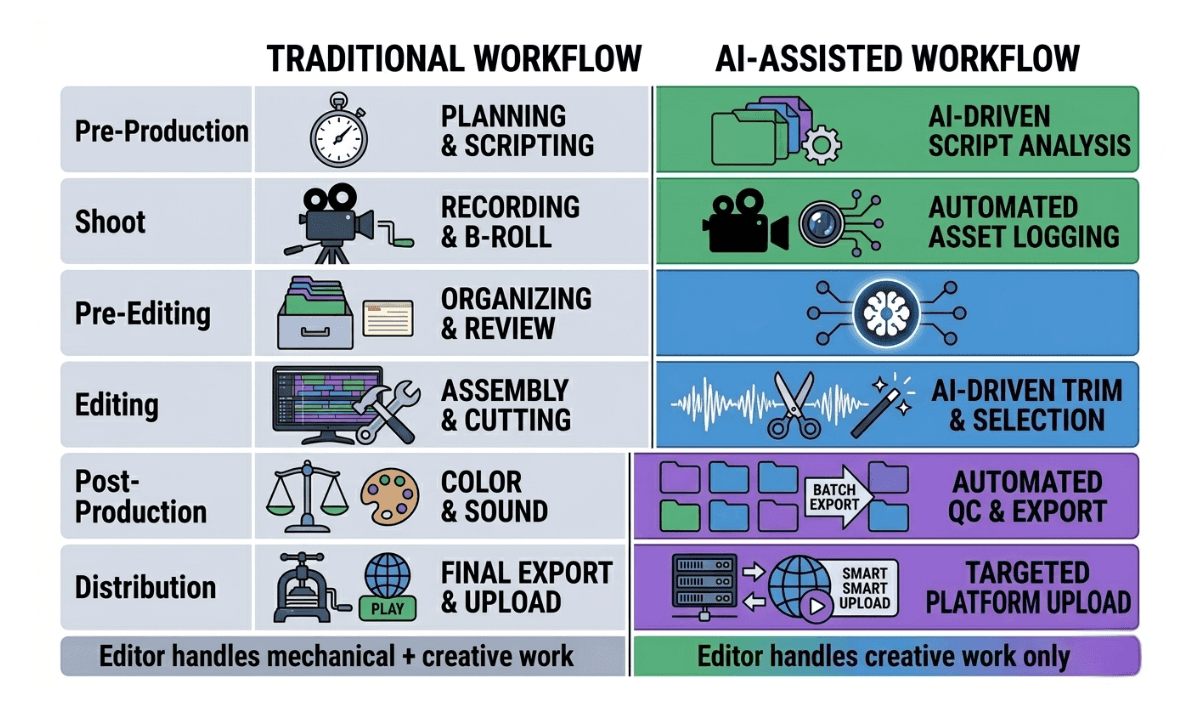
The critical difference between this and a traditional workflow isn't the number of steps; it's how many of those steps require a human. In a systematized studio, the editor is making creative decisions at every stage. In an unsystematized one, the editor is also doing the mechanical work that surrounds those decisions.
How Smaller Studios Can Replicate the Same Systems To Scale Media Production
The workflows above aren't exclusive to studios with large teams or large budgets. The tools that power them are accessible to any professional studio, and the ROI compounds faster for smaller teams, because every hour saved represents a larger proportion of total capacity.
The practical entry point for most studios is the pre-editing layer. It delivers the largest time saving, requires no change to the existing NLE workflow, and scales directly with project volume. A studio doing five projects a month and a studio doing fifty both benefit proportionally.
The key mindset shift is treating AI tools as infrastructure rather than features. The studios that see the biggest gains aren't using AI to do one thing faster; they're building systems where AI handles entire categories of work, freeing editors to do more of what they were hired to do. You can imagine these AI tools as assistant editor copilots.
For studios evaluating whether to build these systems in-house or use existing tools, the answer is almost always the latter. The time cost of building custom automation workflows is rarely justified when purpose-built tools already exist for each layer of the production pipeline.
For a deeper look at how these decisions play out, including when it makes more sense to hire a video editor rather than automate their prep work, the guide to hiring video editors vs. using AI covers the calculus in detail.
Selects vs Hiring an Assistant Editor: The Pre-Edit AI Layer For Agencies That Scales With Your Team
Every workflow described in this post depends on solving the pre-editing layer first. Everything downstream, the editing, the post-production automation, the distribution pipeline, runs faster and more efficiently when editors start from a structured, organized starting point rather than raw footage.
Selects by Cutback is built specifically for that layer.
Drop in raw footage, single cam or multi-cam, with external audio, and Selects handles the mechanical prep automatically: syncing cameras, transcribing audio, detecting speakers, removing silences and filler words, organizing content into topic-based chapters, and exporting a structured, labeled timeline directly to Premiere Pro, Final Cut Pro, or DaVinci Resolve.
The editor doesn't change their NLE. They don't change their workflow. They just start further ahead, with the hours of prep work already done.
For YouTube studios, that means editors spend their time on pacing and storytelling, not on scrubbing through raw footage. For podcast agencies, it means each client project takes significantly less editor time, improving margins without compromising quality. For in-house teams, it means one editor can handle the volume that previously required two.
You can watch a practical example of how podcast agencies handle high-volume editing using Selects below.
For studios choosing between AutoPod and Selects specifically, this comparison breaks down the pre-edit pipeline differences and the real time savings per episode.
The best studios in the world aren't faster because they work harder. They're faster because they've built systems that remove the work that doesn't require a human. Selects is the fastest way to build that system at the pre-editing layer, and it's where the biggest efficiency gains are still available for studios that haven't made the shift yet.
Start your free 7-day Selects trial today!
For agencies deciding between Selects and Descript at the pre-editing stage, this direct comparison of the two tools covers the workflow differences in detail.
FAQ
Q: What AI tools do professional video studios use? A: Professional video studios typically use AI across three layers of their workflow: pre-editing tools for footage organization, transcription, and rough cut automation; NLE plugins for silence removal, captions, and multicam switching; and post-production tools for export automation, repurposing, and distribution. At the pre-editing layer, tools like Selects by Cutback handle the mechanical prep work before footage reaches the NLE, significantly compressing the time between shoot and edit.
Q: How do high-output YouTube studios manage large volumes of footage? A: High-output YouTube studios manage footage volume by systematizing the pre-editing stage, using AI tools to sync cameras, transcribe audio, label speakers, and build structured rough cuts automatically rather than manually. This removes the most time-consuming mechanical work from editors' plates and allows small teams to handle significantly higher project volumes without proportional headcount growth.
Q: Is Selects suitable for video production agencies managing multiple clients? A: Yes. Selects is particularly well-suited for agencies handling multiple concurrent projects, because the time savings compound across client volume. Each project that goes through Selects arrives at the editor as a structured, organized timeline rather than raw footage, reducing per-project editor time and improving margins without lowering output quality. It handsoff to Premiere Pro, Final Cut Pro, and DaVinci Resolve, so it fits into existing agency workflows without requiring NLE changes.
Q: How much time can AI pre-editing tools save in a professional video workflow? A: The time savings vary by project type and footage volume, but the pre-editing stage (syncing, transcribing, organizing, and building a rough cut) typically accounts for several hours of work per project for long-form content. Selects automates this entire stage, reducing what is often a three-to-five-hour manual process to a fraction of that time.

Kay Sesoko
Marketer
Share post