AI Video Editing: The Complete 2026 Guide (Tools, Workflows, Use Cases)
The best AI video editing tools in 2026 compared by workflow stage and use case: Selects, Premiere Assistant, Descript, and more.
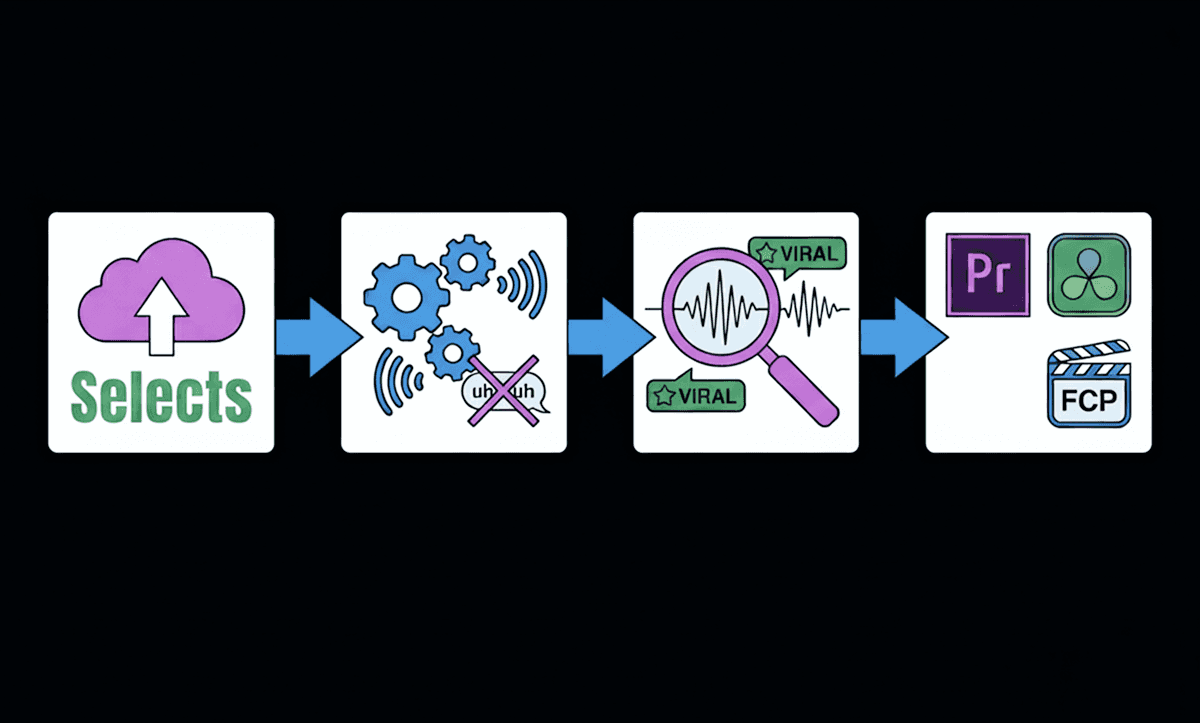
TLDR: The best AI video editing tools in 2026 operate at three distinct layers - pre-editing (footage organization, creating rough cuts, and preparing ready-to-edit timelines), in-NLE workflows (captions, silence removal, multicam), and post-production (repurposing and export); and the strongest workflows use tools at all three.
Video editing hasn’t gotten harder; content creation demands have. Content creators are producing longer shows, more clips, and publishing across multiple platforms at once. Industry trends surrounding AI video generation or AI video repurposing have increased the demand for content output tenfold. Every hour of recording turns into a full day of syncing, cleaning, and trimming before the real creative edit can even begin.
That’s where AI finally matters.
Modern AI video editors don’t replace human storytelling. They automate the boring part, the sync, the silences, the rough cuts, so editors can spend their time on pacing, emotion, and the moments that actually make people watch.
In this guide, we’ll break down how AI is transforming the editing workflow, the AI video tools leading the shift, and how to apply AI to your own process, whether you’re editing podcasts, interviews, documentaries, or long-form YouTube videos.
For more specific guidelines on AI editing workflows for content creators or further explanation about video editing terms, check out our guides.
AI saves 60-90% of prep time. Creativity gets to start earlier.
Can AI Do Video Editing? What AI Video Editing Actually Is
AI video editing refers to software that understands footage like an editor does:
Who is talking and when
What topics are being discussed
Where silence or filler can be cut
Which shots matter for storytelling
This isn't inclusive of LLM editing workflows using chatbots like ChatGPT, Claude, Perplexity, Gemini, Manus, and others. For anyone who's tried using ChatGPT or Claude to edit footage directly, this breakdown of the full LLM video editing workflow explains exactly why it doesn't work and what to use instead.
From utility AI to vibe editing software (usually focused on chat-based editing), AI has proven to be a powerful co-pilot to video editors of varying skill levels.
Instead of dragging clips around a timeline blindly, AI turns recordings into searchable, editable transcripts (script-based editing) and automatically builds a clean starting cut.
The key shift:
Editing begins at the storytelling level, not the cleanup level.
The best ai video editors focus on the prep stage, the messy work before polishing in Premiere Pro, DaVinci Resolve, or Final Cut.
How AI Is Changing Editing (Faster, Smarter, Automated)
Traditional editing workflows break down when recordings get long.
Podcasts run 60–120 minutes. Interviews drift. Multicam sync drifts.
By the time cleanup is done, the creative energy is gone.
AI fixes that by eliminating repetitive decisions:
Task AI Automates | Manual Effort Saved |
Transcription + speaker detection | Hours of typing and labeling |
Multicam sync | No more claps, hand matches, or nudge keys |
Automatic jump cuts to clean pacing | |
Clip detection + topic segmentation | Faster moment-hunting |
Rough-cut timelines | Get 70% of the edit instantly |
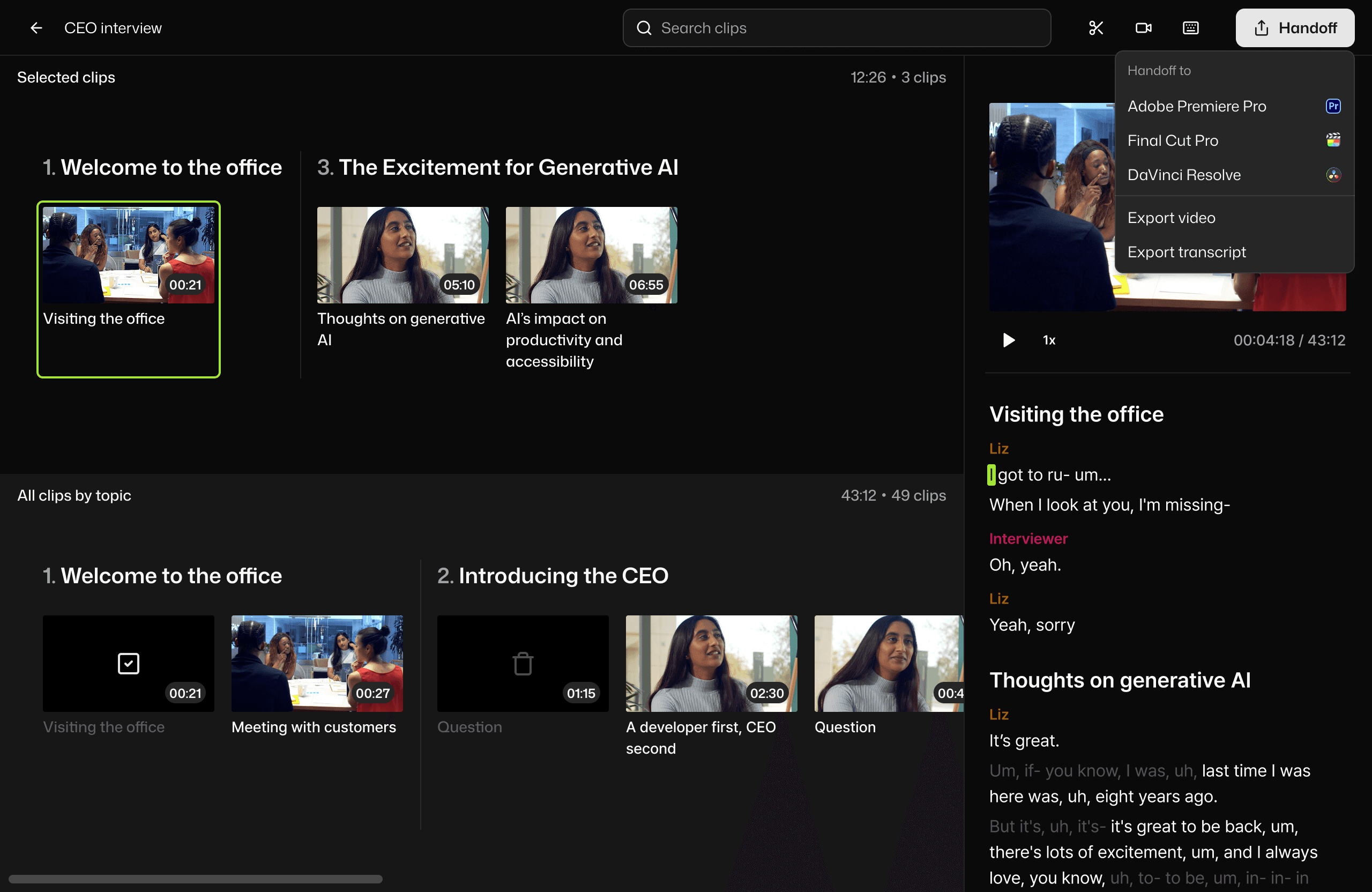
Apps like Selects do this before footage enters the NLE.
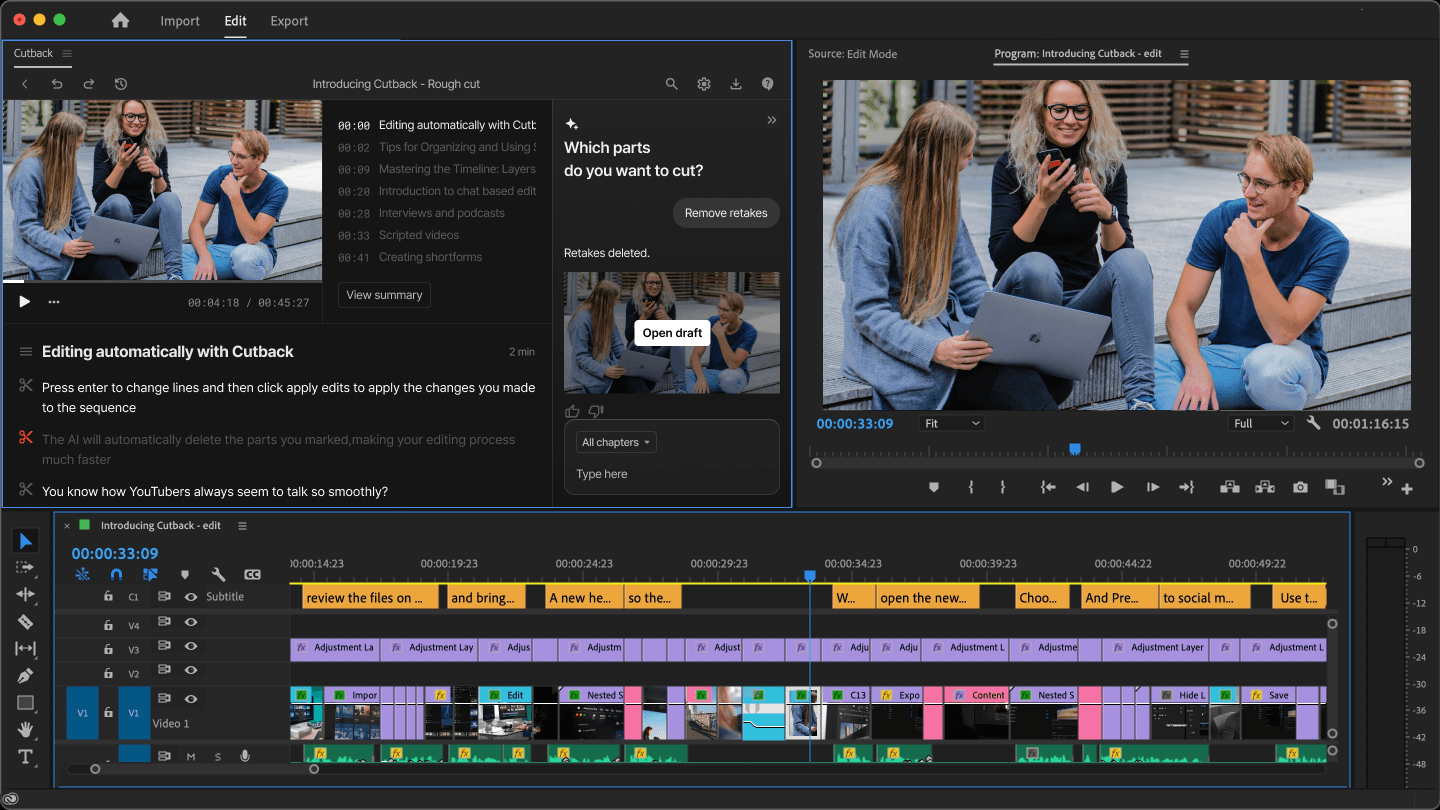
Apps like Premiere Assistant do it inside the NLE.
Either way, you start editing with structure instead of chaos.
If you’re a video podcaster, in particular, check out our AI Podcast Editing Guide too.
Core AI Video Editing Features Explained
Even editors who don’t trust “auto edits” still rely on AI for prep.
These are the features worth caring about:
1. Multicam Sync & Switching
Automatically aligns all cameras and microphones, and chooses the correct angle when a speaker talks.
Get an idea of the best multicam sync plugins in our comparison guide.
2. Silence Removal
Cut awkward pauses and dead space using adjustable audio thresholds.
Get an idea of the best silence removal plugins in our comparison guide.
3. Video Search and Clip/Topic Detection
Search transcripts and your labeled video clips to instantly find reactions, jokes, or hooks.
For example, if you search “funny moment”, you can get short-form snippets to pick from in seconds.
4. Script-Based Editing
Trim or reorder your story directly from the text, faster than dragging clips.
5. Auto Assembly Cut
AI creates a first pass edit, and you decide what stays.
Creativity starts at version 1.0, not version 0.1
Best AI Video Editing Software (2026)
AI tools for video creation don’t all solve the same problem. Some are designed to replace hours of rough-cut cleanup. Others are built to automate repetitive actions inside the timeline.
Here’s where each tool fits, so you choose based on workflow, not hype:
Selects: Best for Long-Form Prep & Multicam Podcasts
Instead of struggling with sync issues in Final Cut or even multicam sync problems in DaVinci Resolve…
Selects handles the entire front half of the edit:
Multicam sync + angle switching
Silence + filler word cleanup
Script search for fast story shaping
Viral clip extraction
Auto-chapters + content chunking
XML handoff to Premiere Pro, DaVinci Resolve, or Final Cut
Selects turns 2–6 hours of prep into 2–6 minutes.
For the complete breakdown of which plugins cover which jobs in a DaVinci Resolve workflow, the DaVinci Resolve plugin guide separates pre-editing automation from in-timeline enhancement.
Who it’s for:
Interview editors
Podcasters
Documentary teams
YouTubers clipping episodes for Shorts / Reels
Check out our full walkthrough of the best AI podcast editors, too.
Premiere Assistant, Best Inside for AI Editing in Premiere Pro
Great when you want automation without leaving your NLE.
Auto transcription & labeling
Text-based timeline control
Rough-cut generation including retake removal
Caption styling & export options
Who it’s for:
Premiere users polishing long-form cuts
Editors who prefer timeline-first workflows
Descript: Best for Script-Heavy Solo Creators
Works like Google Docs for video.
You edit the transcript, and the timeline updates.
Fast cleanup for one-camera shows
AI retake removal
Speaker color coding & fillers removed
Eye-Contact AI for host-reads
Who it’s for:
Solo podcasters
TikTok/YT commentary creators
People who hate timeline navigation
For an in-depth comparison and review of Selects vs Descript, check out our feature.
Autopod: Best for Quick Multicam Angles
Autopod is ideal only if everything is already structured in Premiere:
One-click camera switching
Auto-reframing for social aspect ratios
Batch clip exports
But:
No transcript
No clip search
No XML handoff outside Premiere
You might encounter some common issues with the Autopod AI editor. Check out how to troubleshoot them in our guide.
FireCut / AutoCut: Best for Simple Timeline Automation
Lightweight plugins that automate jump cuts through silence removal and filler word removal.
Not ideal for complex edits, but can shave minutes off long-form and short-form edits.
TL;DR Tool Summary
Tool | Best for | Weakness |
Selects | Long-form prep automation for multitrack projects | Final polish still in NLE |
Premiere Assistant | Inside-Premiere refinement | Requires a structured timeline |
Descript | Script-based single-camera edits | AI credit limits, export quirks |
Autopod | Simple multicam switching | Struggles with non-standard setups |
FireCut / AutoCut | Fast creator workflows | No deep intelligence |
Try Selects’ free 7-day trial here with no credit limits!
How To Use AI Video Editors: AI Editing Workflows (For Solo Creators, Pro Video Editors, and Studios)
Workflow 1: Podcasts & Interview Shows
Best strategy: AI first → NLE second
Upload to Selects
Auto-sync, auto-label, auto-stringout, remove silences and filler words
Natural-language search to label viral clips
Handoff to Premiere, Resolve, or Final Cut for pacing & polish
Result: Final timeline starts at 90% complete
Workflow 2: Long-Form YouTube
Selects can instantly generate:
Chapters (for YouTube SEO)
Clip bins for Shorts, Reels, TikToks, and other social media videos
Assembly cut based on script flow
Editors then jump straight into video pacing, b-roll, and story.
Workflow 3: Educational / Documentary
AI shines at structure:
Topic segmentation
Speaker-aware camera switching
B-roll markers via transcript flags
Teams keep creative collaboration inside the NLE.
Workflow 4: Short-Form-First Channels
Premiere Assistant + Selects combo wins:
Clip discovery
Social-ready crops (9:16 / 1:1 / 16:9)
High-volume batch delivery
Think one shoot turning into 2 long-form uploads and 10–30 short-form clips. Check out our guide on repurposing long-form content into short-form clips, for more detail on how to utilize content repurposing tools.
Future Trends in AI Editing
Editing is shifting toward agent-based automation, software that makes decisions instead of waiting for button clicks.
Emerging changes:
Fully auto-assembled rough cuts for common formats
AI that detects story beats, not just words
Smart clip scoring: “viral,” “funny,” “emotional”
Unified production → post pipelines
Zero-credit limits (flat pricing will win)
Expected by 2027:
Timeline starts finished, editors just refine.
This is where Selects is already heading.
For a full breakdown of what agentic AI means in practice and how it differs from rule-based tools, read our dedicated guide to agentic video editing.
Skip the grunt work; start where storytelling happens.
Try Selects free → No credit limits, no watermark
For more in-depth knowledge about the ins and outs of video editing, check out our latest posts on the Cutback blog or our YouTube channel.
FAQs (Frequently Asked Questions): Video Editing AI
Q: Will AI take over and replace video editing or editors? Will AI take video editing jobs?
A: No. AI replaces prep. Editors still shape narrative and emotion.
Q: How accurate is AI multicam switching?
A: Very strong when audio is clean, and speakers are distinct.
(Selects = transcript-aware switching)
Q: Which AI editor works best with Premiere Pro?
A: Selects → best for prep / Premiere Assistant → best for refinement / Autopod → best for simple switching
Q: How good is AI Video Editing? Can AI detect viral clips automatically?
A: Yes. Selects detects interesting moments by meaning & reactions.
Q: Is there an AI that can do video editing?
A: Yes. AI video editing tools like Selects and Premiere Assistant analyze footage the way an editor doesidentifying who is speaking and when, detecting topics being discussed, finding silence and filler words to cut, and recognizing which moments matter for storytelling. This is distinct from using a general-purpose chatbot like ChatGPT or Claude directly, which cannot access video files or make timeline cuts on their own; footage-native AI editing tools are built specifically to read and act on video and audio data.
Q: How does AI work in video editing?
A: AI video editing tools work primarily through five core functions: multicam sync and switching (automatically aligning cameras and selecting the correct angle when someone speaks), silence removal (cutting pauses and dead space using adjustable thresholds), clip and topic detection (searching transcripts to instantly locate specific moments), script-based editing (trimming or reordering footage by editing text rather than dragging clips), and auto assembly cut generation (producing a first-pass edit for the editor to refine). These functions operate either upstream of the NLE (tools like Selects) or directly inside it (tools like Premiere Assistant).
Q: How do you automate video editing with AI?
A: The most efficient automated workflow starts with a pre-editing tool that handles sync, transcription, silence removal, and clip organization before footage reaches your NLE, Selects handles this stage, turning what is typically 2-6 hours of manual prep into 2-6 minutes. From there, in-NLE tools like Premiere Assistant automate captions, retake removal, and final rough cut adjustments directly inside Premiere Pro. The combination automates roughly 70% of the edit, leaving the creative pacing and storytelling decisions to the editor.
Q: How can AI improve my video editing workflow?
A: AI improves a video editing workflow most by eliminating the repetitive decisions that consume time without requiring creative judgment, transcription, speaker labeling, multicam sync, silence and filler word removal, and clip-finding across long recordings. Editors typically save 60-90% of prep time, which means creative decisions about pacing, structure, and storytelling can start much earlier in the process instead of after hours of manual cleanup. The improvement compounds for editors working with long-form, multicam, or high-volume content where prep time is otherwise the biggest bottleneck.
Q: Is there a free AI video editing workflow tool?
A: Most professional AI video editing tools, including Selects and Premiere Assistant, offer trial periods rather than permanent free plans, Selects has a 7-day free trial and Premiere Assistant includes limited usage before converting to paid. DaVinci Resolve remains the only fully free professional NLE, though it lacks dedicated AI pre-editing automation natively.
Q: Is AI video editing the same as an AI video generator?
A: No, and this distinction matters. AI video editing tools like Selects and Premiere Assistant work with footage that already exists, they organize, cut, and structure real recordings faster than manual editing would. AI video generators (such as Sora or Runway) create entirely new video content from text prompts, with no underlying footage required. For creators who have already filmed content, interviews, podcasts, talking-head videos, the editing-automation category is what removes the actual production bottleneck, since there is nothing to generate, only footage to shape.
Q: Is there an open-source AI video editing workflow available?
A: There is no widely-used open-source equivalent that replicates the full pre-editing automation of dedicated tools like Selects, multicam sync, transcription, topic detection, and assembly cut generation in one workflow. Individual open-source components exist (transcription models, basic silence-detection scripts), but assembling them into a comparable end-to-end workflow requires significantly more technical setup than a purpose-built tool, without matching the accuracy or NLE handoff reliability.
Kay Sesoko
Marketer
Share post