Selects vs Eddie AI : Which AI Video Editing Tool Is Right for You?
Eddie AI builds rough cuts mode by mode. Selects automates the full pre-edit before you open your NLE. Here's where each tool actually saves time — and where it doesn't.
TLDR: Eddie AI is a desktop AI editor that builds rough cuts mode by mode (Clean-Up, Scripted, Multicam Podcast, Multicam Interview, Docs, Stringouts). Each mode has caps and constraints, and multicam camera switching only works in two of those six modes.
Eddie AI builds rough cuts inside its own modal interface. Selects prepares the full pre-edit, then hands off to Premiere Pro, Final Cut Pro, or DaVinci Resolve.
Selects automates the full pre-edit (sync, transcribe, organize, assemble) before you open your NLE. Footage stays local. Output is a clean .prproj or Final Cut Pro XML or DaVinci Resolve timeline. No mode-switching, no source-hour caps you cannot lift, no 5-minute project minimum.
At a Glance
Selects | Eddie AI | |
|---|---|---|
Type | Standalone desktop app | Desktop app, modal interface |
Scope | Entire pre-edit (sync, transcribe, organize, assemble) | Mode-specific rough cuts |
Local processing | Yes, no upload | No, footage uploads to the cloud |
Multicam cameras | 10+ | 6 podcast / 3 interview / 3 docs + 1 audio |
Multicam in documentary mode | Yes | No |
Project source cap | 20hr video / unlimited audio / 500 GB to 1 TB+ | 2hr Clean-up / 7hr Pro+ Docs |
NLE | Premiere Pro, Final Cut Pro, DaVinci Resolve native | Premiere, Final Cut, DaVinci, Avid EDL |
Entry Pricing | $16/mo Starter | $25/mo Plus |
Selects vs Eddie AI
Two AI editors. Different scopes.
Eddie AI's pitch is rough cuts mode by mode, with the heaviest emphasis on Clean-Up and Multicam Podcast. You pick a mode that matches your content, drop in footage, and Eddie produces an edit inside its own interface. The output is meant to be a near-final cut for that mode.
Selects' pitch is footage to assembly cut in one workflow, NLE-agnostic. You drop in raw footage. Selects syncs the cameras, transcribes every speaker, breaks the conversation into topics, picks the best takes, and writes a real timeline you can drag into Premiere Pro, Final Cut Pro, or DaVinci Resolve. The output is designed to be the start of your real edit, not the end of it.
If you cut multicam podcasts in one room, all week, every week, Eddie's mode-specific approach can feel tight. If your week looks more like a documentary cutdown on Monday, a 30-second reel on Tuesday, a 90-minute interview on Wednesday, and a YouTube essay on Friday, the mode model starts to chafe. Selects is built for the second case.
What Eddie AI Does Well
Eddie AI has been in market for about two years and has built a real user base (roughly 40,000 users at the time of writing) and a serious feature surface. The team shipped at NAB 2026, and the product genuinely earns several wins worth naming.
Eddie's Premiere Pro plug-in is solid. So is the Avid EDL export, the Frame.io integration, and the DOCX transcript export, which makes it easy to circulate scripts and approval drafts. Eddie supports more than 30 transcription languages, which is a meaningful strength for international teams. On-prem deployment is available for studios that need to keep footage inside the building. The Plus plan at $25/month is a real on-ramp for solo editors. And the modal interface (Clean-Up, Scripted, Multicam Podcast, Multicam Interview, Docs, Stringouts) can feel focused for editors who only do one content type.
These are real strengths. The problem is not what Eddie does well. It is what happens when your work does not fit one of Eddie's modes.
Where Eddie AI Stops and Manual Work Begins
Eddie's capabilities are split across six modes. What you can do depends on which mode you are in, and the modes do not all work the same way. Here is what changes from mode to mode, sourced from Eddie's own help center.
Multicam switching is modal
Multicam camera switching works in Podcast and Multicam Interview modes only. In Docs and Stringouts, the modes Eddie recommends for documentary and narrative work, Eddie explicitly does not choose camera angles for you (Eddie's help center, article 10966480). If you cut documentaries with multiple cameras, you are doing the cutting.
Camera count caps
Eddie supports 6 cameras in Podcast mode, 3 in Multicam Interview, and 3 cameras plus 1 audio source in Docs. Selects supports 10+ cameras. If your shoot is 8 cameras, you have a problem in Eddie before you start.
5-minute minimum project duration
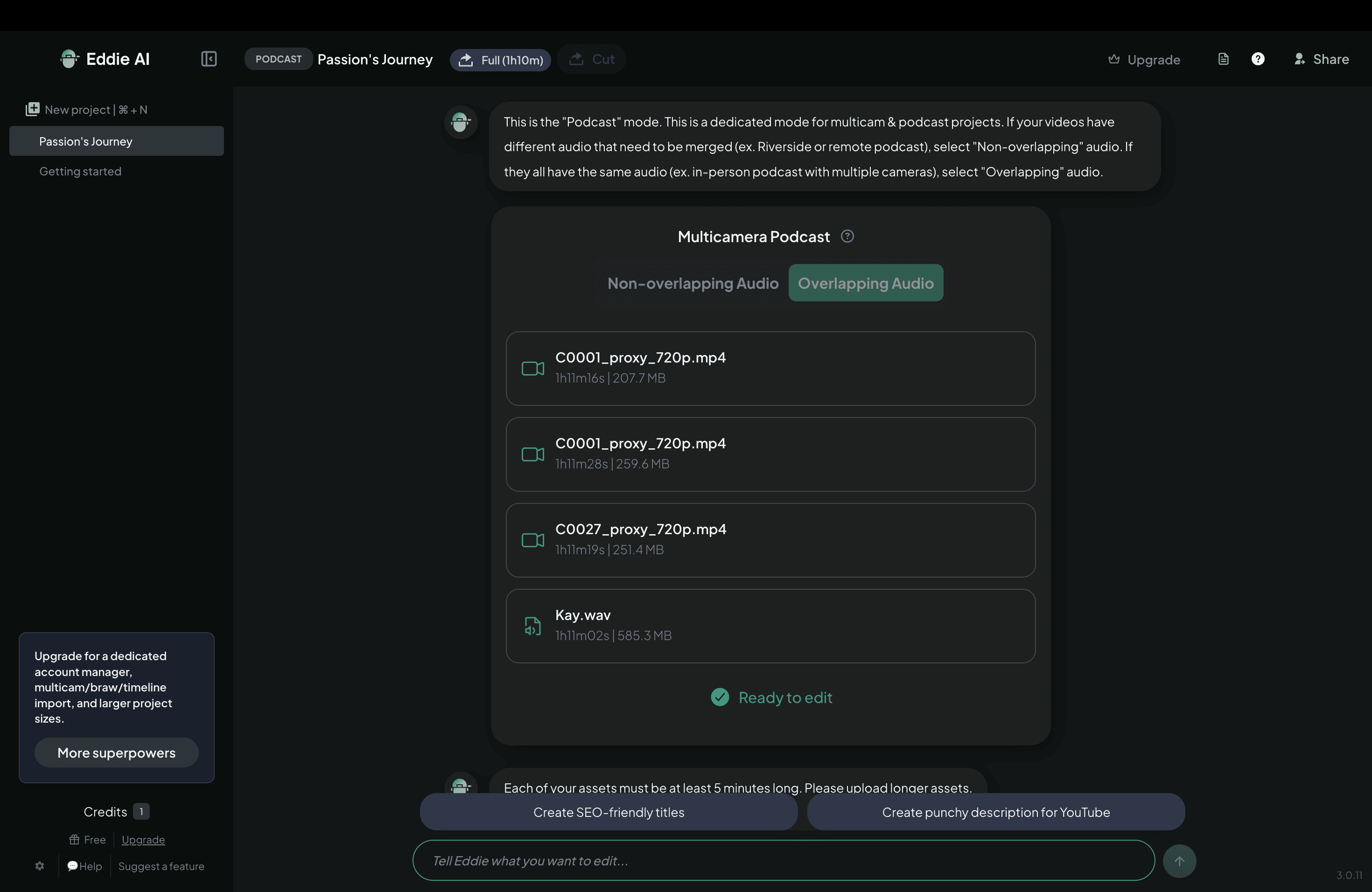
Eddie cannot process clips shorter than 5 minutes (help center, article 12584297). If your work involves reels, shorts, raw triage on selects pulls, or any kind of short form turnaround, Eddie will not open the project. Selects has no minimum. A 30-second clip and a 3-hour podcast move through the same workflow.
Pro codec transcoding
Eddie force-transcodes BRAW, R3D, Canon, Sony, files over 5 GB, and multi-track audio before editing (help center, article 14094823). That is a queue-blocking step on footage that is already large. Selects plays these codecs natively, with about 97.8% codec coverage, and uses a frame-level integer coordinate system that holds frame accuracy across multicam.
No-speech footage
Eddie does not edit footage with no speech, except as B-roll logging (help center, article 10042996). Laughter, room tone, b-cam reaction shots, performance footage, anything where the cut is driven by visuals rather than dialogue, Eddie will not edit it as A-roll. Selects' visual-annotation editor reads facial expressions, on-screen action, and laughter, and edits no-speech footage the same way it edits interview footage.
Audio-only import
Eddie does not support audio-only import (help center, article 13361737). If you cut podcasts that ship as audio first and video second, you cannot start in Eddie with just the audio file. Selects allows audio-only import.
Multi-track audio
Audio must be on track 1 unless you go through the NLE extension (help center, article 12144835). Selects accepts unlimited audio tracks and routes them by mic and speaker.
Vertical export from multicam
Vertical export from multicam is not supported in Eddie. Vertical exports are single-cam only (help center, article 14173272). If you finish a 3-camera podcast and want a vertical version of the multicam cut for short-form distribution, you cannot do that in Eddie. Selects exports vertical from multicam directly.
Podcast edits are terminal
Eddie's help center is direct on this: "You cannot prompt Eddie to do another full podcast cut" (article 10548843). Once Eddie produces a podcast cut, you cannot ask for a different version of the same cut. You start over. Selects supports iterative re-prompts. Edit the prompt, regenerate, repeat.
Gate-free export
Eddie blocks Rough Cut export until every chapter reaches "Final Cut" (help center, article 13998533). If you want to send a partial cut to a producer for early feedback, you cannot. Selects lets you export at any stage.
Where the Hours Actually Go
Picture a 90-minute, 3-camera podcast with two hosts and one guest. This is the kind of project Eddie's Multicam Podcast mode is built for, and Eddie does it well. It is also a useful case to walk through, because it shows where each tool covers and where it stops.
In Eddie, you upload the footage to the cloud, choose Multicam Podcast mode, and let the tool produce a multicam cut. That gets you the speaker-driven camera switching for the dialogue. You still have to handle ingest organization, B-roll selection, color, audio polish, any silent footage (laughter, prep, room tone), and any vertical export. If something in the cut is wrong, you cannot prompt for a new full podcast cut on the same project.
In Selects, you drop the same footage on the desktop. The footage stays local. Selects ingests it, syncs the three cameras using MFCC spectral analysis (no scratch audio needed), diarizes the three speakers, generates a transcript with word-level timestamps, breaks the conversation into topic chapters, picks the best take across any retakes, and writes an assembly cut with context-aware B-roll. You then open the .prproj in Premiere Pro (or the FCP XML in Final Cut Pro, or the timeline in DaVinci Resolve) and refine.
Eddie shaves time off one mode. Selects replaces the entire pre-edit workflow that an assistant editor used to spend a full day on, regardless of which content type you are cutting.
How Selects Works: The Full Pre-Edit Pipeline
Selects runs end-to-end on the desktop. There is no mode picker. Here is what happens, in order, after you drop in raw footage.
1) Drop in raw footage. No upload. Footage stays on your machine. Selects accepts up to 500 GB to 1 TB+ per project.
2) Auto-sync via MFCC spectral analysis. 10+ cameras. No scratch audio needed. No PluralEyes round-trip.
3) Diarization. 97 to 98% accuracy in the best cases. The best mic per speaker is auto-selected.
4) Transcript with word-level timestamps. Over 99% word accuracy on clean audio.
5) Topic breakdown. The transcript is auto-segmented into topic chapters you can drag around.
6) Stringout from topics. Drag whole topics or individual words to a real timeline. The timeline uses Premiere Pro, Final Cut Pro, and DaVinci Resolve shortcuts.
7) Multi-take grouping with quality evaluation. The selection is ranked on Delivery, Visuals, Context, in that order.
8) Auto-assembly cut. Removes prep, camera adjustments, battery changes, and dead air. Adds context-aware B-roll.
9) Iterative re-prompt. Edit the prompt and regenerate. Or paste a YouTube link and copy that video's editing style.
10) Hand-off. Native .prproj with nested sequences and B-roll bins. Final Cut Pro XML. DaVinci Resolve timeline. Metadata-aware on all three.
Feature-by-Feature Comparison
Platform and Input
Feature | Selects | Eddie AI |
|---|---|---|
Desktop app (Mac + Windows) | ✓ | ✓ |
Local processing | ✓ | ✗ |
Max raw footage | 20hr / 500GB to 1TB+ | 2hr Clean-up / 7hr Pro Docs |
Project minimum duration | None | 5min |
Pro codecs (BRAW, R3D, ProRes, MXF) | ✓ | ⚠ Forced transcode |
Multicam
Feature | Selects | Eddie AI |
|---|---|---|
Camera count | 10+ | 6 pod / 3 int / 3 docs+1 aud |
Auto-sync | ✓ | ⚠ Waveform, scratch req'd |
Multicam in doc / narrative mode | ✓ | ✗ |
Context-aware switching (facial) | ✓ | ✗ Speaker-ID only |
Editing Surface
Feature | Selects | Eddie AI |
|---|---|---|
Diarization | ✓ | ✓ |
Real timeline with NLE shortcuts | ✓ | ✗ A-roll is text-only |
Transcript-based editing | ✓ | ✓ |
Visual-annotation (no-speech OK) | ✓ | ✗ B-roll log only |
Multi-take grouping + best take | ✓ | ✓ Clean-up / scripted |
Topic breakdown to drag-to-timeline | ✓ | ✗ doc-edit only |
Iterative re-prompt on finished cut | ✓ | ✗ podcast cuts terminal |
Import and Export
Feature | Selects | Eddie AI |
|---|---|---|
Auto-only import | ✓ | ✗ |
Multi-track audio | ✓ unlimited | ✗ track 1 only |
Vertical export from multicam | ✓ | ✗ single-cam only |
Native .prproj (nested seq + bins) | ✓ | ✓ |
FCP XML | ✓ | ✓ |
DaVinci Resolve | ✓ | ✓ |
Avid EDL / Fram.io | Roadmap | ✓ |
Premiere Pro plug-in | ✓ | ✓ |
Differentiators
Feature | Selects | Eddie AI |
|---|---|---|
MCP server integration | ✓ | ✗ |
Director signal detection | ✓ | ✗ |
Adaptive pacing (praat prosody) | ✓ | ✗ |
Korean / Japanese UI | ✓ | ✗ |
30+ transcription languages | ⚠ limited | ✓ |
Enterprise and Pricing
Feature | Selects | Eddie AI |
|---|---|---|
SAML / SSO | ✓ Enterprise | ✓ |
SOC 2 Type 2 | In progress | ✗ |
On-prem deployment | Roadmap | ✓ |
Free tier (ongoing) | ✗ trial only | ⚠ |
Free trial | ✓ 7-day | n/a |
Entrey pricing | $16/mo Starter | $25/mo Plus |
Where the Real Differences Are
Seven sharp differences are worth pulling out from the table.
Local processing vs upload-required
Selects keeps footage on your machine. Eddie uploads. For sensitive footage, NDA work, or anything that lives on a producer's shared drive, that distinction matters.
One pipeline vs six modes
Selects has one workflow. Eddie's capabilities depend on which mode you are in, and the modes have different caps. If your week mixes podcasts, interviews, documentaries, and short-form, you are switching modes constantly.
Multicam in any mode vs only two modes
Selects switches cameras in any kind of footage. Eddie switches cameras in Podcast and Multicam Interview only. Documentary and narrative cuts in Eddie are single-cam from the model's perspective.
No project minimum vs 5-minute minimum
Selects opens a 30-second clip the same as a 3-hour podcast. Eddie will not open anything under 5 minutes. If reels and shorts are part of your output, that is a hard wall.
Pro codecs play natively vs forced transcoding
Selects plays BRAW, R3D, MXF, and ProRes natively. Eddie transcodes them on the way in. The transcoding step is queue-blocking on large footage, and it converts away from the camera-original codec.
No-speech footage edited vs ignored
Selects watches facial expressions, on-screen action, and laughter, and edits no-speech footage as A-roll. Eddie's editor needs speech to operate, and treats the rest as B-roll logging only.
Iterative prompts vs terminal cuts
Selects re-prompts. Eddie's podcast edits cannot be re-prompted as a full new cut. If the first pass is wrong, in Eddie you start over.
What Each Dollar Buys
Pricing is comparable at the entry tier and diverges at the pro tiers. Both tools publish public pricing for solo editors and shift to custom pricing at the team and enterprise levels.
Selects Pricing
Plan | Price | Best for | Included |
|---|---|---|---|
Selects - Starter | $16/mo | Solo editors | Basic pre-edit automation |
Selects - Creator | $40/mo | Creators & freelancers | Multi-cam sync, 20hrs capacity |
Selects - Pro | $160/mo | Small post teams | 10-track multi-cam, 80 hrs, collaboration |
Selects - Team | $160/seat/mo | Post-production teams | Centralized admin, shared projects |
Selects - Enterprise | Custom | Studios & broadcasters | SSO, SOC 2, dedicated support |
Eddie AI Pricing
Plan | Price | Best for | Included |
|---|---|---|---|
Eddie - Flex | Pay-as-you-go credits | Occasional users, no commitment | Per-credit processing, no monthly fee |
Eddie - Plus | $25/mo | Solo editors, podcasters | Clean-up and Scripted modes, 2-hour project cap |
Eddie - Pro | $199/mo | Multicam podcast and interview editors | Multicam Podcast, Interview, Docs, Stringouts modes, 7-hour cap, 30+ languages |
Eddie - Pro+ | $399/mo | Ambitious pros who want no compromises | Everything in Pro, 25 exports/mo, bigger project sizes, premium AI models |
Eddie - Ultra | $1,499/mo | Demanding teams that need only the absolute best | Everything in Pro+, 100 exports/mo, 5 seats included, largest project sizzes, most advanced AI models |
Eddie - Enterprise | Custom | Studios and broadcasters | Centralized admin, on your cloud, SAML/SSO, enterprise-grade security |
Choose Selects if
You work across documentary, podcast, interview, scripted, and short-form in the same week.
You cut on Final Cut Pro or DaVinci Resolve.
You need to edit footage shorter than 5 minutes.
You cut footage with no speech (b-cam, performance, reaction).
You want one pipeline instead of six modes.
You work as a team and need SSO and audit logs.
Choose Eddie AI if
You only cut multicam podcasts and the modal interface feels right for that one use case.
You use Avid EDL or Frame.io as your primary handoff (Selects has these on the roadmap).
You need transcription in more than 30 languages today.
You need on-prem deployment now (Selects' on-prem is roadmap).
Frequently Asked Questions (FAQs)
What is the main difference between Selects and Eddie AI?
Selects automates the full pre-edit pipeline before you open your NLE: sync, diarization, transcript, topic breakdown, multi-take grouping, and assembly cut. Output is a native Premiere Pro project, Final Cut Pro XML, or DaVinci Resolve timeline. Eddie AI builds rough cuts inside its own modal interface (Clean-Up, Scripted, Multicam Podcast, Multicam Interview, Docs, Stringouts), each with different capabilities and caps. Eddie covers one mode at a time. Selects covers one workflow that handles every content type.
Does Eddie AI choose camera angles in documentary mode?
No. Per Eddie's help center (article 10966480), multicam camera switching is supported in Podcast and Multicam Interview modes only. In Docs and Stringouts modes, the modes Eddie recommends for documentary and narrative work, Eddie does not choose camera angles for you. Selects switches cameras across every kind of footage and uses context (facial expression, mid-action) plus speaker ID, not waveform alone.
Can Eddie AI handle short clips and reels?
No. Per Eddie's help center (article 12584297), Eddie has a 5-minute minimum project duration. Anything shorter cannot be opened as a project. Selects has no minimum. Drop in a 30-second cut or a 3-hour podcast and the workflow is the same.
Does Eddie AI work with BRAW, R3D, or large multi-track files?
With caveats. Per Eddie's help center (article 14094823), BRAW, R3D, Canon, Sony, files over 5 GB, or multi-track audio are force-transcoded before editing. Selects plays these codecs natively, with about 97.8% codec coverage, and uses a frame-level integer coordinate system that holds frame accuracy across multicam.
Is Selects more expensive than Eddie AI?
Eddie's Plus plan starts at $25/month. Selects Starter starts at $16/month. Both have professional tiers with multicam and team features. Selects offers a 7-day free trial with full features. Eddie offers a Flex pay-as-you-go credit option as the no-commitment entry point. Selects does not offer an ongoing free tier.
Can I use Selects with my existing NLE?
Yes. Selects exports native Premiere Pro projects with nested sequences and auto-organized B-roll bins, Final Cut Pro XML, and DaVinci Resolve timelines. Sync, take selection, B-roll organization, and transcripts all carry over. You finish in your NLE of choice.
Can I switch from Eddie AI to Selects?
Yes. Most editors who switch import their raw footage into Selects directly. There is no project file migration. Selects' workflow runs end-to-end on the same source files. The 7-day free trial includes the full pipeline, so you can test it on a real project before committing.
Ready to Cut Your Editing Prep in Half?Drop in your raw footage and let Selects handle the sync, the organization, the transcription, and the rough cut. You open your NLE to refine, not to build. |

Kay Sesoko
Marketer
Share post