Best AI Podcast Editors Compared: Selects, Descript, Autopod, and More
Compare the best AI podcast editors like Selects, Descript, Autopod, and Riverside to find tools that speed up editing without losing creative control.
TLDR: Selects is best for long-form footage prep and NLE handoff, Descript is best for text-based editing in-browser, Autopod is best for quick multicam sync in Premiere Pro, and Riverside is best for remote recording with built-in editing.
AI is changing podcast editing in a very practical way. It is not replacing editors. Their work is too creative, and the decisions they make are too specific to be automated, but there are many podcast editing options available to assist them.
But pre-editing tasks like transcription, silence removal, and camera switching take days. Editors want something that cuts prep time without stripping away their creative control. You’ll hear the same problems mentioned over and over again whenever people talk about long-form editing because everyone is trying to solve the same bottlenecks.
That desire is why interest in the modern AI podcast editor has exploded. Selects, Autopod, Descript, and Riverside also show up in these conversations because they all solve different problems in the early prep stage.
Don’t miss out on our ultimate guide to podcast and interview editing and video editing terminology glossary either!
Why Editors Are Using AI Podcast Editing Software
Modern creators and editors fall into a few common workflows:
Remote interviews (Riverside-friendly)
Video podcasts with guests (Selects or Autopod)
Solo creators with retakes (Selects or Descript)
Editors delivering to clients weekly (Selects)
This helps you match the tool to your workflow faster.
Ever wondered what software video podcasters use? Long podcasts are tough to prep because the recordings are raw in the truest sense. Most sessions run for an hour or more, sometimes much longer. Nothing is paused just for the editor’s sake. Conversation might stop mid-sentence, someone adjusts a mic, or a guest backtracks to a previous topic.
With multi-camera podcast setups, A-cam, B-cam, and wide shots run nonstop. You have to decide when the shot should be on the host, the guest, or the wide, then add those cuts by hand. Long recordings also drift slightly between angles, so the footage needs to be realigned to the main audio before you can even start placing those switches.
All of this takes time, and the hours spent on cleanup leave very little flexibility in your schedule. Editors want to bring down turnaround times because faster editing means more time to finish other content in the same window.
Editors report that prepping a 2-hour, 3-camera podcast can take 5-12 hours before creative cuts even begin (sync, trims, labeling, storyline planning). AI removes 60-90% of that setup time.
The most obvious way to do that is to offload the repetitive work, and this is something AI is exceptionally good at.
Podcast Video Editing in NLEs
Most creators still cut their podcasts in Premiere Pro, DaVinci Resolve, or Final Cut because the creative features these editors offer are hard to replace. While they do offer complete control, they come with a steep learning curve and don’t deal well with messy source files. A two-hour recording dropped straight into an NLE is going to need a long cleanup pass before the storytelling cuts can begin.
AI tools help by handling the parts that sit outside an NLE’s strengths. You’ll still color, mix, and shape the final cut in the NLE, but AI can produce a prepared timeline that drops directly into the NLE through XML or timeline handoff.
The best podcast editing software works alongside the NLE instead of trying to replace it.
A Side-by-Side Look at 4 Automated Podcast Editors
1. Selects
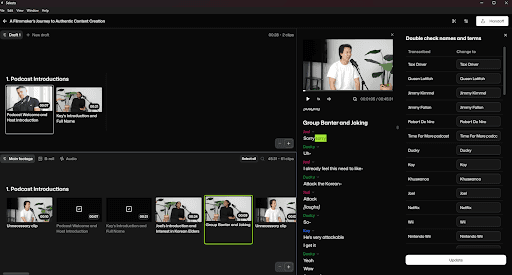
Selects is a prep assistant for podcasts, interviews, and talking-head content. It handles transcription, speaker detection, multicam sync, and silence removal. Selects also lets you search through the script, select the clips you want, and generate a clean stringout. It builds an edit-ready timeline to slot directly into your NLE workflow.
Choose the prep tasks you want, press Proceed, and Selects will process in the background while you focus on something else.
For Final Cut Pro editors specifically, here's how Selects handles silence removal before the FCP handoff, including why native XML export matters for FCP's magnetic timeline.
For the full Final Cut Pro multicam setup beyond silence removal, including Angle Editor audio management and AI-based angle switching upstream, the FCP multicam editing guide covers every step.
For editors who work in DaVinci Resolve specifically, the DaVinci multicam workflow guide covers how Selects hands off a structured multicam timeline to Resolve and where SmartSwitch picks up from there.
Pros
Names and key terms are flagged for quick review
Flags filler clips as “Unnecessary clip”
Automatically breaks the conversation into chapters
Produces a clean transcript with correct speaker labels
Removes silences using custom gap length settings
Search clips by keyword to locate short-form material, e.g., by searching “funny moments,” you can easily repurpose your podcast content into smaller clips.
For editors specifically dealing with the footage-hunting problem on long recordings, searching video footage without scrubbing covers how Selects' text and scene search address it directly.
Syncs all cameras and switches angles based on the active speaker
AI works automatically and is not limited by a credit system
Create multiple timeline drafts
Handoff is simple. Click Handoff and then pick your NLE (Premiere Pro, Final Cut Pro, or DaVinci Resolve) from the dropdown
Ready-to-edit timeline with color-coded video chunks in your preferred NLE
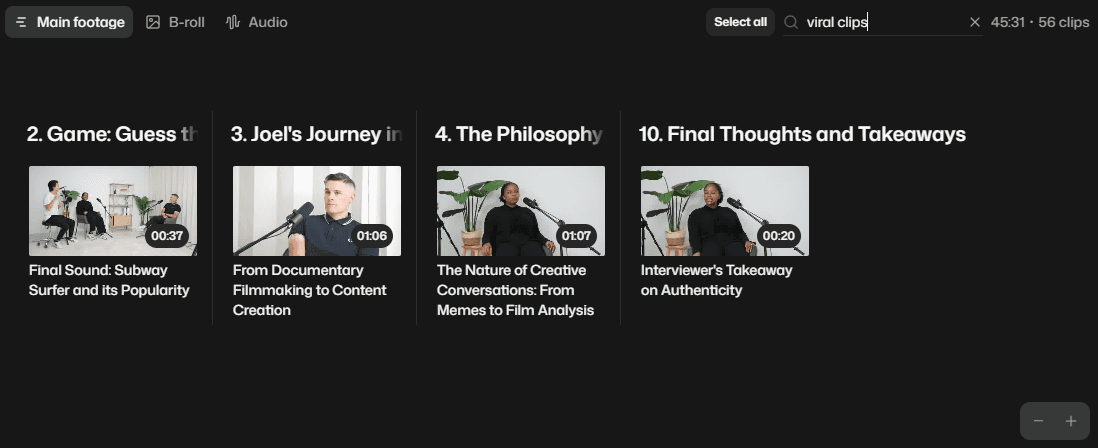
Selects lets you search by keyword or idea to gather clips tied to topics, reactions, or viral moments.
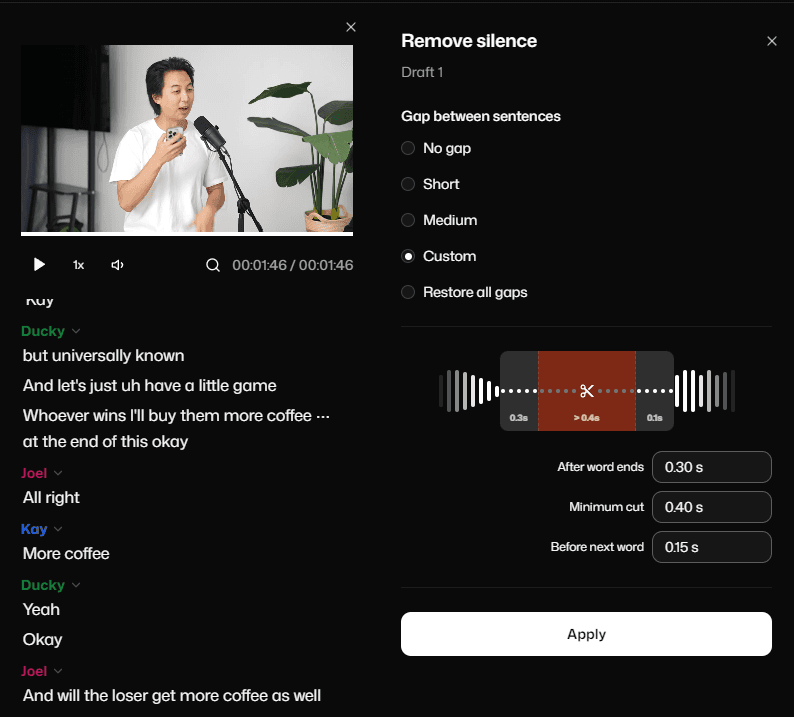
Customize silence cuts for tighter dialogue
Cons
Storyline beta is useful, but not ready for final-cut decisions
Focused on prep, mixed-media assembly stays in the NLE
No captioning yet
What makes Selects unique
Every edit action is anchored to transcripts, not waveforms
Prepared timelines preserve multicam context for NLEs
Provides a non-destructive editing workflow
Works before Premiere/Resolve, not inside them → no timeline chaos
Unlimited AI processing (no credit caps) based on your plan
For a direct comparison of how Selects fits into the full distribution pipeline, including where Opus Clip picks up after the cut, see Selects vs Opus Clip: two different tools for two different jobs.
Pricing
Free 7-day trial. Tiered pricing, starting at $16/month, billed yearly or $20/month.
Best for professional video editors, podcasters, studios, and agencies with footage-heavy edits to tackle.
Star Rating
4.5 / 5
For real-world professional editor reactions to Selects on complex long-form projects, the roast campaign results cover the specific workflow feedback in detail.
2. Autopod
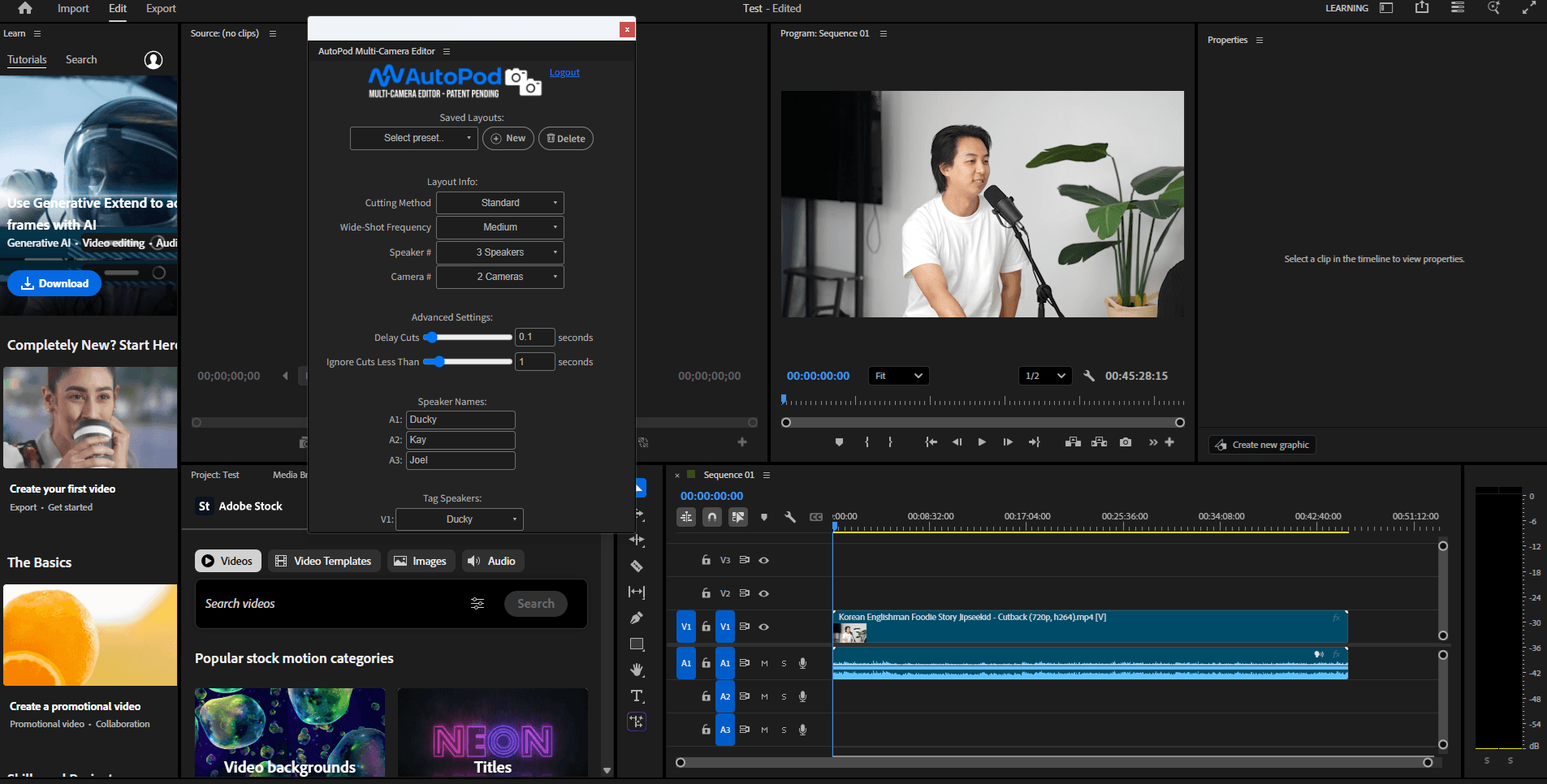
Autopod.fm works as a one-click workflow inside Premiere Pro. It builds multicam timelines, switches cameras automatically, and assembles a basic edit for interview-style podcasts. Autopod can also spin out social clips quickly by auto-reframing and resizing the footage.
It is built for editors who want fast structure without leaving the NLE.
Pros
Works for up to 10 cameras and 10 microphones
Works directly inside Premiere Pro
Lets you save presets for repeat layouts
Automatically creates social-ready sequences in multiple aspect ratios
Auto-reframes and resizes clips for vertical formats
Cuts the podcast's silence using a decibel cutoff setting
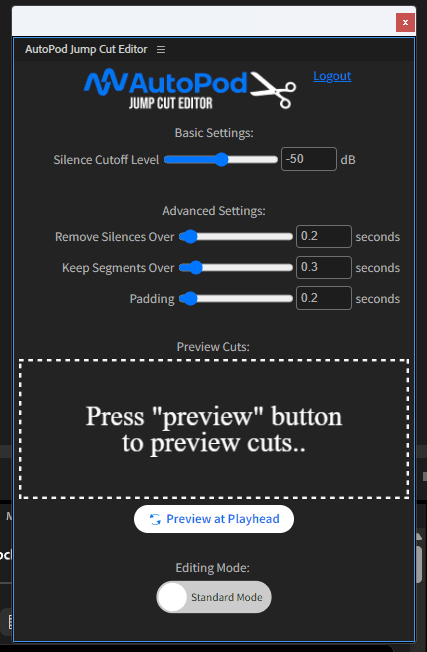
Adjust the dB threshold to control what gets cut
Cons
No transcript
No clip search
Need to name and tag speakers to audio and cameras
Needs multiple audio tracks and cameras to make the editing decisions
Cannot be used for long-form content with just one speaker/camera
Only good if you use Premiere Pro; it does not work with any other NLE
Cannot use the license on more than one computer
If you’re experiencing problems in Autopod, check out some quick solutions in our guide. Better yet, consider checking out an Autopod alternative.
Pricing
Individual license only at $29 per month, billed yearly.
Star Rating
3 / 5
For a direct head-to-head on how AutoPod and Selects compare for multicam podcast workflows, see Selects vs AutoPod: which tool is right for you.
3. Descript
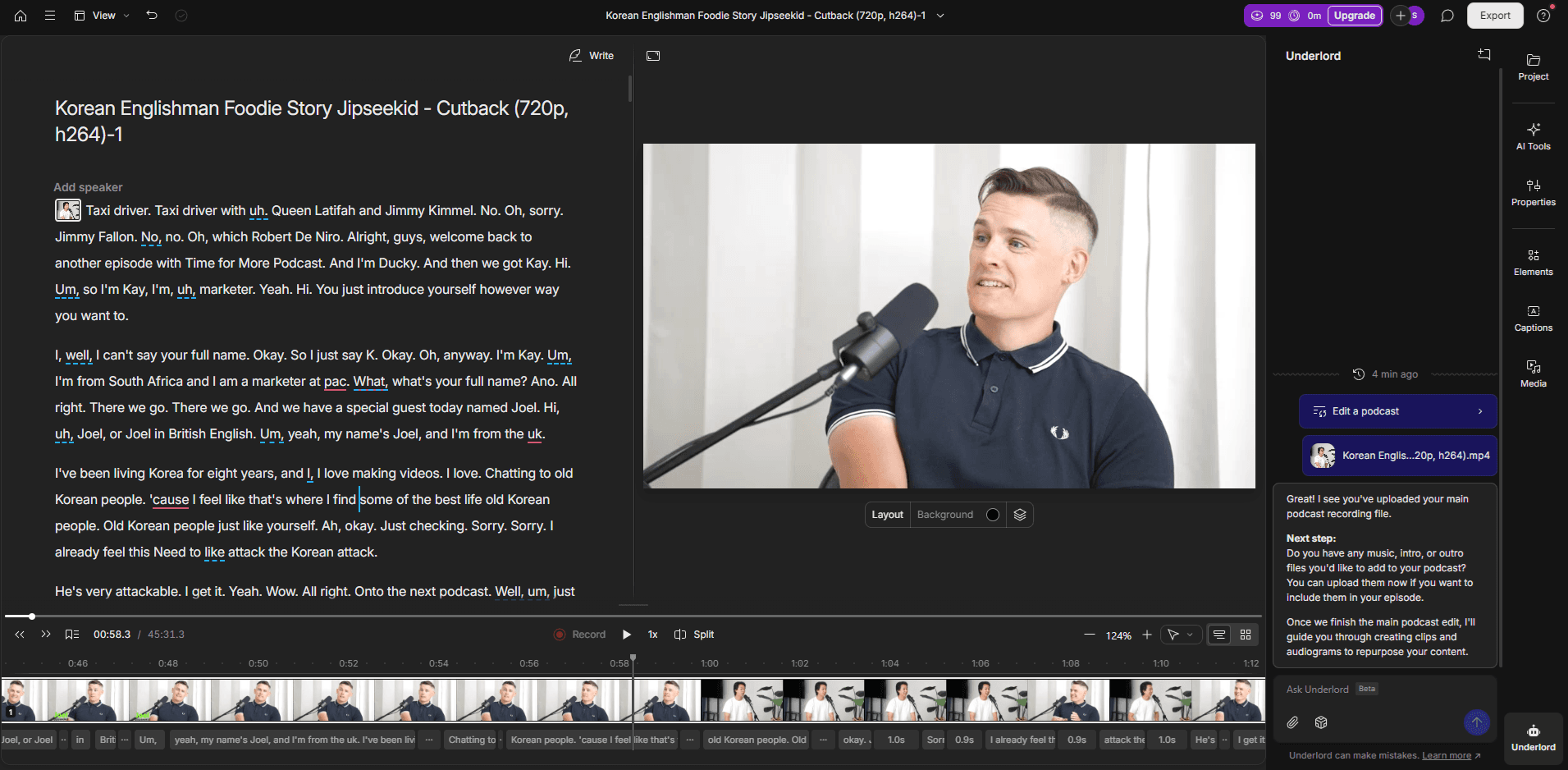
Descript brings text-based editing to podcast production. You cut the video by editing the transcript. It includes filler word detection, silence trimming, and basic multicam features.
Descript also adds AI tools like an AI Chat feature for natural-language edits and automatic retake removal. It works well for structured edits but is not designed for more complex timelines.
Pros
Text-based editing
Automatically identifies and removes retakes for better video pacing
Multicam switching
AI features like Eye Contact that fix an off-camera gaze
Supports quick additions of captions, visuals, and on-screen elements
AI Chat (Underlord) allows you to change the edit by describing what you want in chat-based editing
Helps draft show notes, titles, summaries, and YouTube descriptions
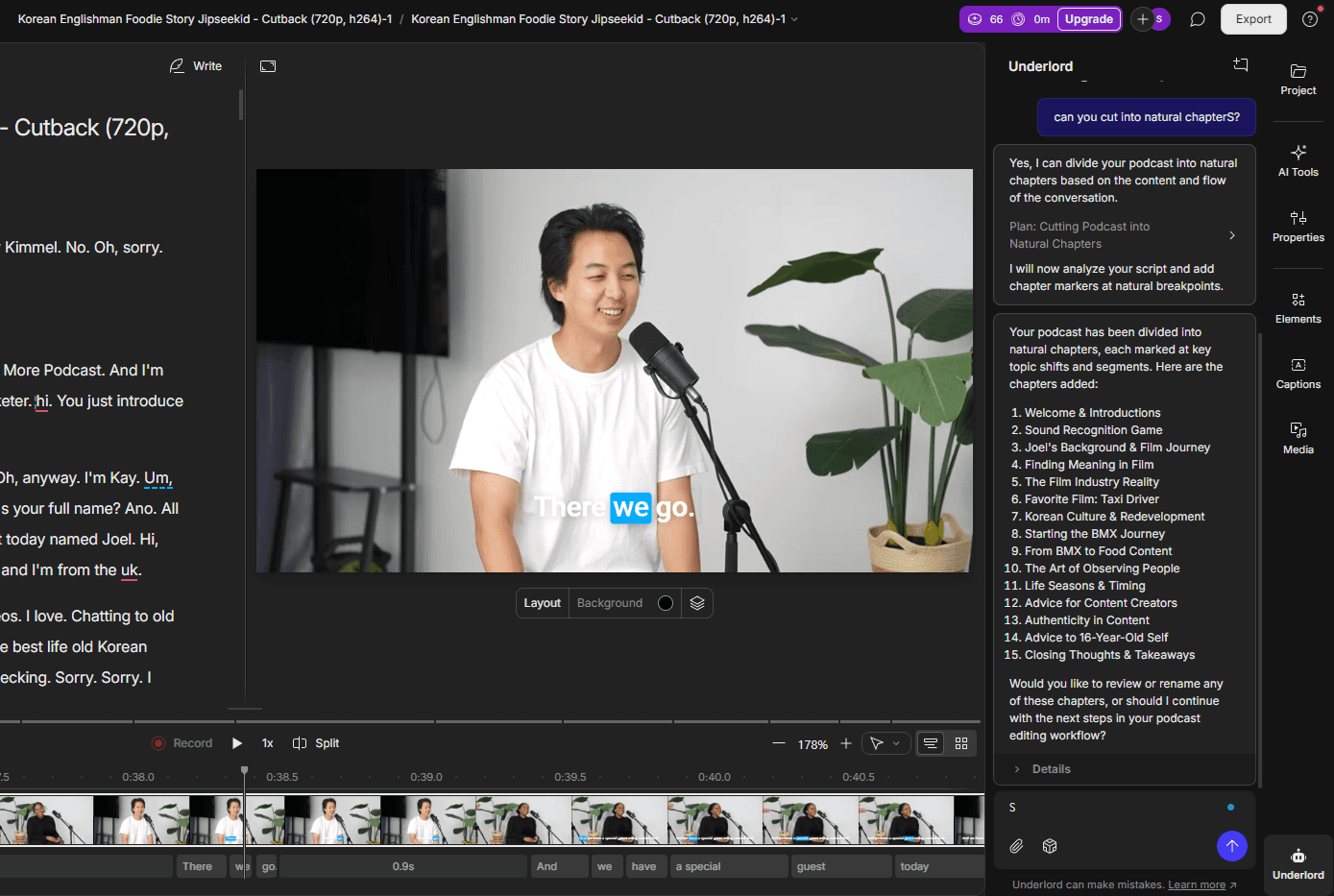
Descript’s Underlord bot lets you guide the edit with natural-language prompts in a chat UI
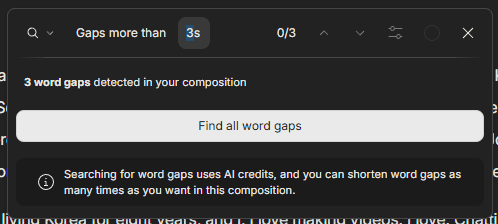
Finds word gaps in the transcript so you can clean them up quickly. Note: Use AI credits
Cons
No automatic chaptering or segmenting; need to use Underlord to do this
Supports exports to YouTube, Google Drive, etc, but not directly to an NLE
Uses an AI credit system with a monthly allotment; you may run out and need to purchase more
Pricing
Free tier available. Paid plans start at $16/month, billed yearly.
Star Rating
4 / 5
For a deeper head-to-head on how Descript and Selects compare specifically for long-form video workflows, see Selects vs. Descript: Which is Better for Long-form Video Editing.
4. Riverside
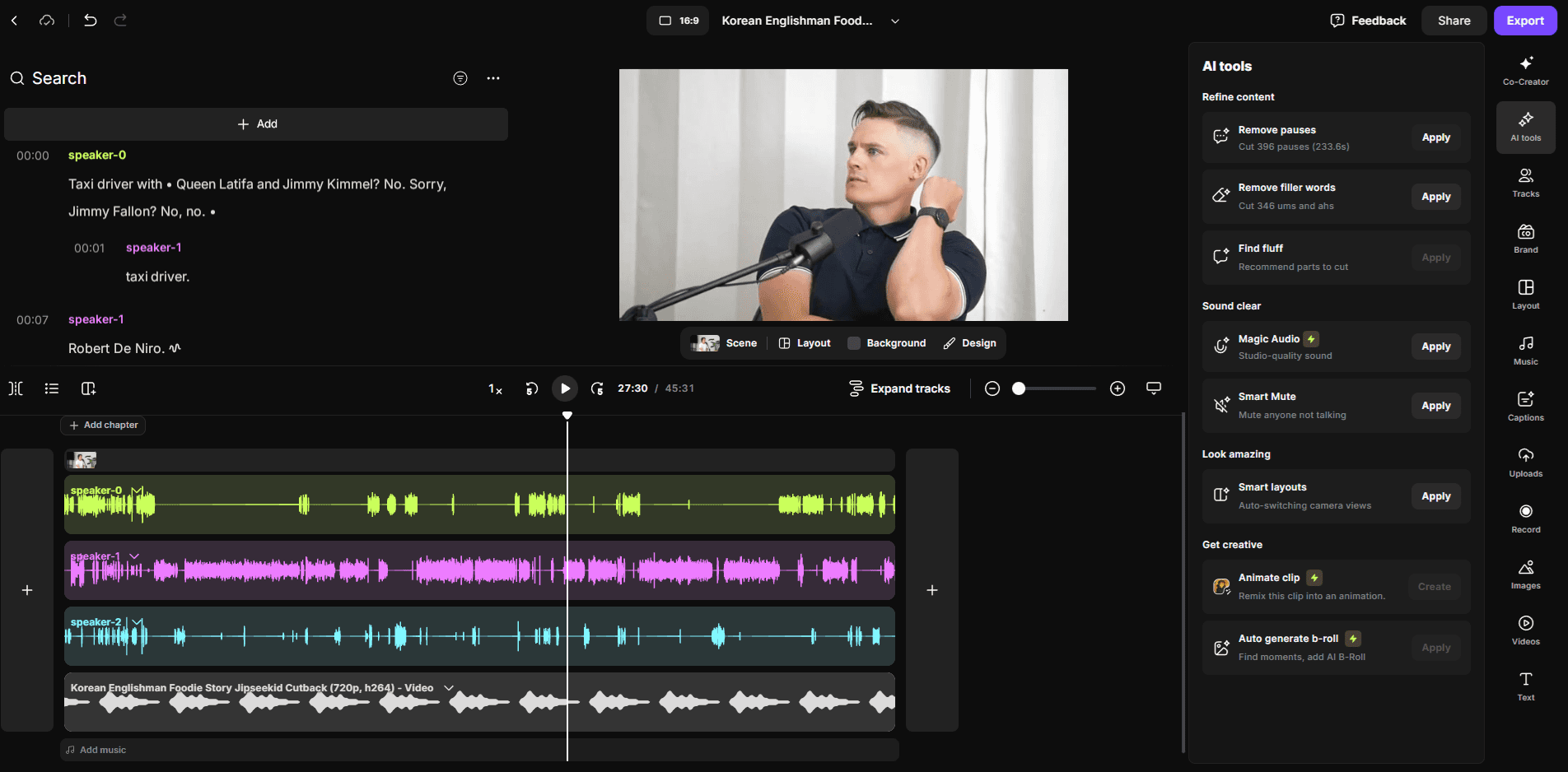
Riverside is built around remote recording with local files, which gives you higher-quality inputs than a standard video call. It is better known as audio editing software for podcasts or a best podcast recording software, due to its limitations with video file uploads. It adds light AI cleanup, silence removal, and transcript editing so you can fix small issues quickly. Riverside also includes simple clipping tools for short-form repurposing.
Pros
Color-coded speakers
Text-based editing
Adjust audio volume for different speakers
Divides content into chapters
Supports guest-and-host PiP layouts
Identifies short form clips (Magic Clips) for social media
Remove silences and filler words with Magic Audio
AI Chat (Co-Creator) allows you to change the edit by describing what you want
Schedule and host events within Riverside
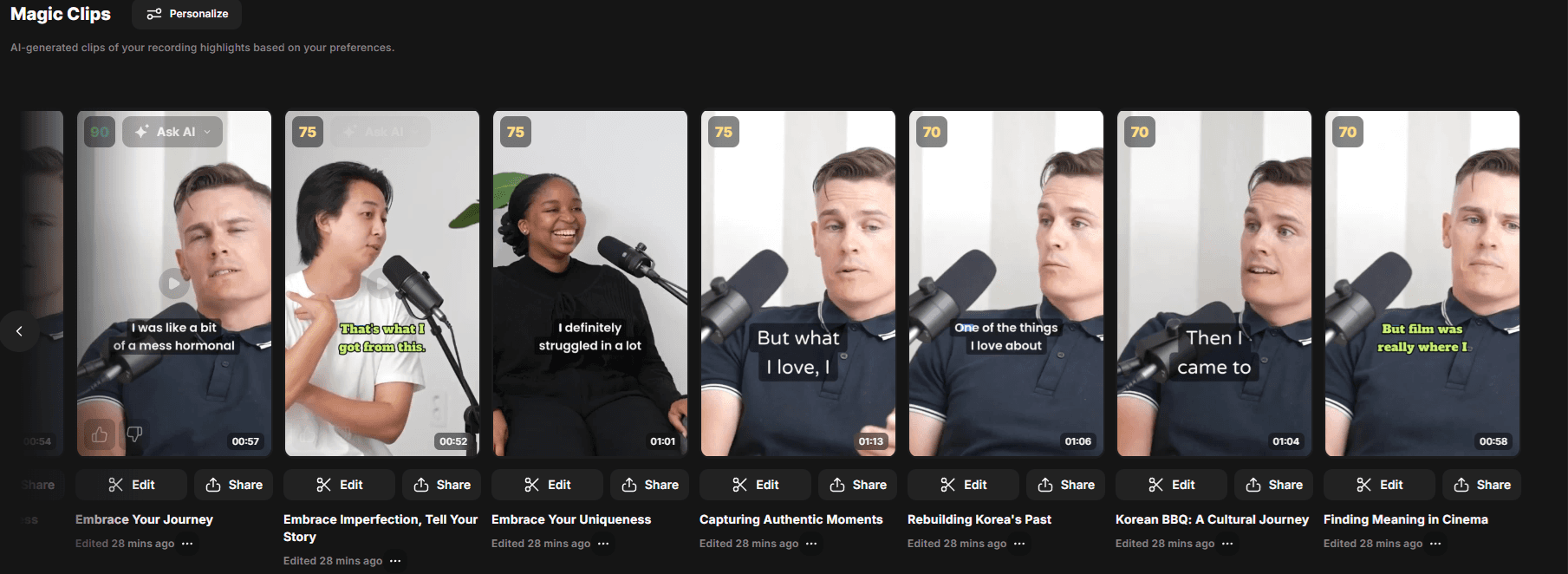
Riverside’s Magic Clips automatically finds shareable moments and creates ready-to-share clips
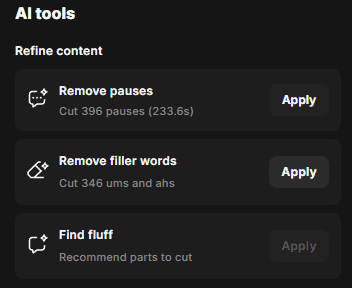
One-click trimming for pauses, fillers, and extra fluff
Cons
Many AI features are only available if all speakers are visible during the entire recording, which prevents real multicam setups
Limited to 15 hours of audio and video per month unless you have a Business plan
Browser-based, so footage recorded elsewhere must be uploaded first
Uses an AI credit system. You get some free, but you will need to purchase more if you plan to use the AI features regularly
Pricing
Limited free tier available. Paid plans start at $24/month, billed yearly.
Star Rating
3.5 / 5
Podcast Software/Video Tool Comparison Table
How we evaluated: transcript accuracy, speaker detection, silence and filler removal automation, multicam reliability, clip extraction workflow, NLE handoff, and pricing fairness.
Best Podcast Editing Tools: AI Podcast Editors Compared (2026)
Feature | Selects | Autopod | Descript | Riverside |
Transcript | ✔️ Yes | ❌ No | ✔️ Yes | ✔️ Yes |
Filler Word Removal | ✔️ Yes | ❌ No | ✔️ Yes | ✔️ Yes |
Chaptering | ✔️ Yes | ❌ No | Requires Underlord prompt | ✔️ Yes |
Clip Search | ✔️ Yes (keyword + themes) | ❌ No | ❌ No | ❌ No |
Multicam Sync | ✔️ Yes | ✔️ Yes | △ Basic | ❌ No true multicam |
Camera Switching | ✔️ Yes | ✔️ Yes | ✔️ Yes | AI speaker-switch layouts only |
Cut Filler Words | ✔️ Yes | ❌ No | ✔️ Yes | ✔️ Yes |
Silence Removal | ✔️ Yes | ✔️ Yes (decibel-based) | ✔️ Yes | ✔️ Yes |
Short-form Clipping | ✔️ Yes (manual selection) | ✔️ Yes (auto-resize for vertical) | ✔️ Yes (Underlord) | ✔️ Yes (Magic Clips auto) |
Captions / Subtitles | ❌ No built-in | ❌ No | ✔️ Yes | ✔️ Yes |
NLE Handoff | ✔️ Yes → Premiere, Resolve, FCP | ✔️ Yes → Premiere only | ❌ No direct NLE export | ✔️ Yes (Business plan only) |
AI Credits Required | ❌ Unlimited automation | ✔️ No credits, but 1 machine limit | ⚠️ Yes — monthly credits | ⚠️ Yes — monthly credits |
Pricing & Trials | Free 7-day trial → From $16/mo | $29/mo — yearly only | Free tier → From $16/mo | Free tier → From $24/mo |
Best Use Case | Multicamera YouTube Podcasts | Fast one-click edits inside Premiere | Solo podcasters / script-first edits | Remote interview capture |
Which AI Podcast Editor Is Best for You
Each of these tools tackles a different pain point in the editing process:
Choose Selects if you want the fastest prep workflow for long-form podcasts or interviews.
It’s the strongest option for cleaning raw sessions. It handles transcription, speaker labels, chaptering, silence cuts, filler-word removal, multicam sync, and camera switching automatically.
For DaVinci Resolve editors specifically, Selects handles silence removal before the Resolve timeline, no plugin required.
Selects isn’t a full editor, but it gives you the cleanest, most organized starting timeline for your NLE workflows, in the least amount of time. It reduces the time spent in your video editing workflow by 90%. It’s not only the best podcast editing software for professionals and serious creators, but also on the development path to be an excellent video podcast editing software for beginners.
Choose Autopod if you're already working in Premiere Pro.
Autopod is built for editors who want instant multicam editing timelines in Premiere Pro or DaVinci Resolve and quick social exports without leaving the NLE. It’s great for simple interview layouts, but Autopod is limited outside Premiere and doesn’t help with transcripts or filler word removal.
Choose Descript if you prefer text-based editing and structured edits.
With Descript podcast editing is done by rewriting the transcript. This makes cleanup fast for solo creators with lots of retakes or conversational shows with fewer cameras. The AI-powered editing features go far, but credit limits can get in the way, and if you need bigger edits, you may still end up in an NLE.
Choose Riverside if remote interviews, webinars, or panel recordings are your main format.
It captures each participant locally for much higher quality, then gives you transcript editing, light cleanup, and quick social clips. Riverside’s layout, transcript tools, and overall workflow are very close to Descript (and it has the same AI credit problem), but its multicam features are limited for multitrack editing.
For more editing workflows for content creators (including podcast editors), check out our guide.
Final Verdict on the Best Podcast Editing App
Podcasts generate a lot of structural work that AI can handle well. Offloading those tasks gives editors back meaningful time for the creative process. Different editing software for podcasts are coming at this problem in different ways.
Best for podcasts with multiple cameras and other video formats → Selects
Best if you only edit in Premiere Pro/DaVinci Resolve → Autopod
Best for transcript-based cleanup → Descript
Best for remote interview capture → Riverside
Selects is unique because it automates the entire front half of a long-form edit without getting in the way of your NLE. This includes transcripts, speaker labels, chapters, silence cuts, filler-word removal, multicam sync, and camera switching.
If your goal is to reduce prep time and keep full control over the final cut, Selects is the most efficient AI podcast editor for getting into Premiere Pro, Resolve, or Final Cut fast.
Try out a free 7-day trial of Selects today (with no watermark or credit caps)!
FAQs (Frequently Asked Questions)
Q: What are the best AI podcast editors in 2026?
A: The four leading AI podcast editors solve different problems in the prep stage. Selects is the strongest option for long-form footage prep and multicam NLE handoff, handling transcription, speaker detection, sync, and silence removal before exporting to Premiere Pro, Final Cut Pro, or DaVinci Resolve. Descript is best for text-based editing entirely in-browser. Autopod is best for quick one-click multicam sync directly inside Premiere Pro. Riverside is best for remote recording with editing built into the same platform. The right choice depends on whether your workflow centers on an NLE or stays browser-based.
Q: Is there a top 10 list of AI podcast editors?
A: Most comprehensive comparisons concentrate around four to six tools that meaningfully differ in approach, since the AI podcast editing category is still narrower than general video editing software. The four most commonly compared, Selects, Descript, Autopod, and Riverside -- each target a distinct workflow: NLE pre-editing prep, browser-based text editing, one-click Premiere Pro multicam, and remote recording with built-in editing respectively. Beyond these four, most other tools in the category are variations on the same approaches rather than fundamentally different solutions.
Q: Is there a free AI podcast editor?
A: Most professional AI podcast editing tools offer trial periods rather than permanent free plans. Selects has a 7-day free trial, with tiered pricing starting at $16-20 per month afterward. Descript and Riverside also offer limited free tiers with caps on transcription minutes or export quality. For genuinely free podcast editing without AI automation, Audacity (audio-only) and DaVinci Resolve (video, no native AI prep) remain the standard no-cost options.
Q: What is Autopod and how does it compare to Selects?
A: Autopod.fm is a one-click podcast editing workflow that operates inside Premiere Pro, it builds multicam timelines, switches cameras automatically, assembles a basic edit, and can generate social clips through auto-reframing. The key difference from Selects is where the work happens: Autopod operates entirely inside Premiere Pro as an in-NLE tool, while Selects works upstream of any NLE, handling the full pre-edit (transcription, sync, silence removal, topic organization) before handing off a structured timeline to Premiere Pro, Final Cut Pro, or DaVinci Resolve.
Q: Is there an AI podcast editor for DaVinci Resolve?
A: DaVinci Resolve does not have strong native AI podcast editing tools comparable to what's available for Premiere Pro. Selects fills this gap by handling the full pre-editing process, multicam sync, transcription, silence removal, and topic-based organization -- before exporting a native DaVinci Resolve timeline via XML handoff. This makes Selects effectively the primary AI podcast editing option for editors working in DaVinci Resolve, since most dedicated podcast plugins (including Autopod) are built specifically for Premiere Pro.
Q: What is Descript and how does it compare to Selects for podcast editing?
A: Descript is a browser-based editing tool built around text-based editing, you edit your podcast by deleting words and sentences in a transcript, and the corresponding audio or video is cut automatically. The key difference from Selects is environment: Descript operates as a standalone web application outside a professional NLE, which is faster to learn but more limited for complex multicam podcasts, color work, or detailed audio mixing. Selects works upstream of a professional NLE, handling pre-editing before handing off to Premiere Pro, Final Cut Pro, or DaVinci Resolve for full creative finishing.
Q: How does Riverside compare to Selects for podcast editing?
A: Riverside is primarily a remote recording platform with editing tools built directly into the same service, it is the strongest option when your podcast involves remote guests, since recording and basic editing happen in one place. Selects is positioned differently: it is a pre-editing tool that works with footage you've already recorded (regardless of how it was captured), focused on transcription, multicam sync, silence removal, and structured handoff to a professional NLE. For podcasters who record remotely and want all-in-one simplicity, Riverside fits; for podcasters who need deeper NLE-based finishing after the prep stage, Selects is the stronger fit.

Cutback Team
Share post